设置 ssh 无密码登录
> ls -al ~/.ssh/id_*.pub
> No such file or directory
> ssh-keygen -t rsa -b 4096 -C "your_email@domain.com"
> Enter file in which to save the key (/home/yourusername/.ssh/id_rsa):
> Enter passphrase (empty for no passphrase):
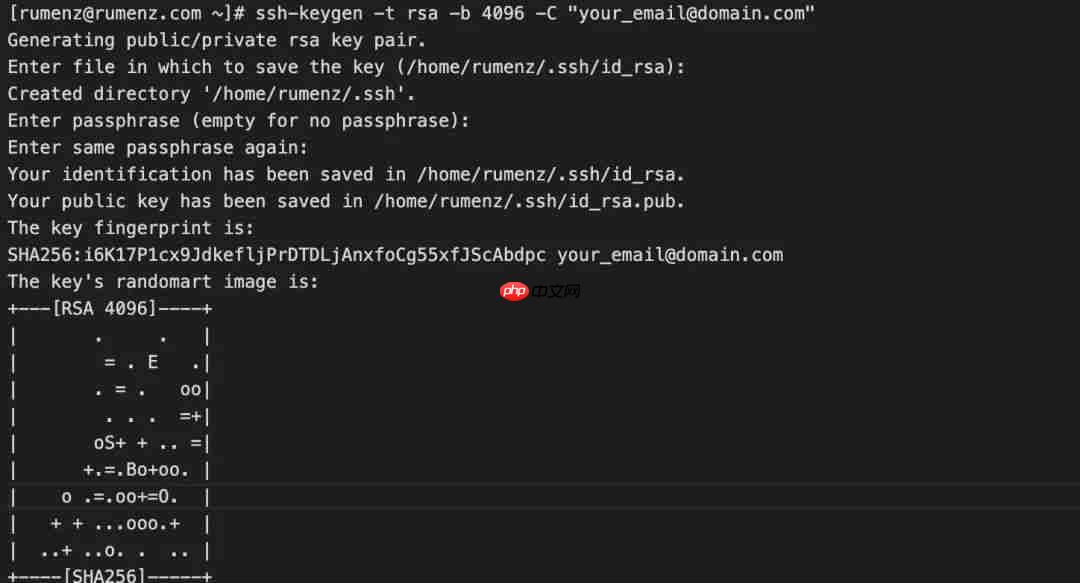
ls ~/.ssh/id_*/home/yourusername/.ssh/id_rsa /home/yourusername/.ssh/id_rsa.pub
> ssh-copy-id rumenz@rumenz.com
> rumenz@rumenz.com's password:
> cat ~/.ssh/id_rsa.pub | ssh rumenz@rumenz.com "mkdir -p ~/.ssh && chmod 700 ~/.ssh && cat >> ~/.ssh/authorized_keys && chmod 600 ~/.ssh/authorized_keys"
> ssh rumenz@rumenz.com
禁用 SSH 密码认证

完全公开源代码,并无任何许可限制 特别基于大型电子商务网站的系统开发 Microsoft SQL Server 2000后台数据库,充分应用了存储过程的巨大功效 基于类模块的扩展数据访问能力支持任何类型的大型数据库 加密用户登录信息(cookie) 易于安装的系统和应用功能 100%的asp.net的代码,没有COM,java或者其他的格式 完全基于MS建议的系统安全设计 最佳的应用程序,数据库
 0
0

> ssh sudo_user@server_ip_address
/etc/ssh/sshd_config,搜索如下指令,修改如下:> vim /etc/ssh/sshd_config PasswordAuthentication no ChallengeResponseAuthentication no UsePAM no
> systemctl restart ssh
> systemctl restart sshd
以上就是linux如何设置无密码SSH登录的详细内容,更多请关注php中文网其它相关文章!

每个人都需要一台速度更快、更稳定的 PC。随着时间的推移,垃圾文件、旧注册表数据和不必要的后台进程会占用资源并降低性能。幸运的是,许多工具可以让 Windows 保持平稳运行。

Copyright 2014-2025 https://www.php.cn/ All Rights Reserved | php.cn | 湘ICP备2023035733号


 524
524









 收藏
收藏