



在centos 7.6上使用maven 3.6.3进行ambari 2.7.6源码编译的指南
由于编译过程中需要的某些JAR包难以下载,本文提供了一个专门用于Ambari编译的Maven仓库。您只需将该仓库替换到您的.m2/repository目录中即可。
提供的仓库文件:repository.tar.gz
提取码:ambari
软件安装
yum install -y wget git psutils python-devel rpm-build java-1.8.0-openjdk-devel
搭建HTTP服务
yum install httpd
systemctl enable httpd
systemctl start httpd
提前下载并放置安装包
请提前下载以下安装包,并将其放置在HTTP服务的/var/www/html/compile-ambari目录下(新建compile-ambari目录):
- hadoop-3.1.1.tar.gz
- hbase-2.0.2.tar.gz
- grafana-6.7.4.linux-amd64.tar.gz
- apache-phoenix-5.0.0-HBase-2.0-bin.tar.gz
源码下载与修改
wget https://mirrors.tuna.tsinghua.edu.cn/apache/ambari/ambari-2.7.6/apache-ambari-2.7.6-src.tar.gz
tar zxvf apache-ambari-2.7.6-src.tar.gz
cd apache-ambari-2.7.6-src
修改主目录下的pom文件,添加HDP仓库:
        true
        always
        warn


        false
        never
        fail

    HDPReleases
    HDP Releases
    https://repo.hortonworks.com/content/repositories/releases/
    default
修改ambari-metrics/pom.xml文件,将hbase、hadoop以及grafana的下载地址替换为本地地址:
http://localhost/compile-ambari/hbase-2.0.2-bin.tar.gz
http://localhost/compile-ambari/hadoop-3.1.1.tar.gz
http://localhost/compile-ambari/grafana-6.7.4.linux-amd64.tar.gz
http://localhost/compile-ambari/apache-phoenix-5.0.0-HBase-2.0-bin.tar.gz
执行编译
mvn clean install rpm:rpm -DskipTests
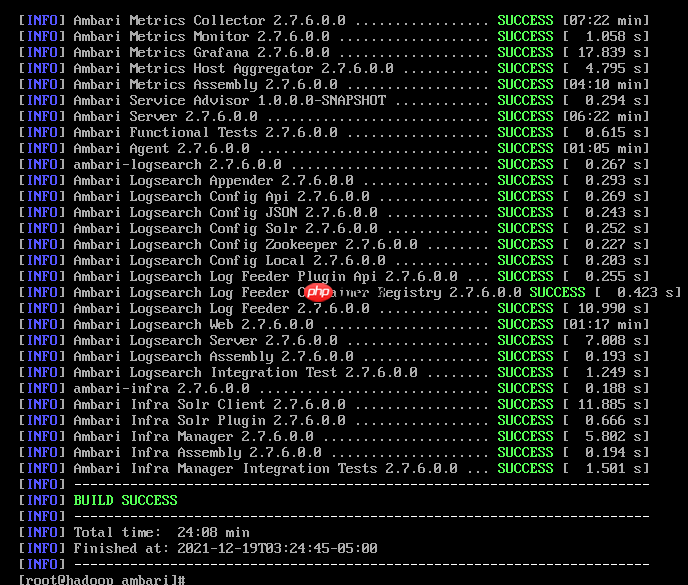
完成上述步骤后,您将得到编译结果:

Delphi组件编写者指南关于《组件编写者指南》翻译的说明 1. 译文中粉红色的部分,是译者认为原文有错误的地方,我已改过,只是用粉红色作了标记; 2. 对于有关“参看”的各章节的页码,我也没有建立页码的关联,因为麻烦,所以只是用原书中的页码值,同时用蓝色加以标记,可以直接删除; 3. 由于原书只分章,没有分节。阅读起来不便。所以,我加了章节的编号,这样更清楚。 4. 书中的“第V部分的其余章节”没有真正的对应部分,所以照译出
问题与解决方法
如果在编译过程中遇到如下问题:
[INFO] [2/4] Fetching packages...
[ERROR] warning fsevents@2.3.2: The platform "linux" is incompatible with this module.
[INFO] info "fsevents@2.3.2" is an optional dependency and failed compatibility check. Excluding it from installation.
[INFO] [3/4] Linking dependencies...
[INFO] [4/4] Building fresh packages...
[INFO] info Visit https://yarnpkg.com/en/docs/cli/install for documentation about this command.
[ERROR] error /root/ambari/ambari-admin/src/main/resources/ui/admin-web/node_modules/phantomjs: Command failed.
[ERROR] Exit code: 1
[ERROR] Command: sh
[ERROR] Arguments: -c node install.js
[ERROR] Directory: /root/ambari/ambari-admin/src/main/resources/ui/admin-web/node_modules/phantomjs
[ERROR] Output:
[ERROR] PhantomJS not found on PATH
[ERROR] Download already available at /tmp/npm_config_tmp/phantomjs/phantomjs-2.1.1-linux-x86_64.tar.bz2
[ERROR] Verified checksum of previously downloaded file
[ERROR] Extracting tar contents (via spawned process)
[ERROR] Removing /root/ambari/ambari-admin/src/main/resources/ui/admin-web/node_modules/phantomjs/lib/phantom
[ERROR] Copying extracted folder /tmp/npm_config_tmp/phantomjs/phantomjs-2.1.1-linux-x86_64.tar.bz2-extract-1639887716005/phantomjs-2.1.1-linux-x86_64 -> /root/ambari/ambari-admin/src/main/resources/ui/admin-web/node_modules/phantomjs/lib/phantom
[ERROR] Install exited unexpectedly
[INFO] ------------------------------------------------------------------------
[INFO] Reactor Summary:
[INFO]
[INFO] Ambari Main 2.7.6.0.0 .............................. SUCCESS [  3.717 s]
[INFO] Apache Ambari Project POM 2.7.6.0.0 ................ SUCCESS [  0.195 s]
[INFO] Ambari Web 2.7.6.0.0 ............................... SUCCESS [01:43 min]
[INFO] Ambari Views 2.7.6.0.0 ............................. SUCCESS [  6.583 s]
[INFO] Ambari Admin View 2.7.6.0.0 ........................ FAILURE [ 47.472 s]
[INFO] ambari-utility 1.0.0.0-SNAPSHOT .................... SKIPPED
[INFO] ambari-metrics 2.7.6.0.0 ........................... SKIPPED
[INFO] Ambari Metrics Common 2.7.6.0.0 .................... SKIPPED
请将/tmp/npm_config_tmp/phantomjs/phantomjs-2.1.1-linux-x86_64.tar.bz2-extract-1639887716005/phantomjs-2.1.1-linux-x86_64目录下的所有内容复制到/root/ambari/ambari-admin/src/main/resources/ui/admin-web/node_modules/phantomjs/lib/phantom目录下,然后重新执行编译命令。
本文由大数据到人工智能博主「xiaozhch5」原创,遵循CC 4.0 BY-SA版权协议,转载请附上原文出处链接及本声明。
原文链接:https://www.php.cn/link/6f5e6653c2100f36ef017088363ea359




