
phpmyadmin是一个基于web的工具,用于管理mysql、mariadb和drizzle服务器。它可以帮助执行数据库操作,如创建、删除、查询、表、列、关系、索引、用户和权限等。
本指南将指导您如何在CentOS 7 / RHEL 7上安装phpMyAdmin。
在安装phpMyAdmin之前,您需要在服务器上安装LAMP Stack。
在CentOS 7上安装phpMyAdmin
phpMyAdmin可以通过EPEL存储库进行安装,因此需要先安装EPEL存储库rpm。
立即学习“PHP免费学习笔记(深入)”;
rpm -Uvh https://dl.fedoraproject.org/pub/epel/epel-release-latest-7.noarch.rpm
接下来,使用以下命令安装phpMyAdmin。
yum -y install phpmyadmin
配置phpMyAdmin
phpMyAdmin的配置文件位于/etc/httpd/conf.d目录中,包含访问权限的规则和设置。
默认情况下,phpMyAdmin只能从localhost访问。要更改此设置,我们需要编辑phpMyAdmin.conf文件。
在CentOS 7中,Web访问由mod_authz_core.c模块管理,因此普通的允许或拒绝规则即使修改也可能无效。
vi /etc/httpd/conf.d/phpMyAdmin.conf
默认配置如下:
Alias /phpMyAdmin /usr/share/phpMyAdmin
Alias /phpmyadmin /usr/share/phpMyAdmin
<p><Directory /usr/share/phpMyAdmin>
AddDefaultCharset UTF-8</p><p><IfModule mod_authz_core.c></p><h1>Apache 2.4</h1><div class="code" style="position:relative; padding:0px; margin:0px;"><pre class="brush:php;toolbar:false;"> <RequireAny>
   Require ip 127.0.0.1
   Require ip ::1
 </RequireAny>
<code> Order Deny,Allow
 Deny from All
 Allow from 127.0.0.1
 Allow from ::1

模板采用响应式设计,自动适应手机,电脑及平板显示;满足单一店铺外卖需求。功能:1.菜单分类管理2.菜品管理:菜品增加,删除,修改3.订单管理4.友情链接管理5.数据库备份6.文章模块:如:促销活动,帮助中心7.单页模块:如:企业信息,关于我们更强大的功能在开发中……安装方法:上传到网站根目录,运行http://www.***.com/install 自动
 0
0

 <RequireAny>
   Require ip 127.0.0.1
   Require ip ::1
 </RequireAny>
 Order Deny,Allow
 Deny from All
 Allow from 127.0.0.1
 Allow from ::1
请注释掉Require ip 127.0.0.1和Require ip ::1的行,并在这些注释行中添加Require all granted,使其如下所示:
Alias /phpMyAdmin /usr/share/phpMyAdmin
Alias /phpmyadmin /usr/share/phpMyAdmin</p><p><Directory /usr/share/phpMyAdmin>
AddDefaultCharset UTF-8</p><p><IfModule mod_authz_core.c></p><h1>Apache 2.4</h1><div class="code" style="position:relative; padding:0px; margin:0px;"><pre class="brush:php;toolbar:false;"> <RequireAny>
   #Require ip 127.0.0.1
   #Require ip ::1
   Require all granted
 </RequireAny>
<code> Order Deny,Allow
 Deny from All
 Allow from 127.0.0.1
 Allow from ::1
 <RequireAny>
   #Require ip 127.0.0.1
   #Require ip ::1
   Require all granted
 </RequireAny>
 Order Deny,Allow
 Deny from All
 Allow from 127.0.0.1
 Allow from ::1
重启服务以使更改生效。
systemctl restart httpd
配置防火墙以允许来自外部网络的HTTP请求。
firewall-cmd --permanent --add-service=http
firewall-cmd --reload
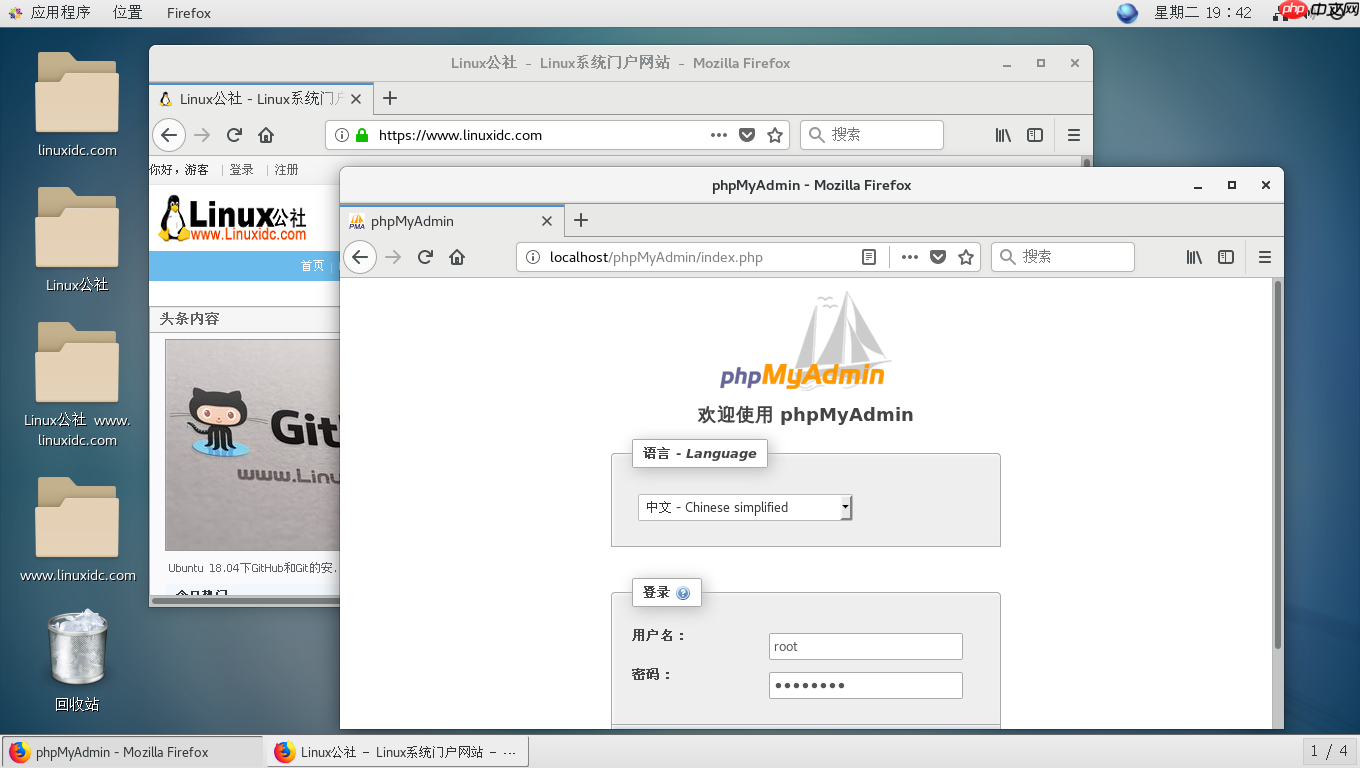
访问phpMyAdmin
现在,您可以从浏览器访问phpMyAdmin,URL为:
https://www.php.cn/link/b6e61f3a46000af53590f293dcf35c20
或
https://www.php.cn/link/df3abfaa6336c64811b77e86b9cb17b0
使用root(数据库管理员)或任何数据库用户登录。
以上就是如何在CentOS 7/RHEL 7上安装phpMyAdmin的详细内容,更多请关注php中文网其它相关文章!

PHP怎么学习?PHP怎么入门?PHP在哪学?PHP怎么学才快?不用担心,这里为大家提供了PHP速学教程(入门到精通),有需要的小伙伴保存下载就能学习啦!

Copyright 2014-2025 https://www.php.cn/ All Rights Reserved | php.cn | 湘ICP备2023035733号


 149
149








 收藏
收藏







 取消收藏
取消收藏







