
引言
自从Windows 10的软件商店开始提供Linux子系统后,用户不再需要像使用虚拟机那样进行繁琐的网络和内存配置。这使得在本地环境中学习和测试Linux变得更为便捷。
在Windows中启用Linux子系统可以通过控制面板中的程序选项,进入“启用或关闭Windows功能”并开启“适用于Linux的Windows子系统”。之后,您可以从微软商店下载并安装Ubuntu(虽然CentOS也可用,但需要付费)。
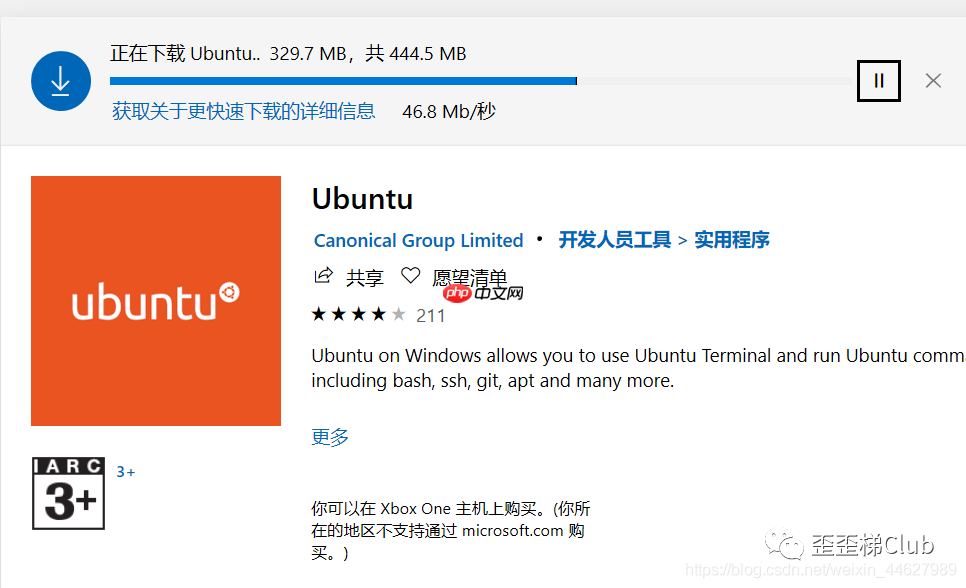 下载并安装Ubuntu后,打开应用程序即可启动一个Linux的黑色终端窗口。
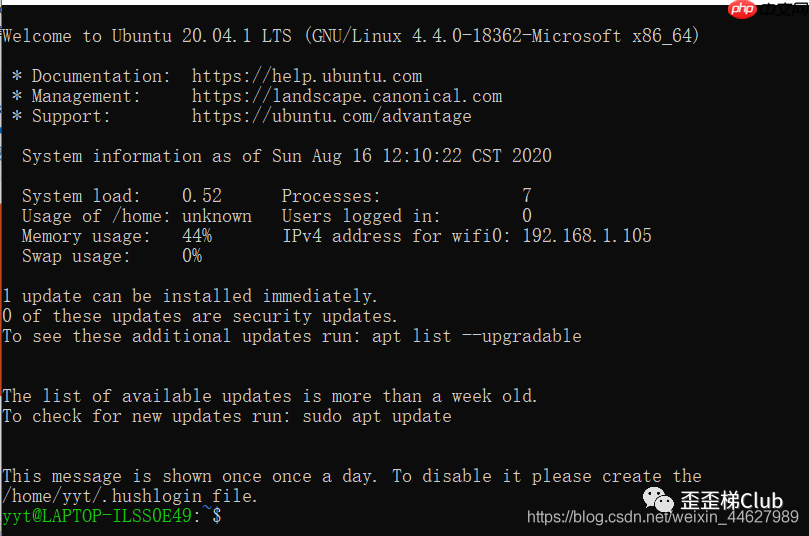 在Windows的Linux子系统中,访问计算机目录可以使用以下命令:
cd /mnt
/mnt目录是计算机目录在子系统中的共享挂载点,每个磁盘都对应一个挂载的文件夹。
如果您希望将Ubuntu的镜像源修改为国内的源,可以执行以下步骤:

HTShop网上购物系统由恒天网络科技有限公司根据国际先进技术和国内商务特点自主版权开发的一款具有强大功能的B2C电子商务网上购物平台。HTShop以国际上通用流行的B/S(浏览器/服务器)模式进行设计,采用微软公司的ASP.NET(C#)技术构建而成。 2007-11-10 HTShop CS 通用标准版 v1.1.11.10 更新内容自由更换模版功能开放 修改了购买多款商品,会员中心订单只显示
 0
0

sudo vim /etc/apt/sources.list
清空文件内容,并填入下面的内容(删除中文注释):
# 默认注释了源码镜像以提高 apt update 速度,如有需要可自行取消注释
deb https://mirrors.tuna.tsinghua.edu.cn/ubuntu/ xenial main restricted universe multiverse
# deb-src https://mirrors.tuna.tsinghua.edu.cn/ubuntu/ xenial main restricted universe multiverse
deb https://mirrors.tuna.tsinghua.edu.cn/ubuntu/ xenial-updates main restricted universe multiverse
# deb-src https://mirrors.tuna.tsinghua.edu.cn/ubuntu/ xenial-updates main restricted universe multiverse
deb https://mirrors.tuna.tsinghua.edu.cn/ubuntu/ xenial-backports main restricted universe multiverse
# deb-src https://mirrors.tuna.tsinghua.edu.cn/ubuntu/ xenial-backports main restricted universe multiverse
deb https://mirrors.tuna.tsinghua.edu.cn/ubuntu/ xenial-security main restricted universe multiverse
# deb-src https://mirrors.tuna.tsinghua.edu.cn/ubuntu/ xenial-security main restricted universe multiverse
# 预发布软件源,不建议启用
# deb https://mirrors.tuna.tsinghua.edu.cn/ubuntu/ xenial-proposed main restricted universe multiverse
# deb-src https://mirrors.tuna.tsinghua.edu.cn/ubuntu/ xenial-proposed main restricted universe multiverse
完成后,执行以下命令更新软件包列表:
sudo apt-get update
如果您使用的是CentOS,可以通过以下命令更改镜像源:
mv /etc/yum.repos.d/CentOS-Base.repo /etc/yum.repos.d/CentOS-Base.repo.backup
cd /etc/yum.repos.d/
wget -O /etc/yum.repos.d/CentOS-Base.repo http://mirrors.aliyun.com/repo/Centos-7.repo
yum makecache
yum -y update
更多相关文章,请搜索公众号歪歪梯Club。

Windows激活工具是正版认证的激活工具,永久激活,一键解决windows许可证即将过期。可激活win7系统、win8.1系统、win10系统、win11系统。下载后先看完视频激活教程,再进行操作,100%激活成功。

 广告
广告Copyright 2014-2025 https://www.php.cn/ All Rights Reserved | php.cn | 湘ICP备2023035733号


 344
344

 收藏
收藏







 取消收藏
取消收藏







