前言
Airtest IDE 提供了四种断言的快捷方式:
- assert_exists 断言存在
- assert_not_exists 断言不存在
- assert_equal 断言相等
- assert_not_equal 断言不相等
其中,assert_exists 和 assert_not_exists 在之前的文章中已经介绍过,详情请参考:https://www.php.cn/link/57c0ef6ca5eb27bf4dd7ff5bc1ba7d0d。
assert_equal 用于断言两个值相等,实际结果等于期望结果。参数包括:
- first – 第一个值
- second – 第二个值
- msg – 断言的简短描述,将记录在报告中
断言失败时会引发 AssertionError 异常,返回值为 None。支持平台包括 Android、Windows 和 iOS。示例代码如下:

>>> assert_equal(1, 1, msg="assert 1==1")
断言两个值相等时,需要传入两个参数,分别是实际结果和期望结果。
assert_equal("实际结果", "期望结果", "请填写断言的简短描述")在 Airtest 中,通常需要获取页面元素的文本,并与 poco 获取属性的脚本一起进行断言。示例如下:
assert_equal(poco("com.taobao.taobao:id/dx_root").get_text(), "天猫新品", "控件的text属性值为天猫新品")
assert_equal(str(poco(text="天猫新品").attr("enabled")), "True", "控件的enabled属性值为True")
assert_not_equal 用于断言两个值不相等,参数包括:
- first – 第一个值
- second – 第二个值
- msg – 断言的简短描述,将记录在报告中
断言失败时会引发 AssertionError 异常,返回值为 None。支持平台包括 Android、Windows 和 iOS。示例代码如下:
>>> assert_not_equal(1, 2, msg="assert 1!=2")
使用示例:打开 APP,断言登录按钮的文本是“登录/注册”。
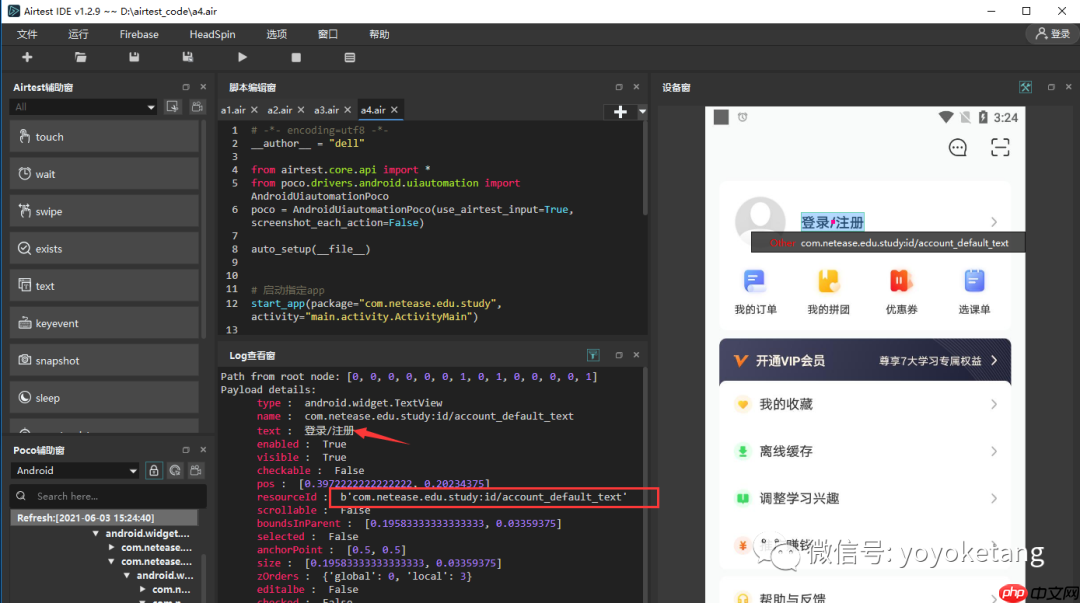
使用 Poco 辅助窗口定位到元素,获取元素的 resourceId:b'com.netease.edu.study:id/account_default_text'。
导入 poco 库,使用 .get_text() 获取文本,使用 .attr("xx") 获取属性。
# -*- encoding=utf8 -*- __author__ = "dell" # 作者-上海悠悠 QQ交流群:717225969 # blog地址 https://www.cnblogs.com/yoyoketang/ from airtest.core.api import * from poco.drivers.android.uiautomation import AndroidUiautomationPoco poco = AndroidUiautomationPoco(use_airtest_input=True, screenshot_each_action=False) auto_setup(__file__)启动指定app
start_app(package="com.netease.edu.study", activity="main.activity.ActivityMain") touch(Template(r"tpl1622690503552.png", record_pos=(0.372, 0.829), resolution=(720, 1280)))
校验按钮文本值
actuel_text = poco("com.netease.edu.study:id/account_default_text").get_text() assert_equal(actuel_text, "登录/注册", "登录/注册 按钮文本值校验")
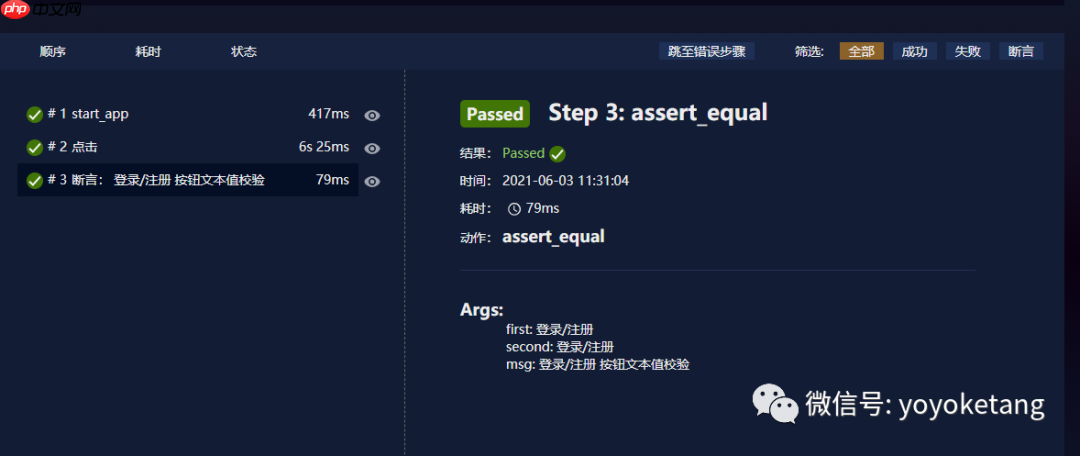
运行后查看报告: