



开始前的html页面 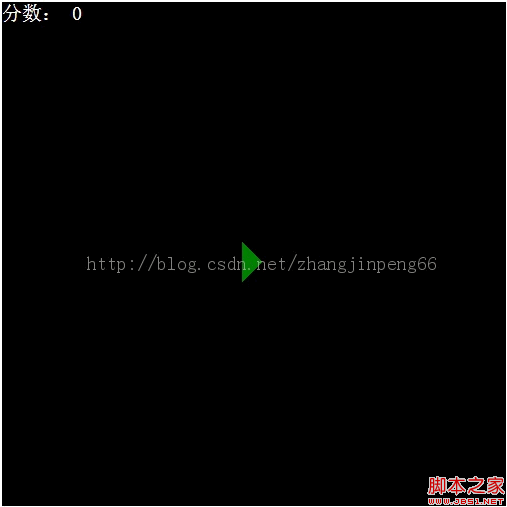
开始后的html游戏界面 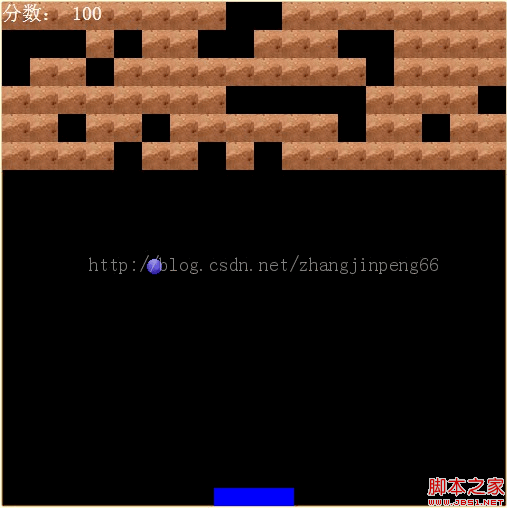
html页面布局,即index.html文件源码如下:

复制代码 代码如下:
分数:
0
0
index.css文件源码如下:
复制代码 代码如下:
#gamePanel{
width:504px;
height:504px;
background:Black;
position:relative;
}
#gamePanel .score{
font-size:20px;
color:White;
position:absolute;
left:0;
top:0;
z-index:9999;
}
#gamePanel .bullet{
width:5px;
height:15px;
position:absolute;
background:url(../img/bullet.png);
overflow:hidden;
}
#gamePanel .stick{
width:80px;
height:18px;
position:absolute;
background:blue;
}
#gamePanel .ball{
width:15px;
height:15px;
position:absolute;
background:url(../img/ball.gif);
}
#gamePanel .brick {
width : 28px;
height : 28px;
position : relative;
background : url(../img/brick.gif);
float : left;
}
#gamePanel .hideBrick {
width : 28px;
height : 28px;
position : relative;
background : black;
float : left;
}
#gamePanel .magic {
width : 27px;
height : 11px;
position : absolute;
background : green;
}
#gamePanel .shortMagic {
width : 28px;
height : 12px;
position : absolute;
background : yellow;
}
#gamePanel .bingo{
width:18px;
height:18px;
position:absolute;
background:url(../img/bingo2.png);
}
#startBtn{
border-width:20px;
border-style:solid;
border-color:Black Black Black Green;
position:absolute;
left:240px;
top:240px;
cursor:pointer;
width:0px;
height:0px;
overflow:hidden;
}
JavaScript部分分为5个源文件,即ball.js(球类)、brick.js(砖类)、game.js(游戏类)、magic.js(魔法棒类)、stick.js(挡板类)
球类代码实现如下:
复制代码 代码如下:
// 球类
var Ball = function() {
// 弹球dom元素
this.dom = null;
// 是否激活
this.isFirst = true;
// 弹球移动方向
this.direction = null;
this.init();
}
Ball.prototype = {
// 弹球横向移动速度
movepx : 3,
// 弹球纵向移动速度
movepy : 2,
// 弹球移动频率
movesp : 20,
// 弹球移动频率映射
movespMap : {
1 : 75,
2 : 65,
3 : 50,
4 : 40
},
// 初始化
init : function() {
this.dom = document.createElement("div");
this.dom.className = "ball";
},
// 设置弹球的初始化位置,x与y坐标
setPosition : function(x, y) {
this.dom.style.left = x + "px";
this.dom.style.top = y + "px";
},
// 弹球动画,就是移动,传入参数为游戏背景的宽与高
animation : function(gameWidth, gameHeight, stick) {
var _this = this;
// 实际的横向移动速度,左或者右
var _movepx = this.dom.offsetLeft > gameWidth/2 ? -1*this.movepx : this.movepx;
var _movepy = this.dom.offsetTop > gameHeight/2 ? this.movepy : -1*this.movepy;
// 处理移动函数
var process = function() {
// 弹球的x,y坐标
var left = _this.dom.offsetLeft;
var top = _this.dom.offsetTop;
// 是否要调转方向
if (left = gameWidth - _this.dom.clientWidth) {
_movepx *= -1;
}
var isCrashStick = _this.OnCheckCrashStick();
var isCrashBall = _this.OnCheckCrashBrick();
// 判断是否想上调转方向
if (top
_movepy *= -1;
}
// 向下移动
top = top + _movepy;
left = left + _movepx;
// 设置弹球位置
_this.dom.style.top = top + "px";
_this.dom.style.left = left + "px";
if(top > gameHeight) {
_this.onend();
alert("You Lose");
} else {
setTimeout(process, _this.movesp);
}
// 判断弹球移动方向
if (_movepx > 0 && _movepy
_this.direction = "RightUp";
return;
}
if (_movepx > 0 && _movepy > 0) {
_this.direction = "RightDown";
return;
}
if (_movepx
_this.direction = "LeftUp";
return;
}
if (_movepx 0) {
_this.direction = "LeftDown";
return;
}
};
// 开始移动
process();
},
// 外部接口,检测是否撞到魔法棒
OnCheckCrashStick : function() {},
// 外部接口,检测是否撞到砖块
OnCheckCrashBrick : function() {},
// 弹球结束事件
onend : function() {},
// 游戏结束
gameover : function() {}
}
砖类代码如下brick.js源文件:
复制代码 代码如下:
// 砖类
var Brick = function(gamePanel) {
// 砖的dom元素
this.dom = null;
// 砖块所在的画布
this.gamePanel = gamePanel;
// 是否激活
this.isLive = true;
// 是否带有魔法棒
this.magic = null;
this.width = 28;
this.height = 28;
this.left = 0;
this.top = 0;
this.init();
}
Brick.prototype = {
// 初始化
init : function() {
this.dom = document.createElement("div");
this.dom.className = "brick";
},
// 为position: relative的Brick初始化位置
setPosition : function(x, y) {
this.left = x;
this.top = y;
},
// 为positon : relative的Brick初始化尺寸
setSize : function(width, height) {
this.width = width;
this.height = height;
},
// 初始化生成魔法棒
initMagic : function() {
var _this = this;
// 随机数
var random = parseInt(Math.random()*1000 + 1, 10);
var type = random % 5 == 0 ? "good" : random % 4 == 0 ? "bad" : "none";
// 新建一个魔法棒对象
var magic = new Magic(type);
this.magic = magic;
magic.initPosition(this);
// 将魔法棒添加进砖块中
this.gamePanel.appendChild(magic.dom);
magic.onEnd = function() {
_this.gamePanel.removeChild(magic.dom);
};
magic.animation(this.gamePanel.clientHeight);
},
// 击中后的动作
onEnd : function() {
this.isLive = false;
this.dom.className = "hideBrick";
this.initMagic();
}
}
魔法棒类代码即magic.js源文件实现如下:
复制代码 代码如下:
// 魔法棒类
var Magic = function(type) {
// Magic的dom元素
this.dom = null;
// Magic的dom信息
this.left = 0;
this.top = 0;
this.width = 0;
this.height = 0;
this.type = type;
this.init();
}
Magic.prototype = {
// 魔法棒类型
magicType : {
"good" : "magic",
"bad" : "shortMagic",
"none" : ""
},
// 每次移动位移
movepy : 3,
// 移动速度
movespeed : 20,
// 初始化魔法棒
init : function() {
this.dom = document.createElement("div");
this.dom.className = this.magicType[this.type];
//this.dom.style.display = "none";
this.width = parseInt(this.dom.style.width, 10);
this.height = parseInt(this.dom.style.height, 10);
},
// 魔法棒初始化位置
initPosition : function(brick) {
this.left = brick.left;
this.top = brick.top;
this.dom.style.left = this.left + "px";
this.dom.style.top = this.top + "px";
},
// 更新位置
update : function() {
this.dom.style.left = this.left + "px";
this.dom.style.top = this.top + "px";
},
// 魔法棒动画,height为游戏背景高度
animation : function(height) {
if (this.type == "none") {
return;
}
var _this = this;
// 向下移动函数
var downMove = function() {
_this.top = _this.top + _this.movepy;
_this.update();
// 判断魔法棒下移是否越界,是否击中stick
if (_this.top
setTimeout(downMove, _this.movespeed);
} else {
// 动画结束触发事件
_this.onEnd();
}
};
downMove();
},
// 动画结束触发事件,外部覆盖
onEnd : function() {},
// 魔法棒是否击中挡板以及击中后处理事件,外部覆盖
isBeatStick : function() {}
}
挡板类代码即stick.js源文件如下:
复制代码 代码如下:
// 新建棒类
var Stick = function() {
// 飞机对应的dom元素
this.dom = null;
// 是否移动中
this.isMove = false;
// 移动的ID
this.moveId = null;
// 是否弹球中
this.isSend = false;
// 变大标记
this.bigCount = 0;
// 变小标记
this.smallCount = 0;
// 接棒的宽度变大变小时做存储
this.width = 0;
this.init();
}
Stick.prototype = {
// 游戏背景Dom
gamePanel : null,
// 游戏背景宽度
gameWidth : 0,
// 游戏背景高度
gameHeight : 0,
// 魔法棒移动速度
movepx : 10,
// 魔法棒移动频率
movesp : 30,
// 方向键值对应
keyCodeAndDirection : {
37 : "left",
39 : "right"
},
// 初始化
init : function() {
this.dom = document.createElement("div");
this.dom.className = "stick";
},
// 设置位置
setPosition : function(gamePanel, width, height) {
// 将魔法棒添加进游戏背景中
this.gamePanel = gamePanel;
this.gamePanel.appendChild(this.dom);
// 设置飞机的初始位置
this.dom.style.left = (width - this.dom.clientWidth)/2 + "px";
this.dom.style.top = height - this.dom.clientHeight + "px";
// 获取到游戏背景的宽和高
this.gameWidth = width;
this.gameHeight = height;
},
// 键盘按下事件
keydown : function(e) {
var keyCode = e.keyCode;
if (!this.isMove) {
this.move(keyCode);
}
},
// 键盘释放事件
keyup : function(e) {
// 判断是否为键盘释放
if (this.keyCodeAndDirection[e.keyCode]) {
// 停止移动
this.stopMove();
} else if (e.keyCode == 32) {
// 设置为非发弹中
this.isSend = false;
}
},
// 移动
move : function(keyCode) {
// 设置为移动中
this.isMove = true;
var _this = this;
// 判断移动方向
switch(this.keyCodeAndDirection[keyCode]) {
case "left" : {
this.moveId = setInterval(function() {_this.moveLeft();}, _this.movesp);
break;
}
case "right" : {
this.moveId = setInterval(function() {_this.moveRight();}, _this.movesp);
break;
}
default : break;
}
},
// 向左移动
moveLeft : function() {
var left = this.dom["offsetLeft"];
left = left - this.movepx >= 0 ? left - this.movepx : 0;
this.dom.style["left"] = left + "px";
if (left == 0) {
this.stopMove();
}
},
// 向右移动
moveRight : function() {
var left = this.dom["offsetLeft"];
var maxDistance = this.gameWidth - this.dom.clientWidth;
left = left + this.movepx this.dom.style["left"] = left + "px";
if (left == maxDistance) {
this.stopMove();
}
},
// 变小
changeSmall : function() {
if (this.smallCount >= 1) {
return;
} else {
this.dom.style.width = 80 + "px";
this.smallCount ++;
this.bigCount >= 1 ? this.bigCount -- : this.bigCount + 0;
}
this.dom.style.left = parseInt(this.dom.style.left, 10) + 20 + "px";
this.dom.style.width = 40 + "px";
},
// 变大
changeBig : function() {
if (this.bigCount >= 1) {
return;
} else {
this.dom.style.width = 80 + "px";
this.bigCount ++;
this.smallCount >= 1 ? this.smallCount -- : this.smallCount + 0;
}
if (parseInt(this.dom.style.left, 10)
this.dom.style.width = parseInt(this.dom.style.width, 10) + 75 + parseInt(this.dom.style.left, 10)+ "px";
this.dom.style.left = 0 + "px";
return;
} else if (this.dom.style.width + 150 + parseInt(this.dom.style.left, 10) >= this.gamePanel.clientWidth) {
this.dom.style.left = parseInt(this.dom.style.left, 10) - 150 + "px";
this.dom.style.width = this.dom.style.width + 150 + "px";
return;
} else {
this.dom.style.left = parseInt(this.dom.style.left, 10) - 75 + "px";
this.dom.style.width = 150 + "px";
}
},
// 停止移动
stopMove : function() {
this.isMove = false;
clearInterval(this.moveId);
},
// 发射弹球,外部接口,
onSendBall : function() {},
// 改分数外部接口
onChangeScore : function() {}
}
部分难点技术实现
通过键盘左右方向键移动挡板的代码实现:
复制代码 代码如下:
// 键盘按下事件
keydown : function(e) {
var keyCode = e.keyCode;
if (!this.isMove) {
this.move(keyCode);
}
},
// 键盘释放事件
keyup : function(e) {
// 判断是否为键盘释放
if (this.keyCodeAndDirection[e.keyCode]) {
// 停止移动
this.stopMove();
} else if (e.keyCode == 32) {
// 设置为非发弹中
this.isSend = false;
}
},
// 移动
move : function(keyCode) {
// 设置为移动中
this.isMove = true;
var _this = this;
// 判断移动方向
switch(this.keyCodeAndDirection[keyCode]) {
case "left" : {
this.moveId = setInterval(function() {_this.moveLeft();}, _this.movesp);
break;
}
case "right" : {
this.moveId = setInterval(function() {_this.moveRight();}, _this.movesp);
break;
}
default : break;
}
},
// 向左移动
moveLeft : function() {
var left = this.dom["offsetLeft"];
left = left - this.movepx >= 0 ? left - this.movepx : 0;
this.dom.style["left"] = left + "px";
if (left == 0) {
this.stopMove();
}
},
// 向右移动
moveRight : function() {
var left = this.dom["offsetLeft"];
var maxDistance = this.gameWidth - this.dom.clientWidth;
left = left + this.movepx this.dom.style["left"] = left + "px";
if (left == maxDistance) {
this.stopMove();
}
},





