jquery动画
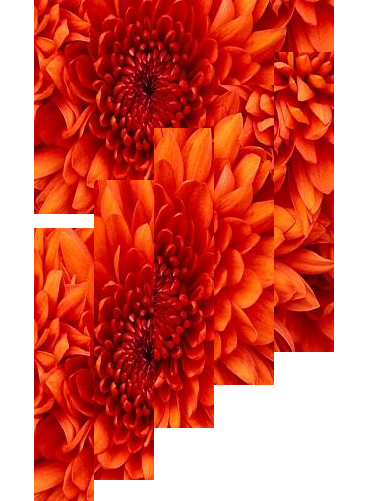
有意思的地方见效果图:
思想:
将图片设置分割div的背景图片,控制div的属性,可以现实有趣的滤镜效果,本例中展示了一种,感兴趣的朋友可以尝试其他滤镜的实现。
本例其余动画部分,主要是利用jquery中提供animate和delay实现。
animate:这个函数的关键在于指定动画形式及结果样式属性对象。这个对象中每个属性都表示一个可以变化的样式属性。
delay:设置一个延时来推迟执行队列中之后的项目。
实例效果:
';
}
test.prepend(html);
test.find("div").eq(0).animate({ "top":"320px"},2000);
test.find("div").eq(1).animate({ "top":"320px"},2500);
test.find("div").eq(2).animate({ "top":"320px"},3000);
test.find("div").eq(3).animate({ "top":"320px"},3500);
test.find("div").eq(4).animate({ "top":"320px"},4000);
test.find("div").eq(0).delay(5000);
test.find("div").eq(4).delay(3000);
test.find("div").eq(1).delay(5000);
test.find("div").eq(3).delay(4000);
test.find("div").eq(2).delay(5000);
test.find("div").eq(0).animate({ "left":"-320px","top":"0px","width":"300px","height":"300px"},5000);
test.find("div").eq(4).animate({ "left":"320px","top":"0px","width":"300px","height":"300px","background-position":"0px 0px"},5000);
test.find("div").eq(1).animate({ "left":"-320px","top":"320px","width":"300px","height":"300px","background-position":"0px 0px"},4500);
test.find("div").eq(3).animate({ "left":"320px","top":"320px","width":"300px","height":"300px","background-position":"0px 0px"},4500);
test.find("div").eq(2).animate({ "left":"0px","top":"320px","width":"300px","height":"300px","background-position":"0px 0px"},4000);
test.find("div").eq(0).delay(2000);
test.find("div").eq(4).delay(2000);
test.find("div").eq(1).delay(2000);
test.find("div").eq(3).delay(2000);
test.find("div").eq(2).delay(2000);
test.find("div").eq(0).animate({ "left":"0px","top":"0px","width":"300px","height":"300px","background-position":"0px 0px"},5000);
test.find("div").eq(4).animate({ "left":"0px","top":"0px","width":"300px","height":"300px","background-position":"0px 0px"},5000);
test.find("div").eq(1).animate({ "left":"0px","top":"0px","width":"300px","height":"300px","background-position":"0px 0px"},4500);
test.find("div").eq(3).animate({ "left":"0px","top":"0px","width":"300px","height":"300px","background-position":"0px 0px"},4500);
test.find("div").eq(2).animate({ "left":"0px","top":"0px","width":"300px","height":"300px","background-position":"0px 0px"},4000);
test.find("div").eq(0).delay(2000);
test.find("div").eq(4).delay(2000);
test.find("div").eq(1).delay(2000);
test.find("div").eq(3).delay(2000);
test.find("div").eq(2).delay(2000);
test.find("div").eq(0).animate({ "left":"0px","top":"300px","width":"60px","height":"300px","background-position":"0px 0px"},5000,function(){test.find("img").css({"position":"absolute","left":"0px","top":"0px","z-index":"999"}); test.find("div").css({"background":"url(/upload/201207/20120725224206323.jpg) no-repeat"});});
test.find("div").eq(4).animate({ "left":"240px","top":"300px","width":"60px","height":"300px","background-position":"-240px 0px"},5000);
test.find("div").eq(1).animate({ "left":"60px","top":"200px","width":"60px","height":"300px","background-position":"-60px 0px"},4500);
test.find("div").eq(3).animate({ "left":"180px","top":"200px","width":"60px","height":"300px","background-position":"-180px 0px"},4500);
test.find("div").eq(2).animate({ "left":"120px","top":"300px","width":"60px","height":"300px","background-position":"-120px 0px"},4000);
});
[Ctrl+A 全选 注:
如需引入外部Js需刷新才能执行]





 355
355




 收藏
收藏















