



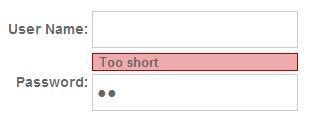

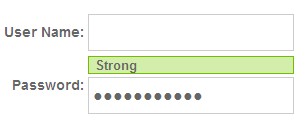
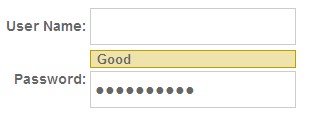
因为是基于JQuery的控件,当然需要JQuery库,还要一个本控件的JS。JQuery的JS大家可以到官网下载:http://code.jquery.com/jquery-1.4.2.min.js
这个控件的JS文件:password_strength_plugin.js
password_strength_plugin.js

易网商务 Build 20030730 OEM版
下载
优化了部分代码及一些BUG.,提高了浏览速度,可以通过会员助手自由管理各种信息,修正了反馈信息及询价订单错误,增加了自助建站系统(16种模板可选),增加在线管理开通域名主机邮局系统,强大的备份功能可以轻松备份压缩恢复数据,后台增加验证码和日志功能,分类管理更详细,更安全默认的管理员帐户是:admin密码是:admin
复制代码 代码如下:
(function($){
$.fn.shortPass = 'Too short';
$.fn.badPass = 'Weak';
$.fn.goodPass = 'Good';
$.fn.strongPass = 'Strong';
$.fn.samePassword = 'Username and Password identical.';
$.fn.resultStyle = "";
$.fn.passStrength = function(options) {
var defaults = {
shortPass: "shortPass", //optional
badPass: "badPass", //optional
goodPass: "goodPass", //optional
strongPass: "strongPass", //optional
baseStyle: "testresult", //optional
userid: "", //required override
messageloc: 1 //before == 0 or after == 1
};
var opts = $.extend(defaults, options);
return this.each(function() {
var obj = $(this);
$(obj).unbind().keyup(function()
{
var results = $.fn.teststrength($(this).val(),$(opts.userid).val(),opts);
if(opts.messageloc === 1)
{
$(this).next("." + opts.baseStyle).remove();
$(this).after("");
$(this).next("." + opts.baseStyle).addClass($(this).resultStyle).find("span").text(results);
}
else
{
$(this).prev("." + opts.baseStyle).remove();
$(this).before("");
$(this).prev("." + opts.baseStyle).addClass($(this).resultStyle).find("span").text(results);
}
});
//FUNCTIONS
$.fn.teststrength = function(password,username,option){
var score = 0;
//password if (password.length //password == user name
if (password.toLowerCase()==username.toLowerCase()){this.resultStyle = option.badPass;return $(this).samePassword;}
//password length
score += password.length * 4;
score += ( $.fn.checkRepetition(1,password).length - password.length ) * 1;
score += ( $.fn.checkRepetition(2,password).length - password.length ) * 1;
score += ( $.fn.checkRepetition(3,password).length - password.length ) * 1;
score += ( $.fn.checkRepetition(4,password).length - password.length ) * 1;
//password has 3 numbers
if (password.match(/(.*[0-9].*[0-9].*[0-9])/)){ score += 5;}
//password has 2 symbols
if (password.match(/(.*[!,@,#,$,%,^,&,*,?,_,~].*[!,@,#,$,%,^,&,*,?,_,~])/)){ score += 5 ;}
//password has Upper and Lower chars
if (password.match(/([a-z].*[A-Z])|([A-Z].*[a-z])/)){ score += 10;}
//password has number and chars
if (password.match(/([a-zA-Z])/) && password.match(/([0-9])/)){ score += 15;}
//
//password has number and symbol
if (password.match(/([!,@,#,$,%,^,&,*,?,_,~])/) && password.match(/([0-9])/)){ score += 15;}
//password has char and symbol
if (password.match(/([!,@,#,$,%,^,&,*,?,_,~])/) && password.match(/([a-zA-Z])/)){score += 15;}
//password is just a numbers or chars
if (password.match(/^\w+$/) || password.match(/^\d+$/) ){ score -= 10;}
//verifying 0 if ( score if ( score > 100 ){ score = 100;}
if (score if (score this.resultStyle= option.strongPass;
return $(this).strongPass;
};
});
};
})(jQuery);
$.fn.checkRepetition = function(pLen,str) {
var res = "";
for (var i=0; i
var repeated=true;
for (var j=0;j repeated=repeated && (str.charAt(j+i)==str.charAt(j+i+pLen));
}
if (j
i+=pLen-1;
repeated=false;
}
else {
res+=str.charAt(i);
}
}
return res;
};
这个控件的css文件:
style.css
复制代码 代码如下:
td label{
font-size:14px;
font-weight:bold;
color:#666;
font-family: arail,helvetica,san-serif;
}
input{
height:28px;
width:200px;
border:1px solid #ccc;
font-size:16px;
font-weight: bold;
color:#666;
padding:7px 0 0 4px;
}
/* ADVANCED STYLES */
.top_testresult{
font-weight: bold;
font-size:13px;
font-family: arail,helvetica,san-serif;
color:#666;
padding:0;
margin:0 0 2px 0;
}
.top_testresult span{
padding:6px ;
margin:0;
}
.top_shortPass{
background:#edabab;
border:1px solid #bc0000;
display:block;
}
.top_shortPass span{
}
.top_badPass{
background:#edabab;
border:1px solid #bc0000;
display:block;
}
.top_badPass span{
}
.top_goodPass{
background:#ede3ab;
border:1px solid #bc9f00;
display:block;
}
.top_goodPass span{
}
.top_strongPass{
background:#d3edab;
border:1px solid #73bc00;
display:block;
}
.top_strongPass span{
}
/* RESULT STYLE */
.testresult{
font-weight: bold;
font-size:13px;
font-family: arial,helvetica,san-serif;
color:#666;
padding:0px 0px 12px 10px;
margin-left:10px;
display: block;
height:28px;
float:left;
}
.testresult span{
padding:10px 20px 12px 10px;
margin: 0px 0px 0px 20px;
display:block;
float:right;
white-space: nowrap;
}
.shortPass{
background:url(../images/red.png) no-repeat 0 0;
}
.shortPass span{
background:url(../images/red.png) no-repeat top right;
}
.badPass{
background:url(../images/red.png) no-repeat 0 0;
}
.badPass span{
background:url(../images/red.png) no-repeat top right;
}
.goodPass{
background:url(../images/yellow.png) no-repeat 0 0;
}
.goodPass span{
background:url(../images/yellow.png) no-repeat top right;
}
.strongPass{
background:url(../images/green.png) no-repeat 0 0;
}
.strongPass span{
background:url(../images/green.png) no-repeat top right;
}
head部分代码
head
复制代码 代码如下:
body部分代码
body
复制代码 代码如下:




