



微信小程序 自定义对话框实例详解
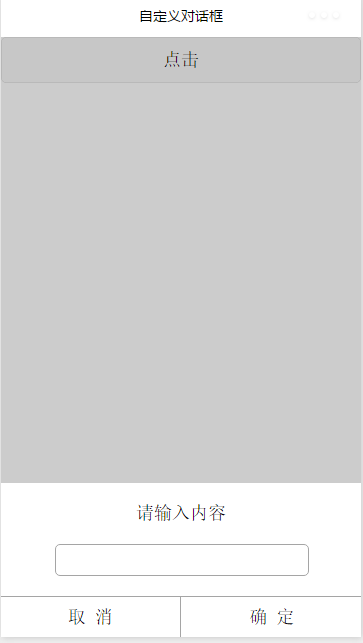
效果图:
index.wxml:
请输入内容 取 消 确 定
index.js:

短视频去水印微信小程序
下载
抖猫高清去水印微信小程序,源码为短视频去水印微信小程序全套源码,包含微信小程序端源码,服务端后台源码,支持某音、某手、某书、某站短视频平台去水印,提供全套的源码,实现功能包括:1、小程序登录授权、获取微信头像、获取微信用户2、首页包括:流量主已经对接、去水印连接解析、去水印操作指导、常见问题指引3、常用工具箱:包括视频镜头分割(可自定义时长分割)、智能分割(根据镜头自动分割)、视频混剪、模糊图片高
var inputinfo = "";
var app = getApp()
Page({
 data: {
  animationData:"",
  showModalStatus:false
 },

 onLoad: function () {

 },
 showModal: function () {
  // 显示遮罩层
  var animation = wx.createAnimation({
   duration: 200,
   timingFunction: "linear",
   delay: 0
  })
  this.animation = animation
  animation.translateY(300).step()
  this.setData({
   animationData: animation.export(),
   showModalStatus: true
  })
  setTimeout(function () {
   animation.translateY(0).step()
   this.setData({
    animationData: animation.export()
   })
  }.bind(this), 200)
 },
 clickbtn:function(){
  if(this.data.showModalStatus){
   this.hideModal();
  }else{
   this.showModal();
  }
 },
 hideModal: function () {
  // 隐藏遮罩层
  var animation = wx.createAnimation({
   duration: 200,
   timingFunction: "linear",
   delay: 0
  })
  this.animation = animation
  animation.translateY(300).step()
  this.setData({
   animationData: animation.export(),
  })
  setTimeout(function () {
   animation.translateY(0).step()
   this.setData({
    animationData: animation.export(),
    showModalStatus: false
   })
  }.bind(this), 200)
 },
 click_cancel:function(){
  console.log("点击取消");
   this.hideModal();
 },
 click_ok:function(){
  console.log("点击了确定===,输入的信息为为==",inputinfo);
   this.hideModal();
 },
 input_content:function(e){
  console.log(e);
  inputinfo = e.detail.value;
 }

})
感谢阅读,希望能帮助到大家,谢谢大家对本站的支持!
更多微信微信小程序 自定义对话框实例详解相关文章请关注PHP中文网!





