



由于截图时可能需要精确截取某一部分,所以需要放大镜的功能,这样截取的时候才更容易定位截图的位置。
添加PictureBox,name属性设置为“pictureBox_zoom”;
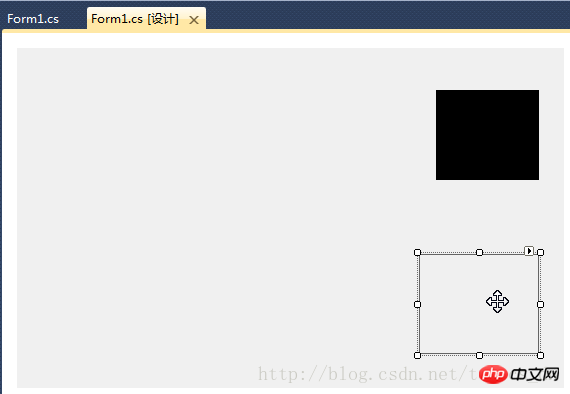
在“Form1_Load”事件处理函数中添加以下代码:
//设置放大镜的大小
            this.pictureBox_zoom.Width = this.ZoomBoxWidth;
            this.pictureBox_zoom.Height = this.ZoomBoxHeight;
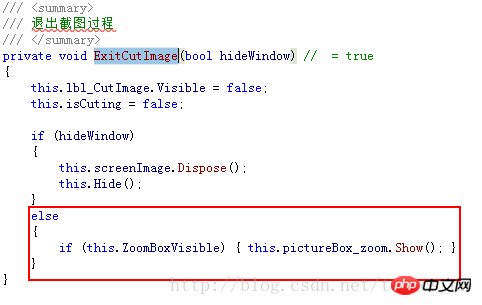
在“ExitCutImage”方法中添加代码:
在“Form1_MouseUp”事件处理函数中添加代码:


在“ShowForm”方法的else条件最后添加代码:
if (this.ZoomBoxVisible)
                {
                    UpdateCutInfoLabel(UpdateUIMode.ShowZoomBox);
                    this.pictureBox_zoom.Show();
                }
在“UpdateCutInfoLabel”函数最后添加以下代码:
if (this.pictureBox_zoom.Visible || (updateUIMode & UpdateUIMode.ShowZoomBox) != UpdateUIMode.None)
            {
                Point zoomLocation = new Point(MousePosition.X + 15, MousePosition.Y + 22);
                if (zoomLocation.Y + this.pictureBox_zoom.Height > this.Height)
                {
                    if (zoomLocation.X + this.pictureBox_zoom.Width > this.Width)
                    {
                        zoomLocation = new Point(MousePosition.X - this.pictureBox_zoom.Width - 10, MousePosition.Y - this.pictureBox_zoom.Height - 10);
                    }
                    else
                    {
                        zoomLocation = new Point(MousePosition.X + 15, MousePosition.Y - this.pictureBox_zoom.Height - 15);
                    }
                }
                else
                {
                    if (zoomLocation.X + this.pictureBox_zoom.Width > this.Width)
                    {
                        zoomLocation = new Point(MousePosition.X - this.pictureBox_zoom.Width - 15, MousePosition.Y);
                    }
                }
                this.pictureBox_zoom.Location = zoomLocation;
                if (!this.pictureBox_zoom.Visible)
                {
                    this.pictureBox_zoom.Show();
                }
}在“Form1_KeyUp”事件处理函数中添加以下代码:

为“pictureBox_zoom”添加“Paint”事件处理程序,代码如下:
////// 放大镜组件重绘事件处理程序 /// 实时显示鼠标指针位置放大后的图像 /// /// /// private void pictureBox_zoom_Paint(object sender, PaintEventArgs e) { Bitmap bmp_lbl = new Bitmap(e.ClipRectangle.Width, e.ClipRectangle.Height); int srcWidth = (int)(this.ZoomBoxWidth / 10); int srcHeight = (int)(this.ZoomBoxHeight / 10); Bitmap bmp = new Bitmap(srcWidth, srcHeight); Rectangle srcRect = new Rectangle(MousePosition.X - 5, MousePosition.Y - 4, srcWidth, srcHeight); if (!isCuting) { srcRect = new Rectangle(MousePosition.X - 6, MousePosition.Y - 5, srcWidth, srcHeight); } Graphics g = Graphics.FromImage(bmp); g.DrawImage(screenImage, 0, 0, srcRect, GraphicsUnit.Pixel); g.Dispose(); //Zoom int x, y; for (int row = 0; row < bmp.Height; row++) { for (int col = 0; col < bmp.Width; col++) { Color pc = bmp.GetPixel(col, row); for (int h = 0; h < 10; h++) { for (int w = 0; w < 10; w++) { x = col * 10 + w; y = row * 10 + h; if (x < bmp_lbl.Width && y < bmp_lbl.Height) { bmp_lbl.SetPixel(x, y, pc); } } } } } e.Graphics.DrawImage(bmp_lbl, 0, 0); int blockX = e.ClipRectangle.Width / 2; int blockY = e.ClipRectangle.Height / 2; SolidBrush brush = new SolidBrush(Color.FromArgb(10, 124124, 202)); Pen pen = new Pen(brush, 2.0F); e.Graphics.DrawLine(pen, new Point(0, blockY), new Point(e.ClipRectangle.Width, blockY)); e.Graphics.DrawLine(pen, new Point(blockX, 0), new Point(blockX, e.ClipRectangle.Height)); g.Dispose(); bmp_lbl.Dispose(); }
编译,运行,截图看看效果吧!




