这篇文章主要介绍了c#中进程的挂起与恢复操作方法,非常不错,具有参考借鉴价值,需要的朋友可以参考下
1. 源起:
仍然是模块化编程所引发的需求。产品经理难伺候,女产品经理更甚之~:p
纯属戏谑,技术方案与产品经理无关,芋头莫怪!
VCU10项目重构,要求各功能模块以独立进程方式实现,比如:音视频转换模块,若以独立进程方式实现,如何控制其暂停、继续等功能呢?
线程可以Suspend、Resume,c#内置的Process没有此类方法,咋整?
山穷水尽疑无路,柳暗花明又一村。情到浓时清转薄,此情可待成追忆!
前篇描述了进程间数据传递方法,此篇亦以示例演示其间控制与数据交互方法。
2、未公开的API函数:NtSuspendProcess、NtResumeProcess
此类函数在MSDN中找不到。
思其原因,概因它们介于Windows API和 内核API之间,威力不容小觑。怕二八耙子程序员滥用而引发事端,因此密藏。
其实还有个NtTerminateProcess,因Process有Kill方法,因此可不用。
但再隐秘的东西,只要有价值,都会被人给翻出来,好酒不怕巷子深么!
好,基于其,设计一个进程管理类,实现模块化编程之进程间控制这个需求。
3、ProcessMgr

PHP网络编程技术详解由浅入深,全面、系统地介绍了PHP开发技术,并提供了大量实例,供读者实战演练。另外,笔者专门为本书录制了相应的配套教学视频,以帮助读者更好地学习本书内容。这些视频和书中的实例源代码一起收录于配书光盘中。本书共分4篇。第1篇是PHP准备篇,介绍了PHP的优势、开发环境及安装;第2篇是PHP基础篇,介绍了PHP中的常量与变量、运算符与表达式、流程控制以及函数;第3篇是进阶篇,介绍
 398
398

直上代码吧,封装一个进程管理单元:
public static class ProcessMgr
 {
  /// <summary>
  /// The process-specific access rights.
  /// </summary>
  [Flags]
  public enum ProcessAccess : uint
  {
   /// <summary>
   /// Required to terminate a process using TerminateProcess.
   /// </summary>
   Terminate = 0x1,
   /// <summary>
   /// Required to create a thread.
   /// </summary>
   CreateThread = 0x2,
   /// <summary>
   /// Undocumented.
   /// </summary>
   SetSessionId = 0x4,
   /// <summary>
   /// Required to perform an operation on the address space of a process (see VirtualProtectEx and WriteProcessMemory).
   /// </summary>
   VmOperation = 0x8,
   /// <summary>
   /// Required to read memory in a process using ReadProcessMemory.
   /// </summary>
   VmRead = 0x10,
   /// <summary>
   /// Required to write to memory in a process using WriteProcessMemory.
   /// </summary>
   VmWrite = 0x20,
   /// <summary>
   /// Required to duplicate a handle using DuplicateHandle.
   /// </summary>
   DupHandle = 0x40,
   /// <summary>
   /// Required to create a process.
   /// </summary>
   CreateProcess = 0x80,
   /// <summary>
   /// Required to set memory limits using SetProcessWorkingSetSize.
   /// </summary>
   SetQuota = 0x100,
   /// <summary>
   /// Required to set certain information about a process, such as its priority class (see SetPriorityClass).
   /// </summary>
   SetInformation = 0x200,
   /// <summary>
   /// Required to retrieve certain information about a process, such as its token, exit code, and
   priority class (see OpenProcessToken, GetExitCodeProcess, GetPriorityClass, and IsProcessInJob).
   /// </summary>
   QueryInformation = 0x400,
   /// <summary>
   /// Undocumented.
   /// </summary>
   SetPort = 0x800,
   /// <summary>
   /// Required to suspend or resume a process.
   /// </summary>
   SuspendResume = 0x800,
   /// <summary>
   /// Required to retrieve certain information about a process (see QueryFullProcessImageName).
   A handle that has the PROCESS_QUERY_INFORMATION access right is automatically granted PROCESS_QUERY_LIMITED_INFORMATION.
   /// </summary>
   QueryLimitedInformation = 0x1000,
   /// <summary>
   /// Required to wait for the process to terminate using the wait functions.
   /// </summary>
   Synchronize = 0x100000
  }
  [DllImport("ntdll.dll")]
  private static extern uint NtResumeProcess([In] IntPtr processHandle);
  [DllImport("ntdll.dll")]
  private static extern uint NtSuspendProcess([In] IntPtr processHandle);
  [DllImport("kernel32.dll", SetLastError = true)]
  private static extern IntPtr OpenProcess(
   ProcessAccess desiredAccess,
   bool inheritHandle,
   int processId);
  [DllImport("kernel32.dll", SetLastError = true)]
  [return: MarshalAs(UnmanagedType.Bool)]
  private static extern bool CloseHandle([In] IntPtr handle);
  public static void SuspendProcess(int processId)
  {
   IntPtr hProc = IntPtr.Zero;
   try
   {
    // Gets the handle to the Process
    hProc = OpenProcess(ProcessAccess.SuspendResume, false, processId);
    if (hProc != IntPtr.Zero)
     NtSuspendProcess(hProc);
   }
   finally
   {
    // Don't forget to close handle you created.
    if (hProc != IntPtr.Zero)
     CloseHandle(hProc);
   }
  }
  public static void ResumeProcess(int processId)
  {
   IntPtr hProc = IntPtr.Zero;
   try
   {
    // Gets the handle to the Process
    hProc = OpenProcess(ProcessAccess.SuspendResume, false, processId);
    if (hProc != IntPtr.Zero)
     NtResumeProcess(hProc);
   }
   finally
   {
    // Don't forget to close handle you created.
    if (hProc != IntPtr.Zero)
     CloseHandle(hProc);
   }
  }
}4、进程控制
我权且主进程为宿主,它通过Process类调用子进程,得其ID,以此为用。其调用代码为:
 private void RunTestProcess(bool hidden = false)
  {
   string appPath = Path.GetDirectoryName(Application.ExecutablePath);
   string testAppPath = Path.Combine(appPath, "TestApp.exe");
   var pi = new ProcessStartInfo();
   pi.FileName = testAppPath;
   pi.Arguments = this.Handle.ToString();
   pi.WindowStyle = hidden ? ProcessWindowStyle.Hidden : ProcessWindowStyle.Normal;
   this.childProcess = Process.Start(pi);
   txtInfo.Text = string.Format("子进程ID:{0}\r\n子进程名:{1}", childProcess.Id, childProcess.ProcessName);
   ...
}控制代码为:
private void btnWork_Click(object sender, EventArgs e)
  {
   if (this.childProcess == null || this.childProcess.HasExited)
    return;
   if ((int)btnWork.Tag == 0)
   {
    btnWork.Tag = 1;
    btnWork.Text = "恢复";
    ProcessMgr.SuspendProcess(this.childProcess.Id);
   }
   else
   {
    btnWork.Tag = 0;
    btnWork.Text = "挂起";
    ProcessMgr.ResumeProcess(this.childProcess.Id);
   }
}子进程以一定时器模拟其工作,向主进程抛进度消息:
 private void timer_Tick(object sender, EventArgs e)
  {
   if (progressBar.Value < progressBar.Maximum)
    progressBar.Value += 1;
   else
    progressBar.Value = 0;
   if (this.hostHandle != IntPtr.Zero)
    SendMessage(this.hostHandle, WM_PROGRESS, 0, progressBar.Value);
}代码量就这么的少,简单吧……
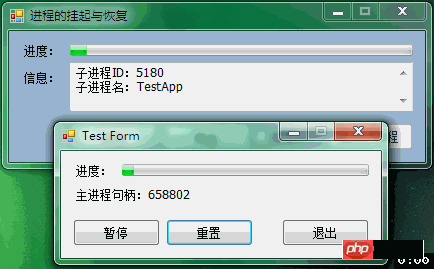
5、效果图:
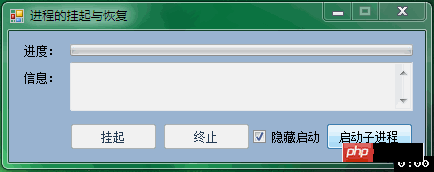
为示例,做了两个图,其一为显示子进程,其二为隐藏子进程。
实际项目调用独立进程模块,是以隐藏方式调用的,以宿主展示其处理进度,如此图:
后记:
扩展思路,一些优秀的开源工具,如youtube_dl、ffmpeg等,都以独立进程方式存在,且可通过CMD管理通信。
以此进程控制原理,可以基于这些开源工具,做出相当不错的GUI工具出来。毕竟相对于强大的命令行,人们还是以简单操作为方便。
以上就是C#中进程的挂起与恢复的代码实例分析(图)的详细内容,更多请关注php中文网其它相关文章!

每个人都需要一台速度更快、更稳定的 PC。随着时间的推移,垃圾文件、旧注册表数据和不必要的后台进程会占用资源并降低性能。幸运的是,许多工具可以让 Windows 保持平稳运行。

Copyright 2014-2025 https://www.php.cn/ All Rights Reserved | php.cn | 湘ICP备2023035733号


 785
785


 收藏
收藏