
详解css中的z-index,如果都没有z-index,结果又会是怎样呢?小编带你们来看一下。
<!DOCTYPE html>
<html lang="en">
<head>
<meta charset="UTF-8">
<title>z-index</title>
<style type="text/css">
*{
margin: 0;
padding: 0;
}
.box1{
position: absolute;
width: 100px;
height: 100px;
background-color: red;
top: 100px;
left: 100px;
}
.box2{
position: absolute;
width: 100px;
height: 100px;
background-color: green;
top: 180px;
left: 180px;
}
</style>
</head>
<body>
<p class="box1">box1</p>
<p class="box2">box2</p>
</body>
</html>运行结果:

由于box2在box1后面,在没有设置z-index的情况下,box2会压住box1。
接下来我们来看一下什么是从父现象?
立即学习“前端免费学习笔记(深入)”;
<!DOCTYPE html>
<html lang="en">
<head>
<meta charset="UTF-8">
<title>Document</title>
<style type="text/css">
.p1{
position: relative;
width: 200px;
height: 200px;
background-color: blue;
z-index: 10
}
.p1 .child1{
position: absolute;
width: 100px;
height: 100px;
top: 240px;
left: 300px;
z-index: 56;
background-color: green;
}
.p2{
position: relative;
width: 200px;
height: 200px;
background-color:red;
z-index: 20;
}
.p2 .child2{
position: absolute;
width: 100px;
height: 100px;
top: 100px;
left: 350px;
z-index: 5;
background-color: pink;
}


</style>
</head>
<body>
<p class="p1">
<p class="child1"></p>
</p>
<p class="p2">
<p class="child2"></p>
</p>
</body>
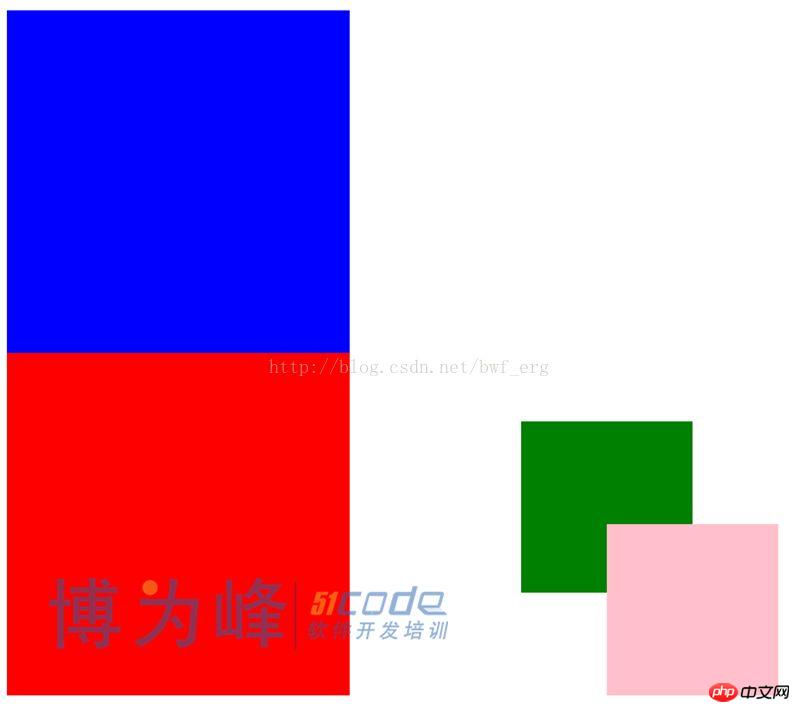
</html>运行结果:

v1.8新增功能简介: 一、后台新增生成网站地图和生成Sitemap.xml的功能。 二、新增下载中心功能,可在后台上传doc,xls,ppt,rar,pdf文件。 三、新增产品缩略图自动缩放功能,图片按比例缩放,解决了图片变形问题。 四、新闻、产品详细页新增了上一个、下一个的功能,改善用户体验。 五、在线客服新增了阿里巴巴贸易通在线客服。 六、可在后台设置分享代码,如百度分享和AddThis等。
 0
0

这里我们设置p2的z-index小于p1的z-index,设置的p1的子元素child1的z-index大于p2的子元素child2的z-index。但最后运行的结果是child2压住child1。这就是从父现象。也就是说如果父元素被压住了。子元素也逃不了被压住的命运。无论子元素的z-index的大小。
【相关推荐】
1. 免费css在线视频教程
2. css在线手册
以上就是详解css中的z-index(二)的详细内容,更多请关注php中文网其它相关文章!

每个人都需要一台速度更快、更稳定的 PC。随着时间的推移,垃圾文件、旧注册表数据和不必要的后台进程会占用资源并降低性能。幸运的是,许多工具可以让 Windows 保持平稳运行。

 广告
广告Copyright 2014-2025 https://www.php.cn/ All Rights Reserved | php.cn | 湘ICP备2023035733号


 105
105


 收藏
收藏







 取消收藏
取消收藏







