
本篇文章主要介绍了基于nodejs 的多页面爬虫 ,小编觉得挺不错的,现在分享给大家,也给大家做个参考。一起跟随小编过来看看吧
前言
前端时间再回顾了一下node.js,于是顺势做了一个爬虫来加深自己对node的理解。
主要用的到是request,cheerio,async三个模块
request
用于请求地址和快速下载图片流。
cheerio
为服务器特别定制的,快速、灵活、实施的jQuery核心实现.
便于解析html代码。
async
异步调用,防止堵塞。
核心思路
用request 发送一个请求。获取html代码,取得其中的img标签和a标签。

升级报告:增加动态新闻功能后台添加,删除,编辑,支持UBB代码,支持上传片及文件。 增加我要入团功能散客可以自由选择加入贵社最近要出发的团队。 增加线路置顶功能置顶后的线路永远显示在最前面。 增加同行报价功能管理员在后台添加同行用户,同行用户登录后可查看贵社线路对同行的报价。同行报价在添加线路中一并添加。(感谢网友拽哥提出修改意见) 增加更多线路显示的分页功能方便大型旅行社由于线路过多而引起的部分
 0
0

通过获取的a表情进行递归调用。不断获取img地址和a地址,继续递归
获取img地址通过request(photo).pipe(fs.createWriteStream(dir + “/” + filename));进行快速下载。
function requestall(url) {

 request({

  uri: url,

  headers: setting.header

 }, function (error, response, body) {

  if (error) {

   console.log(error);

  } else {

   console.log(response.statusCode);

   if (!error && response.statusCode == 200) {

    var $ = cheerio.load(body);

    var photos = [];

    $('img').each(function () {

     // 判断地址是否存在

     if ($(this).attr('src')) {

      var src = $(this).attr('src');

      var end = src.substr(-4, 4).toLowerCase();

      if (end == '.jpg' || end == '.png' || end == '.jpeg') {

       if (IsURL(src)) {

        photos.push(src);

       }

      }

     }

    });

    downloadImg(photos, dir, setting.download_v);

    // 递归爬虫

    $('a').each(function () {

     var murl = $(this).attr('href');

     if (IsURL(murl)) {

      setTimeout(function () {

       fetchre(murl);

      }, timeout);

      timeout += setting.ajax_timeout;

     } else {

      setTimeout(function () {

       fetchre("http://www.ivsky.com/" + murl);

      }, timeout);

      timeout += setting.ajax_timeout;

     }

    })

   }

  }

 });

}防坑
1.在request通过图片地址下载时,绑定error事件防止爬虫异常的中断。
2.通过async的mapLimit限制并发。
3.加入请求报头,防止ip被屏蔽。
4.获取一些图片和超链接地址,可能是相对路径(待考虑解决是否有通过方法)。
function downloadImg(photos, dir, asyncNum) {

 console.log("即将异步并发下载图片,当前并发数为:" + asyncNum);

 async.mapLimit(photos, asyncNum, function (photo, callback) {

  var filename = (new Date().getTime()) + photo.substr(-4, 4);

  if (filename) {

   console.log('正在下载' + photo);

   // 默认

   // fs.createWriteStream(dir + "/" + filename)

   // 防止pipe错误

   request(photo)

    .on('error', function (err) {

     console.log(err);

    })

    .pipe(fs.createWriteStream(dir + "/" + filename));

   console.log('下载完成');

   callback(null, filename);

  }

 }, function (err, result) {

  if (err) {

   console.log(err);

  } else {

   console.log(" all right ! ");

   console.log(result);

  }

 })

}测试:
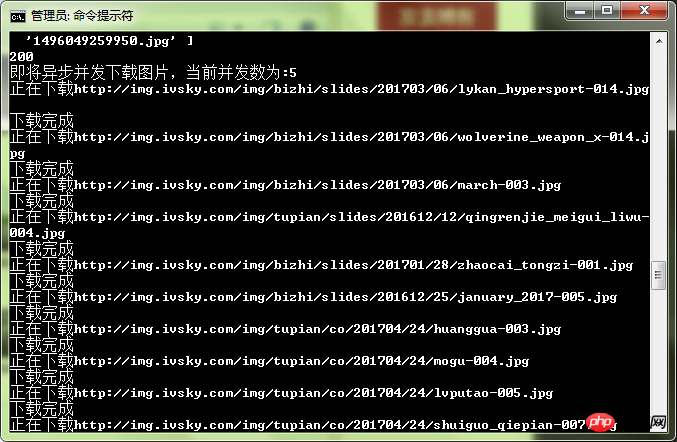
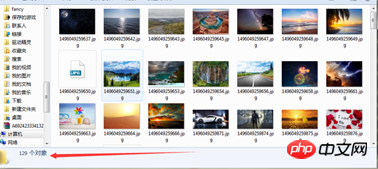
可以感觉到速度还是比较快的。
以上就是多页面爬虫在nodejs中的示例代码分析的详细内容,更多请关注php中文网其它相关文章!

每个人都需要一台速度更快、更稳定的 PC。随着时间的推移,垃圾文件、旧注册表数据和不必要的后台进程会占用资源并降低性能。幸运的是,许多工具可以让 Windows 保持平稳运行。

 广告
广告
 收藏
收藏
 收藏
收藏
 收藏
收藏
Copyright 2014-2025 https://www.php.cn/ All Rights Reserved | php.cn | 湘ICP备2023035733号


 313
313
















