
很多时候我们喜欢在自己电脑的终端直接ssh连接linux服务器,而不喜欢使用那些有ui界面的工具区连接我们的服务器。可是在终端使用ssh我们每次都需要输入账号和密码,这也是一个烦恼,所以我们可以简单的打造一个在linux/mac os运行的自动ssh登录远程服务器的小工具.
来个gif动画示例下先:
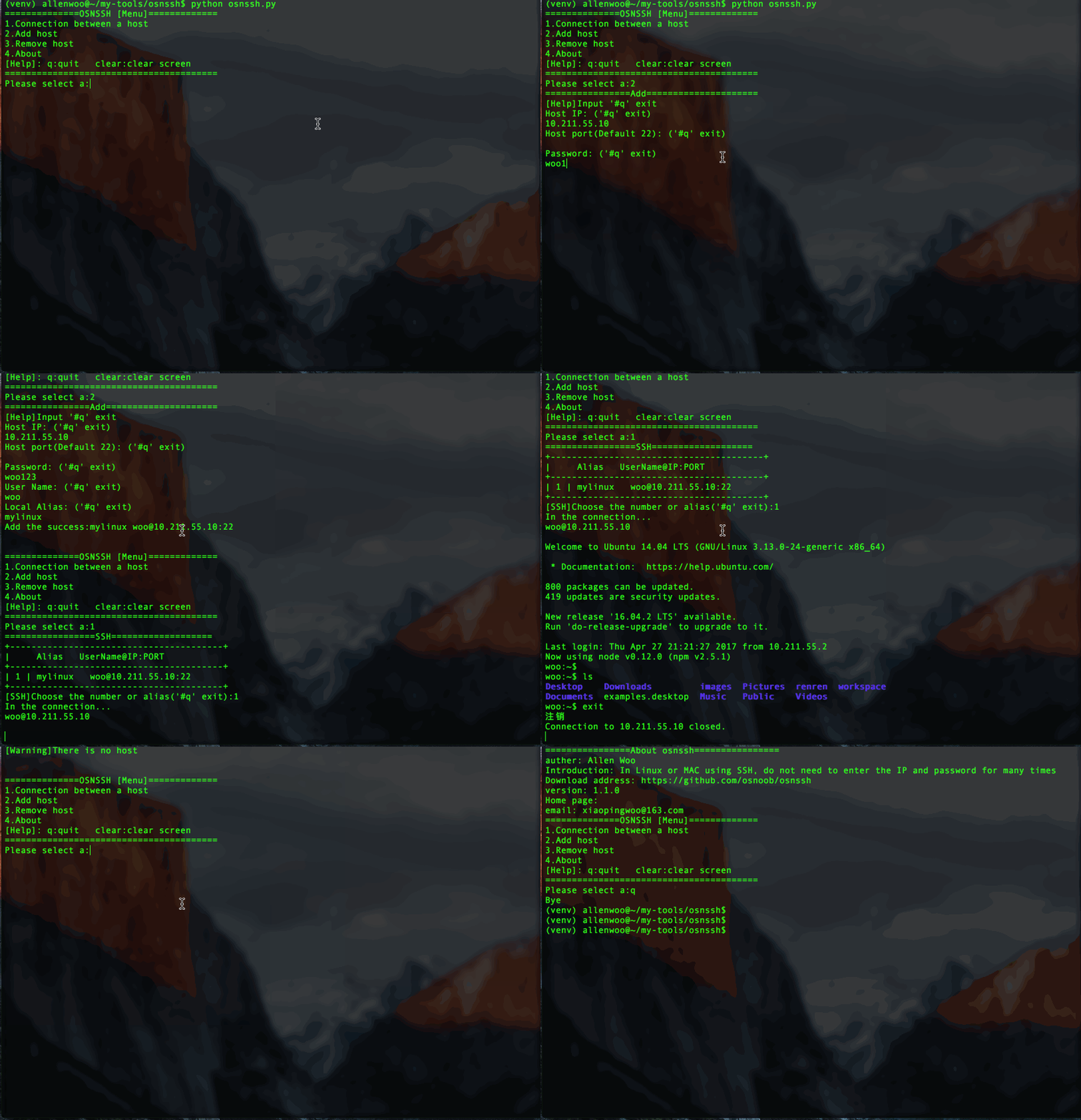
我们先理一下我们需要些什么功能:
1. 添加/删除连接服务器需要的IP,端口,密码2. 自动输入密码登录远程服务器
对,我们就做这么简单的功能
开始写代码
代码比较长,所以我也放在在Github和码云,地址在文章最底部:
1.我们建个模块目录osnssh(Open source noob ssh),然后在下面再建两个目录,一个用来放主程序取名叫bin吧,一个用来保存登录数据(IP, 端口,密码)叫data吧。
-osnssh
    -bin
-data1.设置程序:添加/删除IP,端口,密码. 建立py文件bin/setting.py:
立即学习“Python免费学习笔记(深入)”;
#!/usr/bin/env python#-*-coding:utf-8-*-import re, base64, os, sys
path = os.path.dirname(os.path.abspath(sys.argv[0]))'''
选项配置管理
__author__ = 'allen woo'
'''def add_host_main():while 1:if add_host():break
        print("\n\nAgain:")def add_host():'''
    添加主机信息
    :return:
    '''
    print("================Add=====================")
    print("[Help]Input '#q' exit")# 输入IP
    host_ip = str_format("Host IP:", "^(25[0-5]|2[0-4][0-9]|1[0-9][0-9]|[1-9]?[0-9])\.(25[0-5]|2[0-4][0-9]|1[0-9][0-9]|[1-9]?[0-9])\.(25[0-5]|2[0-4][0-9]|1[0-9][0-9]|[1-9]?[0-9])\.(25[0-5]|2[0-4][0-9]|1[0-9][0-9]|[1-9]?[0-9])$")if host_ip == "#q":return 1# 输入端口
    host_port = str_format("Host port(Default 22):", "[0-9]+")if host_port == "#q":return 1# 输入密码
    password = str_format("Password:", ".*")if password == "#q":return 1# 密码加密
    password = base64.encodestring(password)# 输入用户名
    name = str_format("User Name:", "^[^ ]+$")if name == "#q":return 1elif not name:
        os.system("clear")
        print("[Warning]:User name cannot be emptyg")return 0# The alias# 输入别名
    alias = str_format("Local Alias:", "^[^ ]+$")if alias == "#q":return 1elif not alias:
        os.system("clear")
        print("[Warning]:Alias cannot be emptyg")return 0# 打开数据保存文件
    of = open("{}/data/information.d".format(path))
    hosts = of.readlines()# 遍历文件数据,查找是否有存在的Ip,端口,还有别名for l in hosts:
        l = l.strip("\n")if not l:continue
        l_list = l.split(" ")if host_ip == l_list[1] and host_port == l_list[2]:
            os.system("clear")
            print("[Warning]{}:{} existing".format(host_ip, host_port))return 0if alias == l_list[4]:
            os.system("clear")
            print("[Warning]Alias '{}' existing".format(alias))return 0
    of.close()# save# 保存数据到数据文件
    of = open("{}/data/information.d".format(path), "a")
    of.write("\n{} {} {} {} {}".format(name.strip("\n"), host_ip.strip("\n"), host_port, password.strip("\n"), alias.strip("\n")))
    of.close()
    print("Add the success:{} {}@{}:{}".format(alias.strip("\n"), name.strip("\n"), host_ip.strip("\n"), host_port, password.strip("\n")))return 1def remove_host():'''
    删除主机信息
    :return:
    '''while 1:# 打开数据文件
        of = open("{}/data/information.d".format(path))
        hosts = of.readlines()
        of.close
        l = len(hosts)if l <= 0:
            os.system("clear")
            print("[Warning]There is no host")return

        print("================Remove================")
        print("+{}+".format("-"*40))
        print("|     Alias   UserName@IP:PORT")
        hosts_temp = []
        n = 0# 遍历输出所以信息(除了密码)供选择for i in range(0, l):if not hosts[i].strip():continue
            v_list = hosts[i].strip().split(" ")
            print("+{}+".format("-"*40))
            print("| {} | {}   {}@{}:{}".format(n+1, v_list[4], v_list[0], v_list[1], v_list[2]))
            n += 1
            hosts_temp.append(hosts[i])
        hosts = hosts_temp[:]
        print("+{}+".format("-"*40))
        c = raw_input("[Remove]Choose the Number or Alias('#q' to exit):")
        is_alias = False
        is_y = Falsetry:
            c = int(c)if c > l or c < 1:
                os.system("clear")
                print("[Warning]:There is no")continuedel hosts[c-1]
            is_y = Trueexcept:
            is_alias = Trueif is_alias:if c.strip() == "#q":
                os.system("clear")break
            n = 0for l in hosts:if c.strip() == l.split(" ")[4].strip():del hosts[n]
                    is_y = True
                n += 1if not is_y:
            os.system("clear")
            print("[Warning]:There is no")continueelse: # save# 再次确认是否删除
            c = raw_input("Remove?[y/n]:")if c.strip().upper() == "Y":
                of = open("{}/data/information.d".format(path), "w")for l in hosts:
                    of.write(l)
                print("Remove the success!")
                of.close()def str_format(lable, rule):'''
    用于验证输入的数据格式
    :param lable:
    :param rule:
    :return:
    '''while 1:
        print("{} ('#q' exit)".format(lable))
        temp = raw_input().strip()
        m = re.match(r"{}".format(rule), temp)if m:breakelif "port" in lable:
            temp = 22breakelif temp.strip() == "#q":
            os.system("clear")break
        os.system("clear")
print("[Warning]:Invalid format")return temp2. 我们再添加一个函数在setting.py用于输出我们的信息,也就是about me。
def about():'''
    输出关于这个程序的信息
    :return:
    '''
    of = open("{}/bin/about.dat".format(path))
    rf = of.read()try:
        info = eval(rf)
        os.system("clear")
        print("================About osnssh================")for k,v in info.items():
            print("{}: {}".format(k, v))except:
print("For failure.")return然后在bin目录下面建立个文件about.dat写入我们的一些信息,比如:
{"auther":"Allen Woo","Introduction":"In Linux or MAC using SSH, do not need to enter the IP and password for many times","Home page":"","Download address":"https://github.com/osnoob/osnssh","version":"1.1.0","email":"xiaopingwoo@163.com"
}好了设置程序就这样了:
2. 自动登录远程服务器程序:在bin建个py文件叫auto_ssh.py:
注意:这里我们需要先安装个包叫:pexpect, 用户终端交互,捕捉交互信息实现自动输入密码。
安装pexpect:
pip install pexpect
然后开始写代码:
#!/usr/bin/env python#-*-coding:utf-8-*-import os, sys, base64import pexpect
path = os.path.dirname(os.path.abspath(sys.argv[0]))def choose():# 打开我们的数据文件
    of = open("{}/data/information.d".format(path))
    hosts = of.readlines()
    hosts_temp = []for h in hosts:if h.strip():
            hosts_temp.append(h)
    hosts = hosts_temp[:]
    l = len(hosts)if l <= 0:
        os.system("clear")
        print("[Warning]Please add the host server")returnwhile 1:

        print("=================SSH===================")
        print("+{}+".format("-"*40))
        print("|     Alias   UserName@IP:PORT")for i in range(0, l):
            v_list = hosts[i].strip().split(" ")
            print("+{}+".format("-"*40))
            print("| {} | {}   {}@{}:{}".format(i+1, v_list[4], v_list[0], v_list[1], v_list[2]))
        print("+{}+".format("-"*40))
        c = raw_input("[SSH]Choose the number or alias('#q' exit):")
        is_alias = False
        is_y = Falsetry:
            c = int(c)if c > l or c < 1:
                os.system("clear")
                print("[Warning]:There is no")continue
            l_list = hosts[c-1].split(" ")
            name = l_list[0]
            host = l_list[1]
            port = l_list[2]
            password = l_list[3]
            is_y = Trueexcept:
            is_alias = Trueif is_alias:if c.strip() == "#q":
                os.system("clear")returnfor h in hosts:if c.strip() == h.split(" ")[4].strip():
                    l_list = h.split(" ")
                    name = l_list[0]
                    host = l_list[1]
                    port = l_list[2]
                    password = l_list[3]
                    is_y = Trueif not is_y:continue# ssh# 将加密保存的密码解密
        password = base64.decodestring(password)
        print("In the connection...")# 准备远程连接,拼接ip:port
        print("{}@{}".format(name, host))if port == "22":
            connection("ssh {}@{}".format(name, host), password)else:
            connection("ssh {}@{}:{}".format(name, host, port), password)def connection(cmd, pwd):'''
    连接远程服务器
    :param cmd:
    :param pwd:
    :return:
    '''
    child = pexpect.spawn(cmd)
    i = child.expect([".*password.*", ".*continue.*?", pexpect.EOF, pexpect.TIMEOUT])if( i == 0 ):# 如果交互中出现.*password.*,就是叫我们输入密码# 我们就把密码自动填入下去
        child.sendline("{}\n".format(pwd))
        child.interact()elif( i == 1):# 如果交互提示是否继续,一般第一次连接时会出现# 这个时候我们发送"yes",然后再自动输入密码
        child.sendline("yes\n")
        child.sendline("{}\n".format(pwd))#child.interact()    else:# 连接失败
print("[Error]The connection fails")好了,现在我们只需要启动文件了,也就是打开程序后的第一个菜单
3.再osnssh目录下建个osnssh.py 文件:
#!/usr/bin/env python#-*-coding:utf-8-*-import os, sys
sys.path.append("../")from bin import setting, auto_ssh
path = os.path.dirname(os.path.abspath(sys.argv[0]))'''
方便在LINUX终端使用ssh,保存使用的IP:PORT , PASSWORD
自动登录
__author__ = 'allen woo'
'''def main():while 1:

        print("==============OSNSSH [Menu]=============")
        print("1.Connection between a host\n2.Add host\n3.Remove host\n4.About\n[Help]: q:quit   clear:clear screen")
        print("="*40)
        c = raw_input("Please select a:")if c == 1 or c == "1":
            auto_ssh.choose()if c == 2 or c == "2":
            setting.add_host_main()if c == 3 or c == "3":
            setting.remove_host()if c == 4 or c == "4":
            setting.about()elif c == "clear":
            os.system("clear")elif c == "q" or c == "Q" or c == "quit":
            print("Bye")
            sys.exit()else:
            print("\n")if __name__ == '__main__':try:
        of = open("{}/data/information.d".format(path))except:
        of = open("{}/data/information.d".format(path), "w")
    of.close()
main()终于写完了,我们可以试一试了:
$python osnssh.py
具体的演示,就是我在文章开头放了张GIF动画图片源码加群
学习过程中遇到什么问题或者想获取学习资源的话,欢迎加入学习交流群
626062078,我们一起学Python!
以上就是分享用Python写个自动ssh登录远程服务器的实例的详细内容,更多请关注php中文网其它相关文章!

python怎么学习?python怎么入门?python在哪学?python怎么学才快?不用担心,这里为大家提供了python速学教程(入门到精通),有需要的小伙伴保存下载就能学习啦!

 广告
广告Copyright 2014-2025 https://www.php.cn/ All Rights Reserved | php.cn | 湘ICP备2023035733号





 819
819



 收藏
收藏














