
这篇文章主要为大家详细介绍了php面向对象的用户登录身份验证,具有一定的参考价值,感兴趣的小伙伴们可以参考一下
本文实例为大家分享了php用户登录身份验证的具体代码,供大家参考,具体内容如下
一、代码
conn.php
<?php
$conn = new com("adodb.connection");
$connstr="driver={microsoft access driver (*.mdb)}; dbq=". realpath("data/db_database07_188.mdb");
$conn->open($connstr);
?>index.php

支付宝账户登录ecshop插件简介: 先向支付宝申请支付接口,拿到合作身份者ID和安全检验码这两个东西。 把login整个文件夹传到服务器上ecshop安装所在的目录,如果路径不对可以会导致使用失败。 需要修改的文件:alipay_config.php return_url.php可以修改第30行的邮箱域名为你的网站域名。 别的不用改,否则会导致无法使用。
 0
0

立即学习“PHP免费学习笔记(深入)”;
<!DOCTYPE html PUBLIC "-//W3C//DTD XHTML 1.0 Transitional//EN" "http://www.w3.org/TR/xhtml1/DTD/xhtml1-transitional.dtd">
<html xmlns="http://www.w3.org/1999/xhtml">
<head>
<meta http-equiv="Content-Type" content="text/html; charset=gb2312" />
<title>用户身份验证</title>
<link rel="stylesheet" type="text/css" href="css/style.css" rel="external nofollow" >
<style type="text/css">
<!--
.STYLE1 {color: #FFFFFF}
-->
</style>
</head>
<body>
<table width="250" border="0" align="center" cellpadding="1" cellspacing="0">
 <tr>
  <td height="75" bgcolor="#0099CC"><table width="250" height="75" border="0" cellpadding="0" cellspacing="1">
   <form name="form1" method="post" action="index.php">
   <tr>
    <td height="25" colspan="2" bgcolor="#0099CC"><p align="center" class="STYLE1">用户身份验证</p></td>
   </tr>
   <tr>
    <td width="60" height="25" bgcolor="#FFFFFF"><p align="center">用户名:</p></td>
    <td width="187" bgcolor="#FFFFFF"><p align="left"> <input type="text" name="username" size="22" class="inputcss"></p></td>
   </tr>
   <tr>
    <td height="25" bgcolor="#FFFFFF"><p align="center">密码:</p></td>
    <td height="25" bgcolor="#FFFFFF"><p align="left"> <input type="password" name="userpwd" size="22" class="inputcss"></p></td>
   </tr>
   <tr>
    <td height="25" colspan="2" bgcolor="#FFFFFF"><p align="center"><input name="submit" type="submit" value="登录" class="buttoncss"></p></td>
    </tr>
    </form>
  </table></td>
 </tr>
</table>
<?php
if($_POST[submit]!="")
 {

  $username=$_POST[username];  //接收提交的用户名
  $userpwd=$_POST[userpwd];   //接收提交的密码
  if(trim($username)==""||trim($userpwd)=="")
   {
    echo "<script>alert('请输入用户名或用户密码!');history.back();</script>";
    exit;
   }

   class chk   //定义密码验证类
   {
    private $name;   //定义用户名属性
    private $pwd;   //定义密码属性
    public function construct($x,$y)   //构造函数,对类的属性初始化
     {
      $this->name=$x;
      $this->pwd=$y;
     }
    public function chkuser()   //验证用户身份
     {
      include_once("conn.php");
      $rs=new com("adodb.recordset");     //创建记录集对象
      $rs->open("select * from tb_user where username='".$this->name."' and userpwd='".$this->pwd."'",$conn,3,1);
      if($rs->eof || $rs->bof)
       {
        echo "<script>alert('对不起,密码或用户名错误!');history.back();</script>";
        exit;
       }
      else
       {
        echo "<script>alert('恭喜您登录成功!');history.back();</script>";
        exit;
       }
     }
   }
  $chk1=new chk($username,$userpwd);  //对密码验证类进行实例化
  $chk1->chkuser();   //调用chkuser()方法验证用户身份

 }
?>
</body>
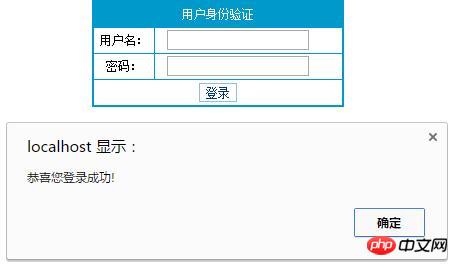
</html>二、运行结果
以上就是本文的全部内容,希望对大家的学习有所帮助,也希望大家多多支持本站。
以上就是php面向对象的用户登录身份验证的详细内容,更多请关注php中文网其它相关文章!

PHP怎么学习?PHP怎么入门?PHP在哪学?PHP怎么学才快?不用担心,这里为大家提供了PHP速学教程(入门到精通),有需要的小伙伴保存下载就能学习啦!

Copyright 2014-2025 https://www.php.cn/ All Rights Reserved | php.cn | 湘ICP备2023035733号


 697
697




 收藏
收藏






 取消收藏
取消收藏






