



这篇文章主要介绍了struts1教程之actionmapping,小编觉得挺不错的,现在分享给大家,也给大家做个参考。一起跟随小编过来看看吧
首先断点走出了processpath方法,
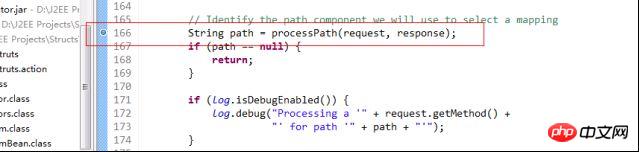
这个方法是用来截取字符串的,今天我们来看怎样获得ActionMapping的方法---processMapping。
在此之前简单说一下ActionMapping,它的源代码中可以看出,其中最重要的属性和我们的mvc小实例中的ActionMapping类似,都是有path、type还有forwardMap,主要是对应的struts-config配置文件而来,这个就是保存这个配置文件的信息到内存中。
具体的mvc小实例的ActionMapping代码如下:
package com.cjq.servlet;

import java.util.Map;

public class ActionMapping {

  private String path;

  private Object type;

  private Map forwardMap;

  public String getPath() {
    return path;
  }

  public void setPath(String path) {
    this.path = path;
  }

  public Object getType() {
    return type;
  }

  public void setType(Object type) {
    this.type = type;
  }

  public Map getForwardMap() {
    return forwardMap;
  }

  public void setForwardMap(Map forwardMap) {
    this.forwardMap = forwardMap;
  }

}
而Struts中的Actionconfig(因为ActionMapping是继承这个ActionConfig的,所以我们来看ActionConfig更加直接)的代码如下:
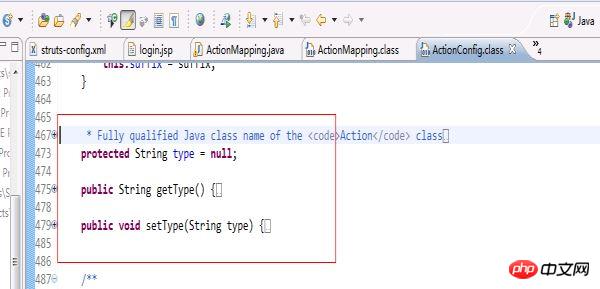
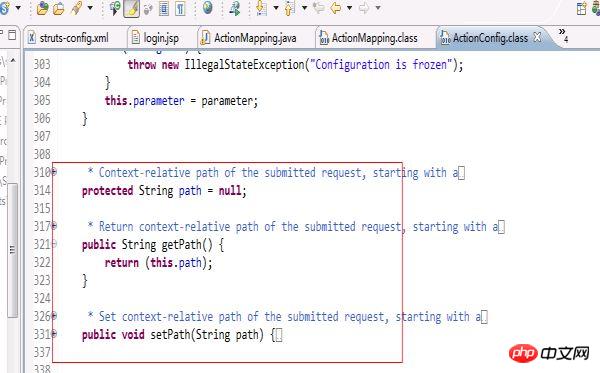

从这两部分代码来看,更加印证了我在开篇写的mvc小实例是一个struts框架的雏形。
讲完ActionMapping的一些内容后,相信对ActionMapping有所了解,那么系统是如何生成ActionMapping和如何找到ActionMapping的呢?这就是今天要说的整体:
我们看下web.xml中有一个
进入断点调试,首先在processMapping方法上设置断点。

进入源代码中:
/** *Select the mapping used to process theselection path for this request * If no mapping can be identified, createan error response and return *
* * @param request The servlet request weare processing * @param response The servlet response weare creating * @param path The portion of the requestURI for selecting a mapping * * @exception IOException if an input/outputerror occurs */ protectedActionMapping processMapping(HttpServletRequestrequest, HttpServletResponse response, String path) throws IOException { // Is there a mapping for this path? ActionMapping mapping = (ActionMapping) moduleConfig.findActionConfig(path); // If a mapping is found, put it in the request and return it if (mapping != null) { request.setAttribute(Globals.MAPPING_KEY, mapping); return (mapping); } // Locate the mapping for unknown paths (if any) ActionConfig configs[] = moduleConfig.findActionConfigs(); for (int i = 0; i < configs.length; i++) { if (configs[i].getUnknown()) { mapping = (ActionMapping)configs[i]; request.setAttribute(Globals.MAPPING_KEY, mapping); return (mapping); } } // No mapping can be found to process this request String msg = getInternal().getMessage("processInvalid"); log.error(msg + " " + path); response.sendError(HttpServletResponse.SC_NOT_FOUND, msg); return null; }null.
首先我们传入我们在上一步截取的路径,通过moduleConfig的findAction方法来查找ActionConfig,并且返回ActionMapping。具体代码是:
ActionMapping mapping =(ActionMapping)
   moduleConfig.findActionConfig(path);
如果找到,那么就讲ActionMapping存放到request的context中。代码:
if (mapping != null) {
      request.setAttribute(Globals.MAPPING_KEY, mapping);
      return (mapping);
    }
如果没有通过path找到mapping,则在Actionconfig中遍历为未知路径寻找mapping,如果找到则存放到request中,如果没有找到,则返回错误信息,具体代码如下:
// Locate the mapping for unknownpaths (if any)
    ActionConfig configs[] = moduleConfigfindActionConfigs();
    for (int i = 0; i < configslength; i++) {
      if (configs[i].getUnknown()) {
        mapping = (ActionMapping)configs[i];
        request.setAttribute(Globals.MAPPING_KEY, mapping);
        return (mapping);
      }
    }

    // No mapping can be found to process this request
    String msg = getInternal().getMessage("processInvalid");
    log.error(msg + " " + path);
    response.sendError(HttpServletResponse.SC_NOT_FOUND, msg);

    return null;
来看下ActionServlet中的一个方法processActionForm,当我们在截取字符串,再根据字符串取得ActionMapping(这是前两篇文章中介绍的)之后,我们就要用利用ActionMapping来创建ActionForm了,并且把ActionForm放到request或session中管理。

先来看具体struts中processActionForm方法的具体实现:
/** *Retrieve and return the
* * @param request The servlet request weare processing * @param response The servlet response weare creating * @param mapping The mapping we are using */ protectedActionForm processActionForm(HttpServletRequestrequest, HttpServletResponse response, ActionMapping mapping) { // Create (if necessary) a form bean to use ActionForm instance = RequestUtilscreateActionForm (request, mapping, moduleConfig, servlet); if (instance == null) { return (null); } // Store the new instance in the appropriate scope if (log.isDebugEnabled()) { log.debug(" Storing ActionForm bean instance in scope '" + mapping.getScope() + "' under attribute key '" + mapping.getAttribute() + "'"); } if ("request".equals(mapping.getScope())) { request.setAttribute(mapping.getAttribute(), instance); } else { HttpSession session =requestgetSession(); session.setAttribute(mapping.getAttribute(), instance); } return (instance); }ActionFormassociatedwith * this mapping, creating and retaining oneif necessary. If there is no *ActionFormassociated with this mapping,return *null.
这个方法的大体流程是:根据ActionMapping中的name名称查找ActionForm,如果配置了ActionForm,那么就到request或session中查找,如果在request或session中存在已经创建的ActionForm,那么将返回。如果不存在那么会根据ActionForm的完成路径采用反射进行创建,再将创建好的ActionForm放到request或session中,之后返回ActionForm。
具体我们可以跟随断点调试来看看这个方法是如何运行的。
先设置断点,之后进入processActionForm方法。
第一个步骤就是创建ActionForm:
// Create (if necessary) a formbean to use

    ActionForm instance = RequestUtils.createActionForm

      (request, mapping, moduleConfig, servlet);

    if (instance == null) {

      return (null);

    }
通过调用RequestUtils.createActionForm的方法把ActionMapping中的ActionForm字符串生成对象,并且返回。进入这段代码中:
publicstaticActionForm createActionForm(

      HttpServletRequest request,

      ActionMapping mapping,

      ModuleConfig moduleConfig,

      ActionServlet servlet) {


    // Is there a form bean associated with this mapping?

    String attribute = mappinggetAttribute();

    if (attribute == null) {

      return (null);

    }


    // Look up the form bean configuration information to use

    String name = mapping.getName();

    FormBeanConfig config =moduleConfigfindFormBeanConfig(name);

    if (config == null) {

      log.warn("No FormBeanConfig found under '"+ name + "'");

      return (null);

    }


    ActionForm instance = lookupActionForm(request,attribute, mappinggetScope());


    // Can we recycle the existing form bean instance (if there is one)?

    try {

      if (instance != null && canReuseActionForm(instance,config)) {

        return (instance);

      }

    } catch(ClassNotFoundException e) {

      log.error(servlet.getInternal().getMessage("formBean",config.getType()), e);

      return (null);

    }


    return createActionForm(config,servlet);

}
方法首先定义变量name,并且从mapping中获取值,String name = mapping.getName();也就是我们实例中的LoginForm字符串。之后通过调用FormBeanConfig config =moduleConfig.findFormBeanConfig(name);这句话把相应的LoginForm字符串生成相应的对象。
这里要说明的是我们在struts-config配置文件中,配置过这样一个标签信息:
这个标签在服务器一启动的时候就会利用digester读取这里的配置信息,并且放在FormBeanConfig类中,这样我们可以通过上面那一句话就可以把LoginForm字符串生成相应的对象。
之后调用了ActionForm instance = lookupActionForm(request,attribute, mapping.getScope());这个方法,这个方法主要是查找scope属性中有没有存在ActionForm。具体实现:
if ("request".equals(scope)){

      instance = (ActionForm)request.getAttribute(attribute);

    } else {

      session = request.getSession();

      instance = (ActionForm)session.getAttribute(attribute);

    }
这里判断scope属性值是否为request,如果是则从request中读出ActionForm,如果不是则从session中读出。程序如果是第一次执行,那么ActionForm会是为空的。因为这里的ActionForm为空,所以就进入了if判断语句中,最后通过调用return createActionForm(config, servlet);创建ActionForm并且返回。
之后processActionForm就会把返回来的ActionForm放入request或者session中。具体实现就是:
if ("request".equals(mapping.getScope())){

      request.setAttribute(mapping.getAttribute(), instance);

    } else {

      HttpSession session =request.getSession();

      session.setAttribute(mapping.getAttribute(), instance);

    }
到此为止,ActionForm就创建完成,当ActionForm创建完成之后,就要用其他的方法来往ActionForm中赋值了




