
本文实例讲述了通过 jQuery EasyUI框架创建一个RSS阅读器,分享给大家供大家参考。具体如下:
运行效果截图如下:
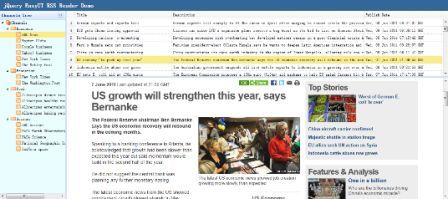
我们将使用以下插件:
layout:创建应用的用户界面。
datagrid:显示 RSS Feed 列表。
tree:显示 feed 频道。
步骤 1:创建布局(Layout)
<body class="easyui-layout">
 <div region="north" border="false" class="rtitle">
 jQuery EasyUI RSS Reader Demo
 </div>
 <div region="west" title="Channels Tree" split="true" border="false" style="width:200px;background:#EAFDFF;">
 <ul id="t-channels" url="data/channels.json"></ul>
 </div>
 <div region="center" border="false">
 <div class="easyui-layout" fit="true">
  <div region="north" split="true" border="false" style="height:200px">
  <table id="dg"
   url="get_feed.php" border="false" rownumbers="true"
   fit="true" fitColumns="true" singleSelect="true">
   <thead>
   <tr>
    <th field="title" width="100">Title</th>
    <th field="description" width="200">Description</th>
    <th field="pubdate" width="80">Publish Date</th>
   </tr>
   </thead>
  </table>
  </div>
  <div region="center" border="false" style="overflow:hidden">
  <iframe id="cc" scrolling="auto" frameborder="0" style="width:100%;height:100%"></iframe>
  </div>
 </div>
 </div>
</body>步骤 2:数据网格(datagrid)处理事件
在这里我们要处理一些由用户触发的事件。
$('#dg').datagrid({
 onSelect: function(index,row){
 $('#cc').attr('src', row.link);
 },
 onLoadSuccess:function(){
 var rows = $(this).datagrid('getRows');
 if (rows.length){
  $(this).datagrid('selectRow',0);
 }
 }
});
本实例使用 'onSelect' 事件来显示 feed 的内容,使用 'onLoadSuccess' 事件来选择第一行。
步骤 3:树形菜单(Tree)处理事件
当树形菜单(Tree)数据已经加载,我们需要选择第一个叶子节点,调用 'select' 方法来选择该节点。 使用 'onSelect' 事件来得到已选择的节点,这样我们就能得到对应的 'url' 值。 最后我们调用数据网格(DataGrid) 的 'load' 方法来刷新 feed 列表数据。
$('#t-channels').tree({
 onSelect: function(node){
 var url = node.attributes.url;
 $('#dg').datagrid('load',{
  url: url
 });
 },
 onLoadSuccess:function(node,data){
 if (data.length){
  var id = data[0].children[0].children[0].id;
  var n = $(this).tree('find', id);
  $(this).tree('select', n.target);
 }
 }
});以上就是关于EasyUI创建RSS Feed阅读器的相关教程,希望对大家的学习有所帮助。

每个人都需要一台速度更快、更稳定的 PC。随着时间的推移,垃圾文件、旧注册表数据和不必要的后台进程会占用资源并降低性能。幸运的是,许多工具可以让 Windows 保持平稳运行。

 C++高性能并发应用_C++如何开发性能关键应用
 Java AI集成Deep Java Library_Java怎么集成AI模型部署
 Golang后端API开发_Golang如何高效开发后端和API
 Python异步并发改进_Python异步编程有哪些新改进
 C++系统编程内存管理_C++系统编程怎么与Rust竞争内存安全
 Java GraalVM原生镜像构建_Java怎么用GraalVM构建高效原生镜像
 Python FastAPI异步API开发_Python怎么用FastAPI构建异步API
 C++现代C++20/23/26特性_现代C++有哪些新标准特性如modules和coroutines
Copyright 2014-2025 https://www.php.cn/ All Rights Reserved | php.cn | 湘ICP备2023035733号


 857
857

 收藏
收藏















