



这次给大家带来重复使用Vue构建的分页组件,重复使用Vue构建分页组件的注意事项有哪些,下面就是实战案例,一起来看一下。
基本结构
分页组件应该允许用户访问第一个和最后一个页面,向前和向后移动,并直接切换到近距离的页面。
大多数应用程序在用户每次更改页面时都会发出API请求。我们需要确保组件允许这样做,但是我们不希望在组件内发出这样的请求。这样,我们将确保组件在整个应用程序中是可重用的,并且请求都是在操作或服务层中进行的。我们可以通过使用用户单击的页面的数字触发事件来实现此目的。
有几种可能的方法来实现API端点上的分页。对于这个例子,我们假设API告诉我们每个页面的结果数、页面总数和当前页面。这些将是我们的动态 props 。
相反,如果API只告诉记录的总数,那么我们可以通过将结果的数量除以每一页的结果数来计算页数: totalResults / resultsPerPage 。
我们想要渲染一个按钮到 第一页 、 上一页 、 页面数量范围 、 下一页 和 最后一页 :
[first] [next] [1] [2] [3] [previous] [last]
比如像下图这样的一个效果:

尽管我们希望渲染一个系列的页面,但并不希望渲染所有可用页面。让我们允许在我们的组件中设置一个最多可见按钮的 props 。
既然我们知道了我们想要的组件要做成什么,需要哪些数据,我们就可以设置HTML结构和所需要的 props 。
Vue.component('pagination', { template: '#pagination', props: { maxVisibleButtons: { type: Number, required: false, default: 3 }, totalPages: { type: Number, required: true }, total: { type: Number, required: true }, currentPage: { type: Number, required: true } } })
上面的代码注册了一个 pagination 组件,如果调用这个组件:
这个时候看到的效果如下:

注意,为了能让组件看上去好看一点,给组件添加了一点样式。
事件监听
现在我们需要通知父组件,当用户单击按钮时,用户点击了哪个按钮。
我们需要为每个按钮添加一个事件监听器。 v-on 指令 允许侦听DOM事件。在本例中,我将使用 v-on 的快捷键 来侦听单击事件。
为了通知父节点,我们将使用 $emit 方法 来发出一个带有页面点击的事件。
我们还要确保分页按钮只有在页面可用时才唯一一个当前状态。为了这样做,将使用 v-bind 将 disabled 属性的值与当前页面绑定。我们还是使用 :v-bind 的快捷键 : 。
为了保持我们的 template 干净,将使用 computed 属性 来检查按钮是否被禁用。使用 computed 也会被缓存,这意味着只要 currentPage 不会更改,对相同计算属性的几个访问将返回先前计算的结果,而不必再次运行该函数。
Vue.component('pagination', { template: '#pagination', props: { maxVisibleButtons: { type: Number, required: false, default: 3 }, totalPages: { type: Number, required: true }, total: { type: Number, required: true }, currentPage: { type: Number, required: true } }, computed: { isInFirstPage: function () { return this.currentPage === 1 }, isInLastPage: function () { return this.currentPage === this.totalPages } }, methods: { onClickFirstPage: function () { this.$emit('pagechanged', 1) }, onClickPreviousPage: function () { this.$emit('pagechanged', this.currentPage - 1) }, onClickPage: function (page) { this.$emit('pagechanged', page) }, onClickNextPage: function () { this.$emit('pagechanged', this.currentPage + 1) }, onClickLastPage: function () { this.$emit('pagechanged', this.totalPages) } } })
在调用 pagination 组件时,将 totalPages 和 total 以及 currentPage 传到组件中:
let app = new Vue({
  el: '#app',
  data () {
    return {
      currentPage: 2
    }
  }
})
运行上面的代码,将会报错:
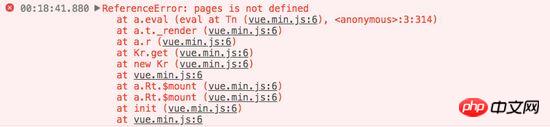
不难发现,在 pagination 组件中,咱们还少了 pages 。从前面介绍的内容,我们不难发现,需要计算出 pages 的值。
Vue.component('pagination', {
  template: '#pagination',
  props: {
    maxVisibleButtons: {
      type: Number,
      required: false,
      default: 3
    },
    totalPages: {
      type: Number,
      required: true
    },
    total: {
      type: Number,
      required: true
    },
    currentPage: {
      type: Number,
      required: true
    }
  },
  computed: {
    isInFirstPage: function () {
      return this.currentPage === 1
    },
    isInLastPage: function () {
      return this.currentPage === this.totalPages
    },
    startPage: function () {
      if (this.currentPage === 1) {
        return 1
      }
      if (this.currentPage === this.totalPages) {
        return this.totalPages - this.maxVisibleButtons + 1
      }
      return this.currentPage - 1
    },
    endPage: function () {
      return Math.min(this.startPage + this.maxVisibleButtons - 1, this.totalPages)
    },
    pages: function () {
      const range = []
      for (let i = this.startPage; i <= this.endPage; i+=1) {
        range.push({
          name: i,
          isDisabled: i === this.currentPage
        })
      }
      return range
    }
  },
  methods: {
    onClickFirstPage: function () {
      this.$emit('pagechanged', 1)
    },
    onClickPreviousPage: function () {
      this.$emit('pagechanged', this.currentPage - 1)
    },
    onClickPage: function (page) {
      this.$emit('pagechanged', page)
    },
    onClickNextPage: function () {
      this.$emit('pagechanged', this.currentPage + 1)
    },
    onClickLastPage: function () {
      this.$emit('pagechanged', this.totalPages)
    }
  }
})
这个时候得到的结果不再报错,你在浏览器中将看到下图这样的效果:

添加样式
现在我们的组件实现了最初想要的所有功能,而且添加了一些样式,让它看起来更像一个分页组件,而不仅像是一个列表。
我们还希望用户能够清楚地识别他们所在的页面。让我们改变表示当前页面的按钮的颜色。
为此,我们可以使用对象语法将HTML类绑定到当前页面按钮上。当使用对象语法绑定类名时,Vue将在值发生变化时自动切换类。
虽然 v-for 中的每个块都可以访问父作用域范围,但是我们将使用 method 来检查页面是否处于 active 状态,以便保持我们的 templage 干净。
Vue.component('pagination', {
  template: '#pagination',
  props: {
    maxVisibleButtons: {
      type: Number,
      required: false,
      default: 3
    },
    totalPages: {
      type: Number,
      required: true
    },
    total: {
      type: Number,
      required: true
    },
    currentPage: {
      type: Number,
      required: true
    }
  },
  computed: {
    isInFirstPage: function () {
      return this.currentPage === 1
    },
    isInLastPage: function () {
      return this.currentPage === this.totalPages
    },
    startPage: function () {
      if (this.currentPage === 1) {
        return 1
      }
      if (this.currentPage === this.totalPages) {
        return this.totalPages - this.maxVisibleButtons + 1
      }
      return this.currentPage - 1
    },
    endPage: function () {
      return Math.min(this.startPage + this.maxVisibleButtons - 1, this.totalPages)
    },
    pages: function () {
      const range = []
      for (let i = this.startPage; i <= this.endPage; i+=1) {
        range.push({
          name: i,
          isDisabled: i === this.currentPage
        })
      }
      return range
    }
  },
  methods: {
    onClickFirstPage: function () {
      this.$emit('pagechanged', 1)
    },
    onClickPreviousPage: function () {
      this.$emit('pagechanged', this.currentPage - 1)
    },
    onClickPage: function (page) {
      this.$emit('pagechanged', page)
    },
    onClickNextPage: function () {
      this.$emit('pagechanged', this.currentPage + 1)
    },
    onClickLastPage: function () {
      this.$emit('pagechanged', this.totalPages)
    },
    isPageActive: function (page) {
      return this.currentPage === page;
    }
  }
})
接下来,在 pages 中添加当前状态:
这个时候你看到效果如下:

但依然还存在一点点小问题,当你在点击别的按钮时, active 状态并不会随着切换:

继续添加代码改变其中的效果:
let app = new Vue({
  el: '#app',
  data () {
    return {
      currentPage: 2
    }
  },
  methods: {
    onPageChange: function (page) {
      console.log(page)
      this.currentPage = page;
    }
  }
})
在调用组件时:
这个时候的效果如下了:

到这里,基本上实现了咱想要的分页组件效果。
无障碍化处理
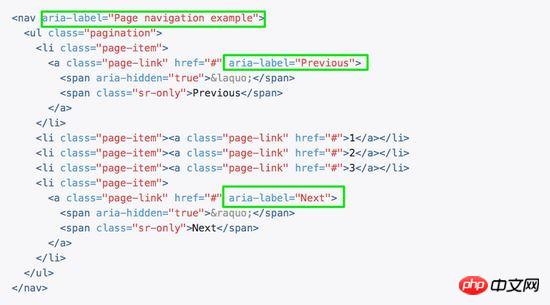
熟悉Bootstrap的同学都应该知道,Bootstrap中的组件都做了无障碍化的处理,就是在组件中添加了WAI-ARIA相关的设计。比如在分页按钮上添加 aria-label 相关属性:
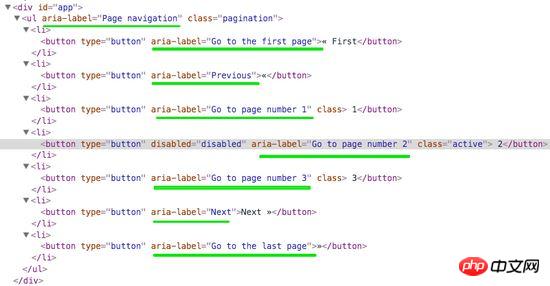
在我们这个组件中,也相应的添加有关于WAI-ARIA相关的处理:
这样有关于 aria 相关的属性就加上了:
相信看了本文案例你已经掌握了方法,更多精彩请关注php中文网其它相关文章!
推荐阅读:

mallcloud商城基于SpringBoot2.x、SpringCloud和SpringCloudAlibaba并采用前后端分离vue的企业级微服务敏捷开发系统架构。并引入组件化的思想实现高内聚低耦合,项目代码简洁注释丰富上手容易,适合学习和企业中使用。真正实现了基于RBAC、jwt和oauth2的无状态统一权限认证的解决方案,面向互联网设计同时适合B端和C端用户,支持CI/CD多环境部署,并提




