
在本文中,我们将向您展示如何创建一个启用用户拖动和放置用户想买的商品的购物车页面,购物篮中的物品和价格将更新,分享给大家,具体内容如下:
效果图:
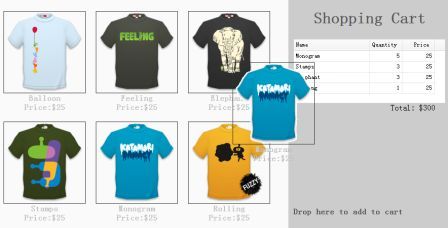
具体代码如下
显示页面上的商品:
<ul class="products">
 <li>
 <a href="#" class="item">
  @@##@@
  <div>
  <p>Balloon</p>
  <p>Price:</p>
                    <div class="aritcle_card">
                        <a class="aritcle_card_img" href="/ai/1393">
                            <img src="https://img.php.cn/upload/ai_manual/000/000/000/175680114391886.jpg" alt="造物云营销设计">
                        </a>
                        <div class="aritcle_card_info">
                            <a href="/ai/1393">造物云营销设计</a>
                            <p>造物云是一个在线3D营销设计平台,0基础也能做电商设计</p>
                            <div class="">
                                <img src="/static/images/card_xiazai.png" alt="造物云营销设计">
                                <span>97</span>
                            </div>
                        </div>
                        <a href="/ai/1393" class="aritcle_card_btn">
                            <span>查看详情</span>
                            <img src="/static/images/cardxiayige-3.png" alt="造物云营销设计">
                        </a>
                    </div>

  </div>
 </a>
 </li>
 <li>
 <a href="#" class="item">
  @@##@@
  <div>
  <p>Feeling</p>
  <p>Price:$25</p>
  </div>
 </a>
 </li>
 <!-- other products -->
</ul>正如您所看到的上面的代码,我们添加一个包含一些
元素中。
创建购物车:
<div class="cart">
 <h1>Shopping Cart</h1>
 <table id="cartcontent" style="width:300px;height:auto;">
 <thead>
  <tr>
  <th field="name" width=140>Name</th>
  <th field="quantity" width=60 align="right">Quantity</th>
  <th field="price" width=60 align="right">Price</th>
  </tr>
 </thead>
 </table>
 <p class="total">Total: $0</p>
 <h2>Drop here to add to cart</h2>
</div>
我们使用数据网格(datagrid)来显示购物篮中的物品。
拖动克隆的商品:
$('.item').draggable({
 revert:true,
 proxy:'clone',
 onStartDrag:function(){
 $(this).draggable('options').cursor = 'not-allowed';
 $(this).draggable('proxy').css('z-index',10);
 },
 onStopDrag:function(){
 $(this).draggable('options').cursor='move';
 }
});
请注意,我们把 draggable 属性的值从 'proxy' 设置为 'clone',所以拖动元素将由克隆产生。
放置选择商品到购物车中
$('.cart').droppable({
 onDragEnter:function(e,source){
 $(source).draggable('options').cursor='auto';
 },
 onDragLeave:function(e,source){
 $(source).draggable('options').cursor='not-allowed';
 },
 onDrop:function(e,source){
 var name = $(source).find('p:eq(0)').html();
 var price = $(source).find('p:eq(1)').html();
 addProduct(name, parseFloat(price.split('$')[1]));
 }
});
var data = {"total":0,"rows":[]};
var totalCost = 0;
function addProduct(name,price){
 function add(){
 for(var i=0; i<data.total; i++){
  var row = data.rows[i];
  if (row.name == name){
  row.quantity += 1;
  return;
  }
 }
 data.total += 1;
 data.rows.push({
  name:name,
  quantity:1,
  price:price
 });
 }
 add();
 totalCost += price;
 $('#cartcontent').datagrid('loadData', data);
 $('div.cart .total').html('Total: $'+totalCost);
}
每当放置商品的时候,我们首先得到商品名称和价格,然后调用 'addProduct' 函数来更新购物篮。
EasyUI实现拖放商品放置购物车的功能就介绍到这,有了本文为大家提供的实例,相信大家应该很轻松的就可以实现拖放商品放置购物车的模块设计,谢谢大家的阅读。



每个人都需要一台速度更快、更稳定的 PC。随着时间的推移,垃圾文件、旧注册表数据和不必要的后台进程会占用资源并降低性能。幸运的是,许多工具可以让 Windows 保持平稳运行。

 C++高性能并发应用_C++如何开发性能关键应用
 Java AI集成Deep Java Library_Java怎么集成AI模型部署
 Golang后端API开发_Golang如何高效开发后端和API
 Python异步并发改进_Python异步编程有哪些新改进
 C++系统编程内存管理_C++系统编程怎么与Rust竞争内存安全
 Java GraalVM原生镜像构建_Java怎么用GraalVM构建高效原生镜像
 Python FastAPI异步API开发_Python怎么用FastAPI构建异步API
 C++现代C++20/23/26特性_现代C++有哪些新标准特性如modules和coroutines
Copyright 2014-2025 https://www.php.cn/ All Rights Reserved | php.cn | 湘ICP备2023035733号


 290
290

 收藏
收藏















