



这篇文章主要为大家详细介绍了php缩略图生成和图片水印制作过程,php实现水印添加与缩略图生成的相关步骤,具有一定的参考价值,感兴趣的小伙伴们可以参考一下
1.开始
在网站上传图片过程,经常用到缩略图功能。这里我自己写了一个图片处理的Image类,能生成缩略图,并且可以添加水印图。
2.如何生成缩略图
生成缩略图,关键的是如何计算缩放比率。
立即学习“PHP免费学习笔记(深入)”;
这里,我根据图片等比缩放,宽高的几种常见变化,得出一个算缩放比率算法是,使用新图(即缩略图)的宽高,分别除以原图的宽高,看哪个值大,就取它作为缩放比率:
缩放比率 = Max( { 新图高度 / 原图高度 , 新图宽度 / 原图宽度 } )
也就是:
If ( (新图高度 / 原图高度) > (新图宽度 / 原图宽度 ) ) {
缩放比率 = 新图高度 / 原图高度;
}ELSE {
缩放比率 = 新图宽度 / 原图宽度;
}
这里列出场景的图片缩放场景,及处理方法:
e.g
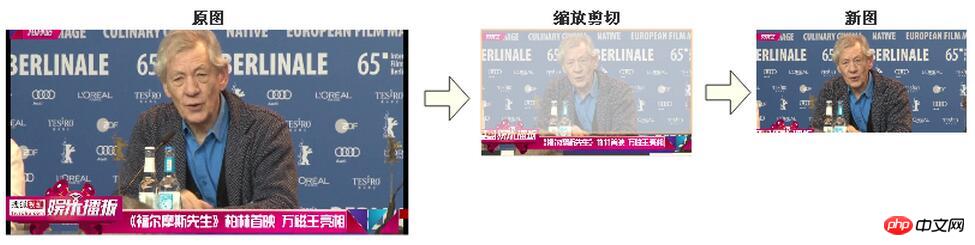
场景1,原图比新图大的情况, 缩放比率 = 新图宽度 / 原图宽度 :
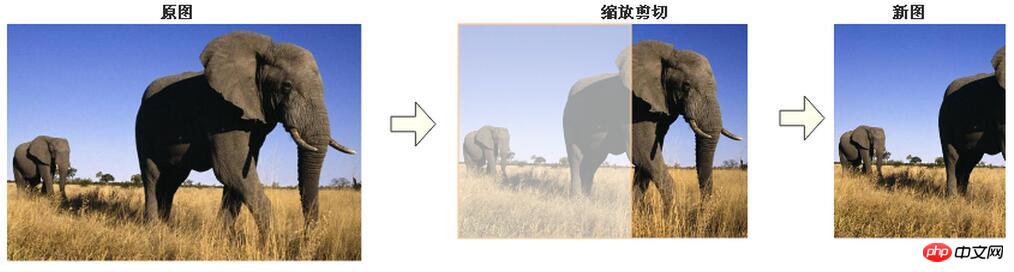
场景2,原图比新图大的情况,b. 缩放比率 = 新图高度 / 原图高度 :
场景3,原图比新图大的情况,而且新图宽高相等,即新图形状是正方形,那么上面的缩放算法也是适用的。
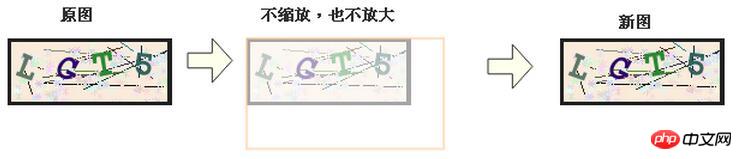
场景4,如果 “新图宽度 >= 原图宽度” ,同时 “新图高度 >= 原图高度”,那么不缩放图片,也不放大图片,保持原图。
场景5,如果 “新图宽度 = 原图高度” ,那么先设置 “新图高度= 原图高度”,再剪切。
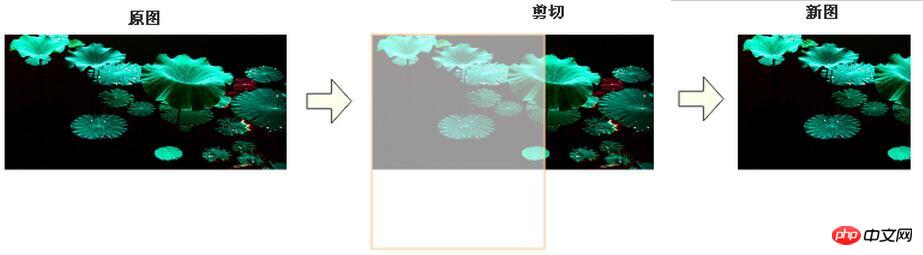
场景6,如果 “新图高度 = 原图宽度” ,那么先设置 “新图宽度= 原图宽度”,再剪切。
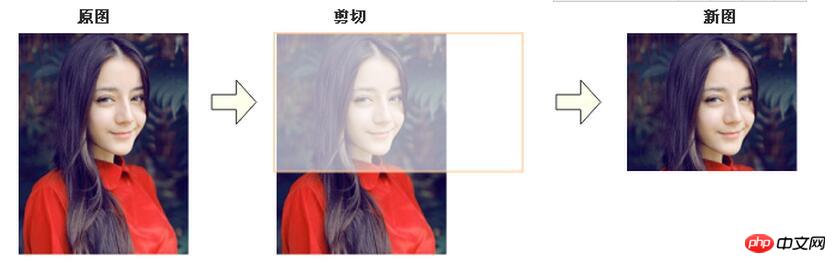
3.如何添加水印图片
添加水印很容易,我这里没考虑那么复杂,主要是控制水印位置在图片的右下角,和控制水印在图片中的大小。如,当目标图片与水印图大小接近,那么需要先等比缩放水印图片,再添加水印图片。
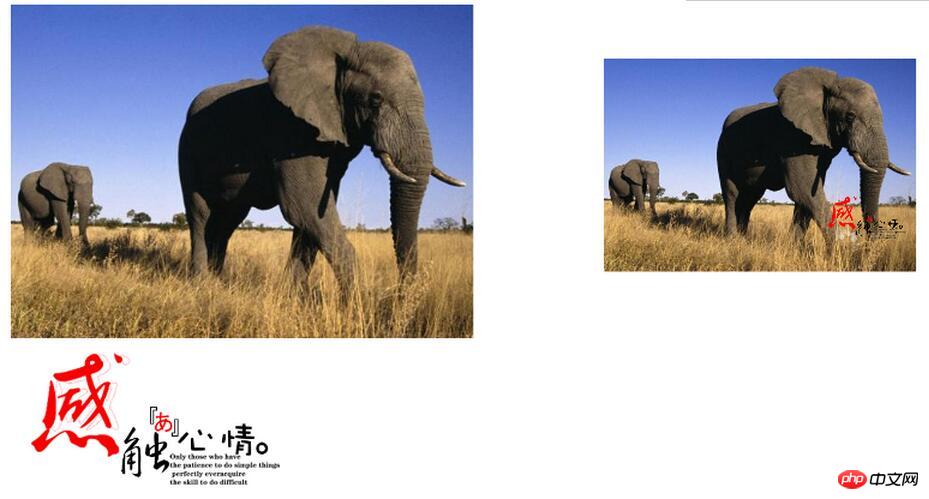
左边两幅图,上面是原图,下面是水印图,右边的缩放后加水印的新图。
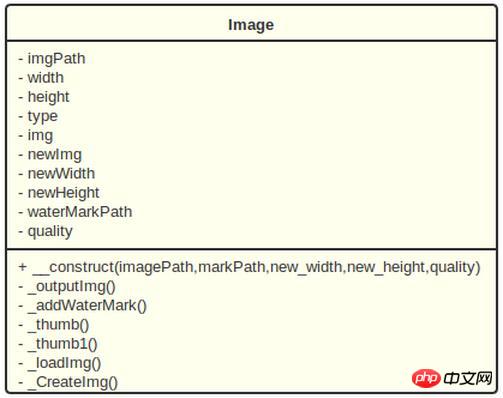
4.类图
5.PHP代码
5.1. 构造函数 __construct()

奥硕企业网站管理系统具有一下特色功能1、双语双模(中英文采用单独模板设计,可制作中英文不同样式的网站)2、在线编辑JS动态菜单支持下拉效果,同时生成中文,英文,静态3个JS菜单3、在线制作并调用FLASH展示动画4、自动生成缩略图,可以自由设置宽高5、图片批量加水印,可以自由设置字体,大小,样式,水印位置(同时支持文字或图片类型水印)6、强大的标签式数据调用,可以调用(新闻,产品,下载,招聘)支持
在Image类中,除了构造函数__construct()是public,其它函数都为private.也就是在函数__construct()中,直接完成了生成缩略图和添加水印图的功能。如果,只生成缩略图而不需要添加水印,那么直接在__construct()的参数$markPath,设置为null即可。
其中,“$this->quality = $quality ? $quality : 75;” 控制输出为JPG图片时,控制图片质量(0-100),默认值为75;
  /**
   * Image constructor.
   * @param string $imagePath 图片路径
   * @param string $markPath 水印图片路径
   * @param int $new_width 缩略图宽度
   * @param int $new_height 缩略图高度
   * @param int $quality JPG图片格输出质量
   */
  public function __construct(string $imagePath,
                string $markPath = null,
                int $new_width = null,
                int $new_height = null,
                int $quality = 75)
  {
    $this->imgPath = $_SERVER['DOCUMENT_ROOT'] . $imagePath;
    $this->waterMarkPath = $markPath;
    $this->newWidth = $new_width ? $new_width : $this->width;
    $this->newHeight = $new_height ? $new_height : $this->height;
    $this->quality = $quality ? $quality : 75;

    list($this->width, $this->height, $this->type) = getimagesize($this->imgPath);
    $this->img = $this->_loadImg($this->imgPath, $this->type);


    //生成缩略图
    $this->_thumb();
    //添加水印图片
    if (!empty($this->waterMarkPath)) $this->_addWaterMark();
    //输出图片
    $this->_outputImg();
  }
Note: 先生成缩略图,再在新图上添加水印 图片。
5.2. 生成缩略图函数_thumb()
   /**
   * 缩略图(按等比例,根据设置的宽度和高度进行裁剪)
   */
  private function _thumb()
  {

    //如果原图本身小于缩略图,按原图长高
    if ($this->newWidth > $this->width) $this->newWidth = $this->width;
    if ($this->newHeight > $this->height) $this->newHeight = $this->height;

    //背景图长高
    $gd_width = $this->newWidth;
    $gd_height = $this->newHeight;

    //如果缩略图宽高,其中有一边等于原图的宽高,就直接裁剪
    if ($gd_width == $this->width || $gd_height == $this->height) {
      $this->newWidth = $this->width;
      $this->newHeight = $this->height;
    } else {

      //计算缩放比率
      $per = 1;

      if (($this->newHeight / $this->height) > ($this->newWidth / $this->width)) {
        $per = $this->newHeight / $this->height;
      } else {
        $per = $this->newWidth / $this->width;
      }

      if ($per < 1) {
        $this->newWidth = $this->width * $per;
        $this->newHeight = $this->height * $per;
      }
    }

    $this->newImg = $this->_CreateImg($gd_width, $gd_height, $this->type);
    imagecopyresampled($this->newImg, $this->img, 0, 0, 0, 0, $this->newWidth, $this->newHeight, $this->width, $this->height);
  }
生成缩略图函数_thumb() ,是按照前面的分析来进行编码。
5.3. 添加水印图片函数 _addWaterMark()
   /**
   * 添加水印
   */
  private function _addWaterMark()
  {
    $ratio = 1 / 5; //水印缩放比率

    $Width = imagesx($this->newImg);
    $Height = imagesy($this->newImg);

    $n_width = $Width * $ratio;
    $n_height = $Width * $ratio;

    list($markWidth, $markHeight, $markType) = getimagesize($this->waterMarkPath);

    if ($n_width > $markWidth) $n_width = $markWidth;
    if ($n_height > $markHeight) $n_height = $markHeight;

    $Img = $this->_loadImg($this->waterMarkPath, $markType);
    $Img = $this->_thumb1($Img, $markWidth, $markHeight, $markType, $n_width, $n_height);
    $markWidth = imagesx($Img);
    $markHeight = imagesy($Img);
    imagecopyresampled($this->newImg, $Img, $Width - $markWidth - 10, $Height - $markHeight - 10, 0, 0, $markWidth, $markHeight, $markWidth, $markHeight);
    imagedestroy($Img);
  }
在添加水印图片中,用到一个_thumb1()函数来缩放水印图片:
  /**
   * 缩略图(按等比例)
   * @param resource $img 图像流
   * @param int $width
   * @param int $height
   * @param int $type
   * @param int $new_width
   * @param int $new_height
   * @return resource
   */
  private function _thumb1($img, $width, $height, $type, $new_width, $new_height)
  {

    if ($width < $height) {
      $new_width = ($new_height / $height) * $width;
    } else {
      $new_height = ($new_width / $width) * $height;
    }

    $newImg = $this->_CreateImg($new_width, $new_height, $type);
    imagecopyresampled($newImg, $img, 0, 0, 0, 0, $new_width, $new_height, $width, $height);
    return $newImg;
  }
5.4. 完整代码:
imgPath = $_SERVER['DOCUMENT_ROOT'] . $imagePath;
  $this->waterMarkPath = $markPath;
  $this->newWidth = $new_width ? $new_width : $this->width;
  $this->newHeight = $new_height ? $new_height : $this->height;
  $this->quality = $quality ? $quality : 75;

  list($this->width, $this->height, $this->type) = getimagesize($this->imgPath);
  $this->img = $this->_loadImg($this->imgPath, $this->type);


  //生成缩略图
  $this->_thumb();
  //添加水印图片
  if (!empty($this->waterMarkPath)) $this->_addWaterMark();
  //输出图片
  $this->_outputImg();
 }

 /**
  *图片输出
  */
 private function _outputImg()
 {
  switch ($this->type) {
   case 1: // GIF
    imagegif($this->newImg, $this->imgPath);
    break;
   case 2: // JPG
    if (intval($this->quality) < 0 || intval($this->quality) > 100) $this->quality = 75;
    imagejpeg($this->newImg, $this->imgPath, $this->quality);
    break;
   case 3: // PNG
    imagepng($this->newImg, $this->imgPath);
    break;
  }
  imagedestroy($this->newImg);
  imagedestroy($this->img);
 }

 /**
  * 添加水印
  */
 private function _addWaterMark()
 {
  $ratio = 1 / 5; //水印缩放比率

  $Width = imagesx($this->newImg);
  $Height = imagesy($this->newImg);

  $n_width = $Width * $ratio;
  $n_height = $Width * $ratio;

  list($markWidth, $markHeight, $markType) = getimagesize($this->waterMarkPath);

  if ($n_width > $markWidth) $n_width = $markWidth;
  if ($n_height > $markHeight) $n_height = $markHeight;

  $Img = $this->_loadImg($this->waterMarkPath, $markType);
  $Img = $this->_thumb1($Img, $markWidth, $markHeight, $markType, $n_width, $n_height);
  $markWidth = imagesx($Img);
  $markHeight = imagesy($Img);
  imagecopyresampled($this->newImg, $Img, $Width - $markWidth - 10, $Height - $markHeight - 10, 0, 0, $markWidth, $markHeight, $markWidth, $markHeight);
  imagedestroy($Img);
 }

 /**
  * 缩略图(按等比例,根据设置的宽度和高度进行裁剪)
  */
 private function _thumb()
 {

  //如果原图本身小于缩略图,按原图长高
  if ($this->newWidth > $this->width) $this->newWidth = $this->width;
  if ($this->newHeight > $this->height) $this->newHeight = $this->height;

  //背景图长高
  $gd_width = $this->newWidth;
  $gd_height = $this->newHeight;

  //如果缩略图宽高,其中有一边等于原图的宽高,就直接裁剪
  if ($gd_width == $this->width || $gd_height == $this->height) {
   $this->newWidth = $this->width;
   $this->newHeight = $this->height;
  } else {

   //计算缩放比率
   $per = 1;

   if (($this->newHeight / $this->height) > ($this->newWidth / $this->width)) {
    $per = $this->newHeight / $this->height;
   } else {
    $per = $this->newWidth / $this->width;
   }

   if ($per < 1) {
    $this->newWidth = $this->width * $per;
    $this->newHeight = $this->height * $per;
   }
  }

  $this->newImg = $this->_CreateImg($gd_width, $gd_height, $this->type);
  imagecopyresampled($this->newImg, $this->img, 0, 0, 0, 0, $this->newWidth, $this->newHeight, $this->width, $this->height);
 }


 /**
  * 缩略图(按等比例)
  * @param resource $img 图像流
  * @param int $width
  * @param int $height
  * @param int $type
  * @param int $new_width
  * @param int $new_height
  * @return resource
  */
 private function _thumb1($img, $width, $height, $type, $new_width, $new_height)
 {

  if ($width < $height) {
   $new_width = ($new_height / $height) * $width;
  } else {
   $new_height = ($new_width / $width) * $height;
  }

  $newImg = $this->_CreateImg($new_width, $new_height, $type);
  imagecopyresampled($newImg, $img, 0, 0, 0, 0, $new_width, $new_height, $width, $height);
  return $newImg;
 }

 /**
  * 加载图片
  * @param string $imgPath
  * @param int $type
  * @return resource
  */
 private function _loadImg($imgPath, $type)
 {
  switch ($type) {
   case 1: // GIF
    $img = imagecreatefromgif($imgPath);
    break;
   case 2: // JPG
    $img = imagecreatefromjpeg($imgPath);
    break;
   case 3: // PNG
    $img = imagecreatefrompng($imgPath);
    break;
   default: //其他类型
    Tool::alertBack('不支持当前图片类型.' . $type);
    break;
  }
  return $img;
 }

 /**
  * 创建一个背景图像
  * @param int $width
  * @param int $height
  * @param int $type
  * @return resource
  */
 private function _CreateImg($width, $height, $type)
 {
  $img = imagecreatetruecolor($width, $height);
  switch ($type) {
   case 3: //png
    imagecolortransparent($img, 0); //设置背景为透明的
    imagealphablending($img, false);
    imagesavealpha($img, true);
    break;
   case 4://gif
    imagecolortransparent($img, 0);
    break;
  }

  return $img;
 }
}
6.调用
调用非常简单,在引入类后,直接new 并输入对应参数即可:
e.g.
new Image($_path, MARK, 400, 200, 100);
7.小结
这个Image 类能够生成缩略图,不出现黑边,添加水印图,能根据图片的大小缩放水印图。当然有个缺点,就是不能缩放GIF的动画,因为涉及到帧的处理,比较麻烦。
以上就是本文的全部内容,希望对大家的学习有所帮助。
相关推荐:




