



本篇文章主要介绍了用vue写一个仿简书的轮播图的示例代码,现在分享给大家,也给大家做个参考。
1.先展示最终效果:

2.解决思路
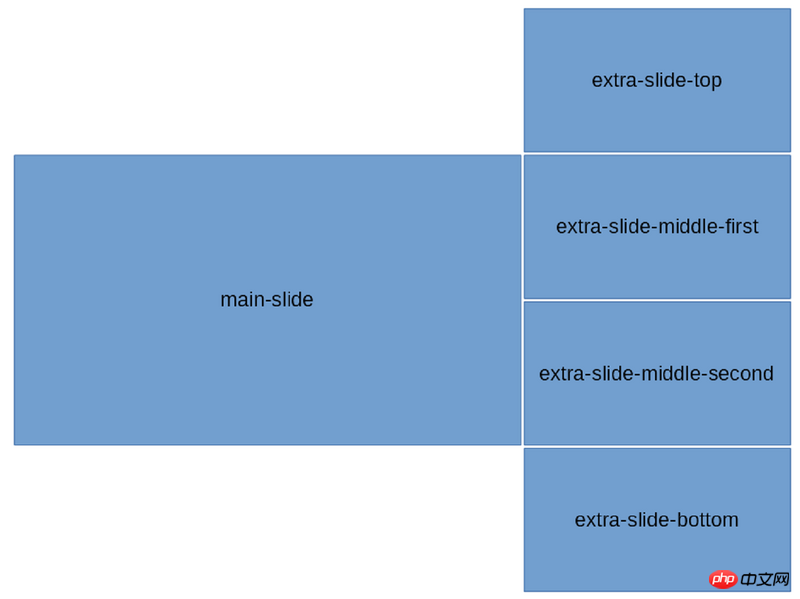
Vue的理念是以数据驱动视图,所以拒绝通过改变元素的margin-top来实现滚动效果。写好css样式,只需改变每张图片的class即可实现轮播效果。动画效果交给transition完成。可以将轮播图看成两个(mainSlide和extraSlide),各个图片的位置如图所示:
3.代码实现
立即学习“前端免费学习笔记(深入)”;
各个slide的样式:
$width: 800px;   // 容器宽度
$height: 300px;   // 容器高度
$bWidth: 500px;   // 大图片宽度
$sWidth: $width - $bWidth; // 小图片宽度
$sHeight: $height / 2; // 小图片高度
#slider-wrapper{
  width: $width;
  height: $height;
  margin: 0 auto;
  cursor: pointer;
  background: #ddd;
  border-radius: 5px;
  box-shadow: 0 1px 6px rgba(0,0,0,0.117647), 0 1px 4px rgba(0,0,0,0.117647);
  display: flex;
  overflow: hidden;
  p{
    display: inline-block;
  }
}
.main-slide{
  width: $bWidth;
  height: $height;
  float: left;
  transition: all .4s ease;
}
.extra-slide{
  width: $sWidth;
  position: relative;
  .extra-slide-item{
    position: absolute;
    width: $sWidth;
    height: $sHeight;
    left: 0;
    transition: .4s ease-out;
  }
  .extra-slide-top{
    top: -$sHeight;
  }
  .extra-slide-middle-first{
    top: 0;
    z-index: 2
  }
  .extra-slide-middle-second{
    top: $sHeight;
    z-index: 2
  }
  .extra-slide-bottom{
    top: $height
  }
  .extra-slide-hide{
    display: none!important;
  }
}
DK企业网站管理系统1.1
下载
后台路径网址+admin(请修改更安全)后台用户名密码admin产品定位:中小型企业,本系统简单实用,无冗余功能,无功能限制。后台功能:一、网站基本信息此功能允许您从后台设置网站的名称、联系人、电话、公司地址、版权、第三方统计代码等等常用信息。二、导航栏设置可以从后台调整导航栏显示项目,可以进行增加删除排序隐藏导航栏等操作三、幻灯设置可以从后台设置前台动画轮播图片,支持排序。四、单页功能用来设置公
模板包含两个轮播图:
scripts部分,设置一个nowIndex,定时改变nowIndex。所有图片的class根据这个nowIndex来变化,这里使用了es6的map类型,详情点击:http://www.jb51.net/article/111734.htm
export default {
  name: 'slider',
  data: function() {
    return {
      slideInterval: null,
      nowIndex: 0,
      slideLength: this.slideConfig.length
    }
  },
  props: {
    slideConfig: {
      type: Array
    }
  },
  methods: {
    // 限制index不能超出图片列表长度
    resetIndex(i) {
      return i > this.slideLength - 1 ? i - this.slideLength : i
    },
    slideClass(i) {
      let nowIndex = this.nowIndex
      // Map就是key也可以是非字符串的对象,不用Map多写几个 if else 也可以
      let map = new Map([
        [this.resetIndex(nowIndex), 'extra-slide-top'],
        [this.resetIndex(nowIndex + 1), 'extra-slide-middle-first'],
        [this.resetIndex(nowIndex + 2), 'extra-slide-middle-second'],
        [this.resetIndex(nowIndex + 3), 'extra-slide-bottom']
      ])
      // 图片的class根据nowIndex的变化而变化
      return map.get(i) ? map.get(i) : 'extra-slide-hide'
    },
    start() {
      // 定时改变nowIndex
      this.slideInterval = setInterval(() => {
        this.nowIndex = this.nowIndex > this.slideLength - 2 ? 0 : this.nowIndex + 1
        console.log(this.nowIndex)
      }, 2000)
    },
    stop() {
      clearInterval(this.slideInterval)
      this.slideInterval = null
    }
  },
  mounted() {
    this.start()
  },
  destroyed() {
    this.stop()
  }
}
slideConfig,组件的props:
const prefix = '/src/assets/'
const slideConfig = [{
 src: prefix + 's1.jpg',
 title: '图1',
 desc: '说明1'
}, {
 src: prefix + 's2.jpg',
 title: '图2',
 desc: '说明2'
}, {
 src: prefix + 's3.jpg',
 title: '图3',
 desc: '说明3'
}, {
 src: prefix + 's4.jpg',
 title: '图4',
 desc: '说明4'
}, {
 src: prefix + 's5.jpg',
 title: '图5',
 desc: '说明5'
}, {
 src: prefix + 's6.jpg',
 title: '图6',
 desc: '说明6'
}]
export default slideConfig
使用:
上面是我整理给大家的,希望今后会对大家有帮助。
相关文章:




