
本篇文章主要介绍了vue+flask实现简单的登录验证跳转的示例代码,现在分享给大家,也给大家做个参考。
本文介绍了Vue+Flask实现简单的登录验证跳转,分享给大家,具体如下:
文件位置: 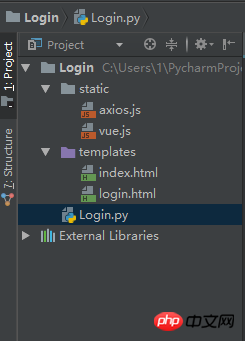
login.html
<!DOCTYPE html>
<html lang="en">
<head>
  <meta charset="UTF-8">
  <title>Login</title>

  <script type="text/javascript" src="../static/vue.js"></script>
  <script type="text/javascript" src="../static/axios.js"></script>

</head>
<body>

<p id="login">
  <form action="#" novalidate>
    <label for="username">Username</label>
    <input type="text" name="username" id="username" placeholder="Enter your Name" v-model="username"><br>
    <label for="password">Password</label>
    <input type="text" name="password" id="password" placeholder="Enter your Password" v-model="password"><br>
    <br>

    <button type="button" v-on:click="login">Apply</button>
  </form>
</p>


<script type="text/javascript">
  var login = new Vue({
    el: '#login',
    data:{
      username: '',
      password: ''
    },
    methods: {
      login: function () {
        axios.post('http://127.0.0.1:5000/login',{
          username: this.username,
          password: this.password
        }).then(function (response) {
          console.log(response.status)
          // 其实是应该走后台路由
          if(parseInt(response.status) === 200){
            window.location.href = 'index'
          }
        }).catch(function (error) {
          console.log(error.response)
        })

      }
    }
  })
</script>

</body>
</html>index.html
立即学习“前端免费学习笔记(深入)”;
<!DOCTYPE html>
<html lang="en">
<head>
  <meta charset="UTF-8">
  <title>Index</title>
</head>
<body>
  <h1>Hello,This is Index Page!</h1>
</body>
</html>
Login.py
# -*- coding: utf-8 -*-

from flask import Flask, request, session, redirect, url_for, render_template, make_response, jsonify
app = Flask(__name__)


@app.route('/login', methods=('GET', 'POST'))
def login():
  if request.method == 'POST':
    session['username'] = request.json.get('username')
    session['password'] = request.json.get('password')
    # 登录成功,则跳转到index页面
    return jsonify({'code': 200, 'token': "123456"})
  # 登录失败,跳转到当前登录页面
  return render_template('login.html')


@app.route('/index')
def index():
  # 如果用户名和密码都存在,则跳转到index页面,登录成功
  if 'username' in session and 'password' in session:
    return render_template('index.html')
  # 否则,跳转到login页面
  return redirect(url_for('login'))


@app.route('/logout')
def logout():
  session.pop('username', None)
  session.pop('password', None)
  return redirect(url_for('login'))


# set the secret key. keep this really secret:
app.secret_key = 'A0Zr98j/3yX R~XHH!jmN]LWX/,?RT'


if __name__ == '__main__':
app.run(debug=True)上面是我整理给大家的,希望今后会对大家有帮助。

动态WEB网站中的PHP和MySQL详细反映实际程序的需求,仔细地探讨外部数据的验证(例如信用卡卡号的格式)、用户登录以及如何使用模板建立网页的标准外观。动态WEB网站中的PHP和MySQL的内容不仅仅是这些。书中还提到如何串联JavaScript与PHP让用户操作时更快、更方便。还有正确处理用户输入错误的方法,让网站看起来更专业。另外还引入大量来自PEAR外挂函数库的强大功能,对常用的、强大的包
 525
525

相关文章:
以上就是使用Vue+Flask如何实现登录验证跳转(详细教程)的详细内容,更多请关注php中文网其它相关文章!

每个人都需要一台速度更快、更稳定的 PC。随着时间的推移,垃圾文件、旧注册表数据和不必要的后台进程会占用资源并降低性能。幸运的是,许多工具可以让 Windows 保持平稳运行。

 广告
广告

 收藏
收藏
 收藏
收藏
Copyright 2014-2025 https://www.php.cn/ All Rights Reserved | php.cn | 湘ICP备2023035733号


 743
743













 取消收藏
取消收藏







