
这篇文章主要为大家介绍了css3实现超酷的黑猫警长首页的相关代码,效果酷炫,具有一定的参考价值,感兴趣的小伙伴们可以参考一下
先看看效果图:
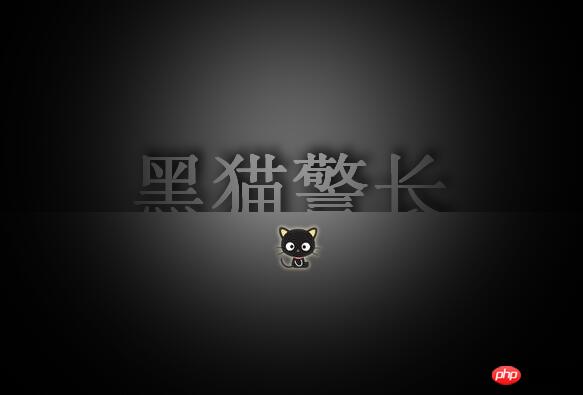
具体代码:
<html>
<head>
<meta http-equiv="Content-Type" content="text/html; charset=utf-8" />
<title>text-shadow</title>
<style type="text/css">
body {/*清除页边距,设计主色调*/
    padding: 0px;
    margin: 0px;
    color: #666;
}
#text-shadow-box {/*设计盒子外框样式*/
    position: relative;/*让内部的定位元素以这个框为参照物*/
    width: 598px;
    height: 406px;
    background: #666;
    overflow: hidden;/*禁止内容超过设定的区域*/
    border: #333 1px solid;
}
#text-shadow-box p.wall {/*设置背景墙样式*/
    position: absolute;
    width: 100%;
    top: 175px;
    left: 0px
}
#text {/*设计导航文本样式*/
    text-align: center;
    line-height: 0.5em;
    margin: 0px;
    font-family: helvetica, arial, sans-serif;
    height: 1px;
    color: #999;
    font-size: 80px;
    font-weight: bold;
    text-shadow: 5px -5px 16px #000;/*设计右上偏移的阴影,适当进行模糊处理,产生色晕效果,阴影色为深色,营造静谧的效果*/
}
p.wall p {/*设计前面挡风板样式*/
    position: absolute;
    width: 100%;
    height: 300px;
    top: 42px;
    left: 0px;
    background: #999;
}
#spotlight {/*设计覆盖在上面的探照灯效果图*/
    position: absolute;/*设计一个层,让其覆盖在页面上,并使其满窗口显示,通过前期设计好的一个探照灯背景来营造神秘效果*/
    width: 100%;
    height: 100%;
    top: 0px;
    left: 0px;
    background: url(images/spotlight.png) center -300px;
}
#spotlight a {
    color:#ccc;
    text-decoration:none;
    position:absolute;
    left:47%;
    top:56%;
    float:left;
}
a img { border:none; }
</style>
</head>
<body>
<!--本案例的结构外套-->
<p id="text-shadow-box">
    <!--墙体外结构-->
    <p class="wall">
        <p id="text">黑猫警长</p>
        <p></p><p><span>立即学习</span>“<a href="https://pan.quark.cn/s/cb6835dc7db1" style="text-decoration: underline !important; color: blue; font-weight: bolder;" rel="nofollow" target="_blank">前端免费学习笔记(深入)</a>”;</p>
                    <div class="aritcle_card">
                        <a class="aritcle_card_img" href="/ai/917">
                            <img src="https://img.php.cn/upload/ai_manual/001/503/042/68b6d3335c2e7978.png" alt="ProcessOn">
                        </a>
                        <div class="aritcle_card_info">
                            <a href="/ai/917">ProcessOn</a>
                            <p>免费在线流程图思维导图,专业强大的作图工具,支持多人实时在线协作</p>
                            <div class="">
                                <img src="/static/images/card_xiazai.png" alt="ProcessOn">
                                <span>925</span>
                            </div>
                        </div>
                        <a href="/ai/917" class="aritcle_card_btn">
                            <span>查看详情</span>
                            <img src="/static/images/cardxiayige-3.png" alt="ProcessOn">
                        </a>
                    </div>

    </p>
     <!--外罩,通过他可以为页面覆盖一层桌纸,添加特殊的艺术效果-->
    <p id="spotlight"><a href="index.htm">@@##@@</a></p>
</p>
</body>
</html>立即学习“前端免费学习笔记(深入)”;
以上就是本文的全部内容,希望对大家的学习有所帮助,更多相关内容请关注PHP中文网!
相关推荐:
以上就是使用CSS3实现超酷的黑猫警长首页的详细内容,更多请关注php中文网其它相关文章!

每个人都需要一台速度更快、更稳定的 PC。随着时间的推移,垃圾文件、旧注册表数据和不必要的后台进程会占用资源并降低性能。幸运的是,许多工具可以让 Windows 保持平稳运行。

Copyright 2014-2025 https://www.php.cn/ All Rights Reserved | php.cn | 湘ICP备2023035733号


 706
706









 收藏
收藏







 取消收藏
取消收藏







