



本篇文章主要介绍了微信小程序图片选择区域屏裁剪实现方法,内容挺不错的,现在分享给大家,也给大家做个参考。
本文介绍了微信小程序图片选择区域屏裁剪实现方法,分享给大家。具体如下:
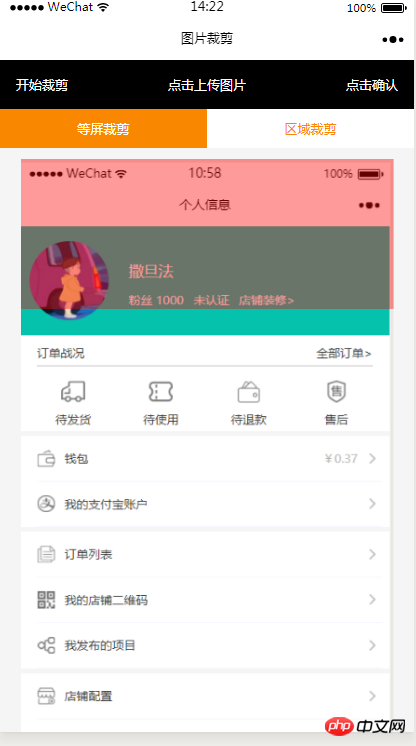
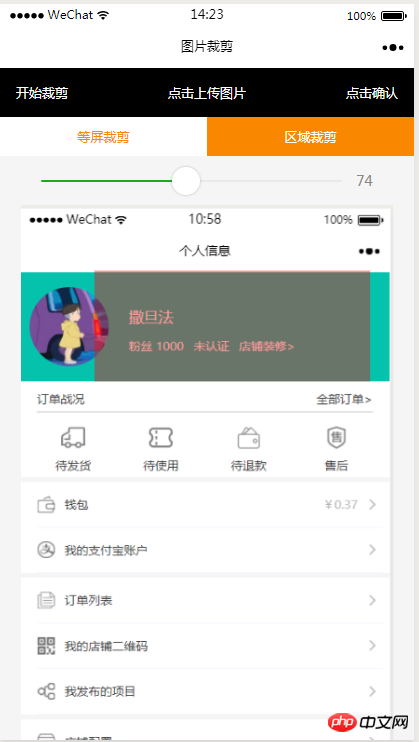
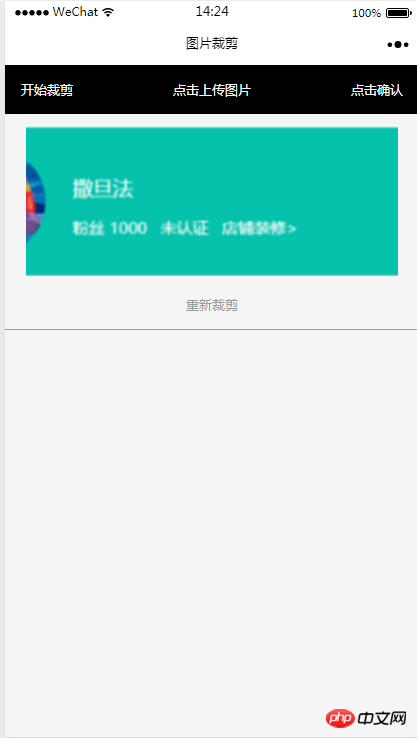
效果图
HTML代码
 开始裁剪
 点击上传图片
 点击确认


  等屏裁剪


  区域裁剪


 重新裁剪
CSS代码
.imgCut_header{
 padding: 30rpx;
 display: flex;
 justify-content: space-between;
 align-items: center;
 background: #000;
 color: #fff;
 font-size: 24rpx;
}
.allCavans{
 margin: 20rpx auto;
 position: relative;
}
.canvasSty{
 position: absolute;
}
.cutImg_box{
 width: 100%;

 border-bottom: 2rpx #f98700 solid;
 padding-bottom: 20rpx;
}
.cutImg_box .cutImg_box_t{
 width: 90%;
 margin: 20rpx auto;
}
.cutImg_box image{
 width: 100%;
}
.cutImg_box .cutImg_box_b{
 margin-top: 20rpx;
 width: 80%;
 height: 80rpx;
 line-height: 80rpx;
 background: #f98700;
 color: #fff;
 border-radius: 10rpx;
 text-align: center;
 margin:0rpx auto;
}
.selectCutMode{
 background: #fff;
 display: flex;
 justify-content: space-between;
 align-items: center;
}
.selectCutMode .selectCutMode_in{
 width: 100%;
 text-align: center;
 background: #fff;
 color: #f98700;
 font-size: 24rpx;
 padding: 20rpx;
}
.selectCutMode .selectCutMode_in_act{
 background: #f98700;
 color: #fff;
 padding: 20rpx;
}
.areaSelct_box{
 width: 100%;
 display: flex;
 align-items: center;
 height: 50rpx;
 justify-content: center;
 margin-top: 20rpx;
}
.areaSelct_box slider{
 width: 80%;
}
.cutImg_box .clickCutImg_txt{
 width: 100%;
 text-align: center;
 height: 50rpx;
 font-size: 24rpx;
 line-height: 50rpx;
 color: #999;
}
JS代码部分
初始加载带入上一个页面带过来的参数路径
onLoad: function (options) {
  var that = this;
  const ctx = wx.createCanvasContext('cutImg');
  ctx.setGlobalAlpha(0.4)
  var aa = 'https://pintuanqu.oss-cn-hangzhou.aliyuncs.com/Uploads/Picture/goodsShow/20171201/5a2125fc86566.png'
  //获取当前屏幕宽度
  var phoneW = Number(util.nowPhoneWH()[0]*90)/100;
  var cutH = 150;
  wx.getImageInfo({
   src: aa,
   success: function (res) {
    var w = phoneW;
    var h = (phoneW/Number(res.width))*Number(res.height)
    ctx.save()
    ctx.drawImage(aa, 0, 0, w, h)
    ctx.restore()
    ctx.setFillStyle('red')
    ctx.fillRect(0, 0, phoneW, cutH)
    ctx.draw()
    that.setData({
     canvasW:w,
     canvasH:h,
     img:aa,
     cutH:cutH
    })
   }
  })
 },
确定选择区域开始裁剪
// 点击确认裁剪图片
 okCutImg:function(){
  var that = this;
  var canvasW = that.data.canvasW;
  var canvasH = that.data.canvasH;
  var nowCutW = that.data.cutType?canvasW:that.data.nowCutW;
  var nowCutH = that.data.cutType?that.data.cutH:that.data.nowCutH;
  var cutX = that.data.cutX;
  var cutY = that.data.cutY;
  const ctx = wx.createCanvasContext('cutImg');
  ctx.setGlobalAlpha(1)
  ctx.drawImage(that.data.img, 0, 0, canvasW, canvasH)
  ctx.draw()
  wx.canvasToTempFilePath({
   x: cutX,
   y: cutY,
   width: nowCutW,
   height: nowCutH,
   destWidth: nowCutW,
   destHeight: nowCutH,
   canvasId: 'cutImg',
   success: function(res) {
    var aa = res.tempFilePath
    that.setData({
     cutImgUrl:aa,
     prienFlag:false,
     alreay:false
    })
   }
  })
 },
红框根据手指移动方法
// 点击红框开始移动
 canvasMove:function(e){
  var that = this;
  var canvasW = that.data.canvasW;
  var canvasH = that.data.canvasH;
  var nowCutW = that.data.cutType?canvasW:that.data.nowCutW;
  var nowCutH = that.data.cutType?that.data.cutH:that.data.nowCutH
  var touches = e.touches[0];
  var x = touches.x;
  var y = touches.y-(Number(nowCutH)/2);
  that.data.cutType?x=0:x=x-(Number(nowCutW)/2);
  that.setData({
   cutX:x,
   cutY:y
  })
  const ctx = wx.createCanvasContext('cutImg');
  ctx.setGlobalAlpha(0.4)
  ctx.drawImage(that.data.img, 0, 0, canvasW, canvasH)
  ctx.setFillStyle('red')
  ctx.fillRect(x, y, nowCutW, nowCutH)
  ctx.draw()
 },
上方两个选择裁剪方式的按钮
等屏裁剪

//等屏裁剪
 etcType:function(){
  var that = this;
  var propor = 100;
  var canvasW = that.data.canvasW;
  var canvasH = that.data.canvasH;
  var cutH = that.data.cutH;
  var nowCutW = (Number(canvasW)*propor)/100
  var nowCutH = (Number(cutH)*propor)/100
  const ctx = wx.createCanvasContext('cutImg');
  ctx.setGlobalAlpha(0.4)
  ctx.drawImage(that.data.img, 0, 0, canvasW, canvasH)
  ctx.setFillStyle('red')
  ctx.fillRect(0, 0, nowCutW, nowCutH)
  ctx.draw()
  that.setData({
   nowCutW:nowCutW,
   nowCutH:nowCutH,
   cutType:true
  })
 },
局域裁剪
areaType:function(){
  var that = this;
  var propor = that.data.propor;
  var canvasW = that.data.canvasW;
  var canvasH = that.data.canvasH;
  var cutH = that.data.cutH;
  var nowCutW = (Number(canvasW)*propor)/100
  var nowCutH = (Number(cutH)*propor)/100
  const ctx = wx.createCanvasContext('cutImg');
  ctx.setGlobalAlpha(0.4)
  ctx.drawImage(that.data.img, 0, 0, canvasW, canvasH)
  ctx.setFillStyle('red')
  ctx.fillRect(0,0, nowCutW, nowCutH)
  ctx.draw()
  that.setData({
   nowCutW:nowCutW,
   nowCutH:nowCutH,
   cutType:false
  })
 },
局域裁剪上方的滑动选择红框根据宽度等比例缩放
areaChange:function(e){
  var that = this;
  var propor = e.detail.value;
  var canvasW = that.data.canvasW;
  var canvasH = that.data.canvasH;
  var cutH = that.data.cutH;
  var nowCutW = (Number(canvasW)*propor)/100
  var nowCutH = (Number(cutH)*propor)/100
  const ctx = wx.createCanvasContext('cutImg');
  ctx.setGlobalAlpha(0.4)
  ctx.drawImage(that.data.img, 0, 0, canvasW, canvasH)
  ctx.setFillStyle('red')
  ctx.fillRect(that.data.cutX||0, that.data.cutY||0,nowCutW, nowCutH)
  ctx.draw()
  that.setData({
   nowCutW:nowCutW,
   nowCutH:nowCutH,
   propor:propor
  })
 },
重新裁剪回到初始选择图片的页面
// 重新裁剪
 againBtn:function(){
  var that = this;
  var data = that.data
  this.setData({
   prienFlag:true,
   alreay:true
  })
  const ctx = wx.createCanvasContext('cutImg');
  ctx.setGlobalAlpha(0.4)
  ctx.drawImage(data.img, 0, 0, data.canvasW, data.canvasH)
  ctx.setFillStyle('red')
  ctx.fillRect(that.data.cutX||0, that.data.cutY||0, data.nowCutW||data.canvasW, data.nowCutH||data.cutH)
  ctx.draw()
 },
现在IOS还有个坑就是裁剪不了,官方正在修复不知道什么时候好
以上就是本文的全部内容,希望对大家的学习有所帮助,更多相关内容请关注PHP中文网!
相关推荐:





