



这篇文章主要介绍了关于react-reflux的基础介绍,有着一定的参考价值,现在分享给大家,有需要的朋友可以参考一下
因工作需要使用 React + Reflux 开发,最近几天都在努力学习着,特别是 Reflux,在网上查找的许多资料和 github 上的文档年代都有点久远,JavaScript 按照目前的节奏,更新得太快,旧文档的一些语法跟不上更新,对广大初学者来说,确实存在许多困惑。本文是仅适于初学者或对 React 感兴趣的朋友,大神请绕道!!!
废话不多说,进入正题~
引用俗话:“学语言用 hello world,学框架用 todolist”,今天咱们就用 todolist 来做说明。
作为一个对比 todolist-raw 是没有用 Reflux 实现 todolist 的增加和删除的,react-reflux 使用 Reflux 实现 todolist 的增加和删除,react-reflux 又分基本关联和简便法关联 Component。
先看下组件的效果图:
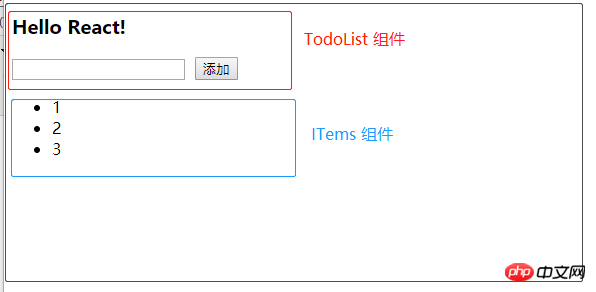
电脑需要准备好环境,我用的是 create-react-app 和 yarn ,请自行百度安装好这两个工具,项目目录精简如下图:
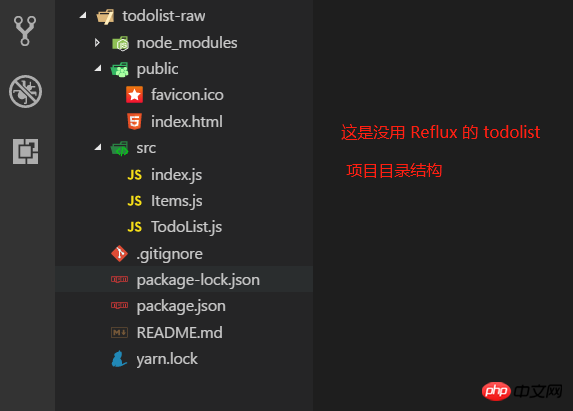
1. todolist-raw 就几个文件,里面的代码都比较简单,相信各道友一看就懂了。
package.json 的配置如下:
{
  "name": "todolist-raw",
  "version": "0.1.0",
  "private": true,
  "dependencies": {
    "react": "^16.4.1",
    "react-dom": "^16.4.1",
    "react-scripts": "1.1.4"
  },
  "scripts": {
    "start": "react-scripts start",
    "build": "react-scripts build",
    "test": "react-scripts test --env=jsdom",
    "eject": "react-scripts eject"
  }
}
这里注意一下版本,版本不对应我也不知道会出现什么样的问题,比如我用的是 yarn 安装了 Rflux 之后, 提示 "react-scripts" 不是内部命令,yarn start 启动不了,反复试验都不行,后来打扣了 yarn -h 然后接着 yarn -autoclean 就好了。讲了那么多,其实我遇到的这个问题也不算版本不对称的问题吧,建议出现一些莫名其妙的 bug 就整理下 yarn。痒?痒就挠呗!!!
index.html 如下:与自动生成的没什么改变,就是删了一些注释!
TodoList-raw
index.js 如下:
1 import React from 'react';
2 import ReactDOM from 'react-dom';
3 import TodoList from './TodoList';
4
5 ReactDOM.render(, document.getElementById('root'));
View Code
TodoList.js 如下:
import React, { Component, Fragment } from 'react';
import Items from './Items';
class TodoList extends Component {
constructor(props) {
super(props);
this.state = {
items: [1, 2, 3],
isC: false
};
this.handlerClick = this.handlerClick.bind(this);
}
// 添加一个 item 项
handlerClick() {
const val = this.refs.inputEl.value;
this.refs.inputEl.value = '';
const items = [...this.state.items, val]; // 最好不要直接操作 state
this.setState({items}); // es6 语法,等价于 {items: items}
}
// 删除某一个 item 项,点击就删除
handlerDelete(index) {
const items = [...this.state.items];
items.splice(index, 1);
this.setState({items});
}
render() {
return (
Hello React!
);
}
}
export default TodoList;说明几点:
a. this.handlerClick = this.handlerClick.bind(this); 是用来绑定 this 的,React 用的是 jsx 语法糖,整个 js 就是一个组件,在标签上绑定事件是不能带括号的,如果像传统的 HTML 事件绑定那样绑事件不行,因为这个标签就是在 js 文件中的,像传统的 HTML 绑定事件就会直接调用了!所以 jsx 中的标签绑定事件绑的是引用。而且需要绑定在这个 js 文件(组件)上。所以 jsx 中的标签的事件就是 .这只是我的理解,不知道对不对,如果不正确,请指正!
b. 代码很少阅读起来应该没难度,而且上面也有一些注释了。不过还是要啰嗦一下。React 是用数据(data)基于状态(state)来驱动视图(view),也就是搞来搞去都是在搞数据,用数据改变状态来达到渲染视图的目的,大多是在虚拟内存处理,通过什么 diff 比较算法,层层计较然后达到提高性能,加快视图渲染的目的。额,我只能用“非常快”来形容 React 的性能,当然,性能的事还是跟实际代码复杂度相关,我只想说 React 确实出众!扯远了...,既然是基于状态(state),所以要有 state,在 constructor 中定义了,而且处理业务时改变 state,比如 handlerClick,deleteClick 中都是先用变量保存下来,通过 this.setState() 方法在设置回去!
c. 父子关系的组件,父组件可通过属性来给子组件传参,就像这样:Items msg={this.state.items} />,子组件可通过 this.props.msg 拿到 items。
Items.js 代码如下:
import React, { Component } from 'react';

class Items extends Component {

  constructor(props) {
    super(props);
    this.func = this.props.func;
  }

  render() {
    return (
-
{this.props.msg.map((item, index) =>
- {item} )}
注意,父组件传递方法给子组件时,this 指向的是子组件,所以通过属性传递时,需要用函数绑定 bind() 绑定父组件的 this。
最后,通过 cmd 命令行,yarn start 运行任务即可实现一个简单的 TodoList 功能。
2. react-reflux: 通过 Reflux 来实现简单的 TodoList (基本法关联 Component)。
2.1 简单地说明下为什么要 Reflux 架构,如图(自己画的组件树结构!),不存在父子关系的组件(如 B 和 E)通讯势必会很困难而且麻烦,需要一个中间件(Store)来存储数据,类似于订阅者和发布者(中间人模式)一样,大家都往 Store 中存取数据就好,不需要层层走关系了,避免了层层传递数据的灾难!
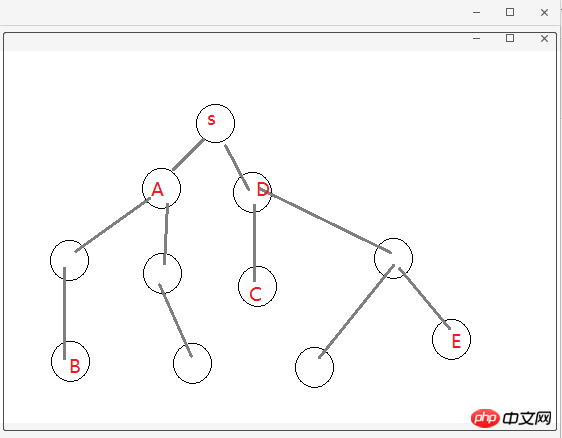
2.2 关于 Actions、Store 和 Component 的关系,可以这么理解:Store 作为一个中间人有订阅和发布的功能,Actions 就是 Component 触发的动作,Actions 被 Store 监听着,组件有新动作了, Store 就会做出相应的处理(回调函数)更改 Store 中的数据通过 this.trigger(this.items) 发布消息[就相当于更新 items], Component 监听着 Store,用一些手段(mixin 或回调函数)关联起 Component 中的状态信息(state.items)和 Store 中的信息(items),这就是所谓的单向数据流,单向表示一个方向流动,不能反向。
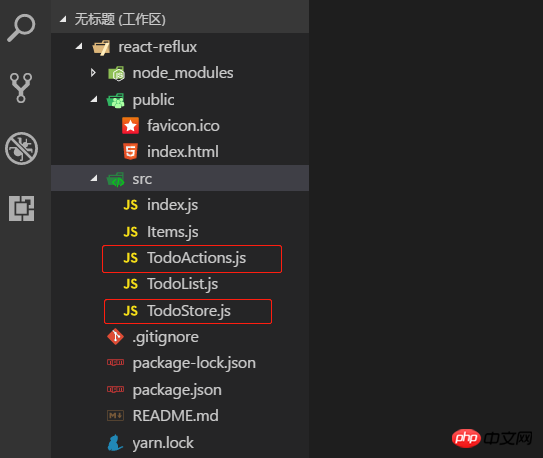
2.3 目录结构和前面的 todolist-raw 没多大区别,就是多了 TodoActions.js 和 TodoStore.js 两个文件。如图:
2.4 一言不合就贴代码。首先 index.js 代码没变化,就不贴了,TodoActions.js 代码如下:
import Reflux from 'reflux';

const TodoActions = Reflux.createActions([
    'getAll',
    'addItem',
    'deleteItem'
]);
export default TodoActions;
TodoStore.js 代码如下:
import Reflux from 'reflux';
import Actions from './TodoActions';
const TodoStore = Reflux.createStore({
    // items: [1, 2, 3],
    // listenables: Actions,
    init() {
        console.log('TodoStore init method~');
        this.items = [1, 2, 3]; // 给个初始值
        this.listenables = Actions; // 监听 TodoActions.js
        // this.listenTo(addItem, 'addItem');
    },
    onGetAll() {
        console.log('onGetAll');
        this.trigger(this.items);
    },
    onAddItem(model) {
        console.log('onAddItem---', model);
        this.items.unshift(model);
        this.trigger(this.items);
    },
    onDeleteItem(index) {
        console.log('onDeleteItem---', index);
        this.items.splice(index, 1);
        this.trigger(this.items);
    }
})
export default TodoStore;
说明:多个监听用 listenables,单个监听 this.listenTo(addItem, 'addItem'); 多个监听的时候定义处理函数是 on + ActionName 驼峰式命名。定义初始值和监听可以写在 init 方法外面,就像上面那样(已注释)。
2.5 Actions 和 Store 都写好了,就差最后一步,整合到组件 Component 中,才算有点意义了!TodoList.js 代码如下:
import React, { Component, Fragment } from 'react';
import Actions from './TodoActions';
import TodoStore from './TodoStore';
import Items from './Items';
class TodoList extends Component {
constructor(props) {
super(props);
this.state = {
items: [],
isC: false
};
this.handlerClick = this.handlerClick.bind(this);
}
// 组件挂载
componentDidMount() {
this.unsubscribe = TodoStore.listen(this.onStatusChange, this);
Actions.getAll();
}
// 组件移除
componentWillUnmount() {
console.log('componentWillUnmount');
this.unsubscribe(); // 解除监听
}
// callback
onStatusChange(items) {
this.setState({items});
}
// 添加一个 item 项
handlerClick() {
const val = this.refs.inputEl.value;
this.refs.inputEl.value = '';
Actions.addItem(val);
}
render() {
return (
Hello React-Reflux!
);
}
}
export default TodoList;说明:这是基本的添加关联,需要在组件挂载时监听 Store,需要定义一个回调函数 onStatusChange(),组件卸载时解除监听 this.unsubscribe(),Store 源码如下:
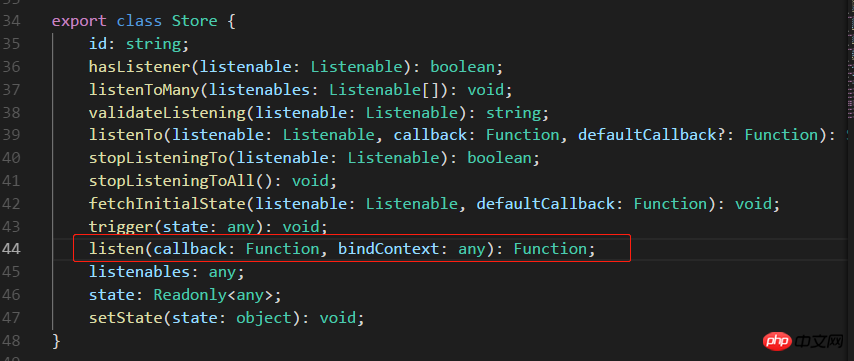
不传 bindContext 更新不了状态,回调函数 onStatusChange 中报异常,传入 this 就好了。如图:

Items.js 代码如下:
import React, { Component } from 'react';
import Actions from './TodoActions';

class Items extends Component {
    render() {
        return (
-
{this.props.msg.map((item, index) =>
- {item} )}
3. react-reflux: 通过 Reflux 来实现简单的 TodoList (简便法关联 Component)。
3.1 先安装 react-mixin 和 axios: npm install react-mixin,npm install axios。结合异步操作实现简便 Store 关联 Component。
安装两个依赖之后,修改 TodoStore.js 和 TodoList.js 代码如下:
我贴:TodoStore.js:
import Reflux from 'reflux';
import Actions from './TodoActions';
import Axios from 'axios';

const TodoStore = Reflux.createStore({

    // items: [3, 2, 1],
    // listenables: Actions,

    init() {
        console.log('TodoStore init method~');
        this.items = [3, 2, 1]; // 初始值,此处不是 state, mark-1 -2 -3 都可以直接操作
        this.listenables = Actions;
    },
    onGetAll() {
        console.log('onGetAll');
        Axios.get('https://api.github.com/')
        .then(res => {
            const keys = Object.keys(res.data);
            console.log('axios-response-keys: ', keys);
            this.items = keys; // mark-1
            this.trigger(this.items);
        })
        .catch(err => console.log('axios-error: ', err));
    },
    onAddItem(model) {
        console.log('onAddItem---', model);
        this.items.unshift(model); // mark-2
        console.log('TodoStore-items: ', this.items);
        this.trigger(this.items);
    },
    onDeleteItem(index) {
        console.log('onDeleteItem---', index);
        this.items.splice(index, 1); // mark-3
        this.trigger(this.items);
    }
})

export default TodoStore;我再贴:TodoList.js:
import React, { Component, Fragment } from 'react';
import ReactMixin from 'react-mixin';
import Reflux from 'reflux';
import Actions from './TodoActions';
import TodoStore from './TodoStore';
import Items from './Items';
class TodoList extends Component {
constructor(props) {
super(props);
this.state = {
items: [],
isC: false
};
this.handlerClick = this.handlerClick.bind(this);
}
// 组件挂载
componentDidMount() {
Actions.getAll();
}
// 添加一个 item 项
handlerClick() {
const val = this.refs.inputEl.value;
this.refs.inputEl.value = '';
if (!val) {
alert('Please enter the data which type of number or string');
return false;
}
Actions.addItem(val);
}
render() {
return (
Hello React-Reflux!
);
}
}
// 用 Reflux.connect 将 Store 和 Component 组合在一起
ReactMixin.onClass(TodoList, Reflux.connect(TodoStore, 'items'));
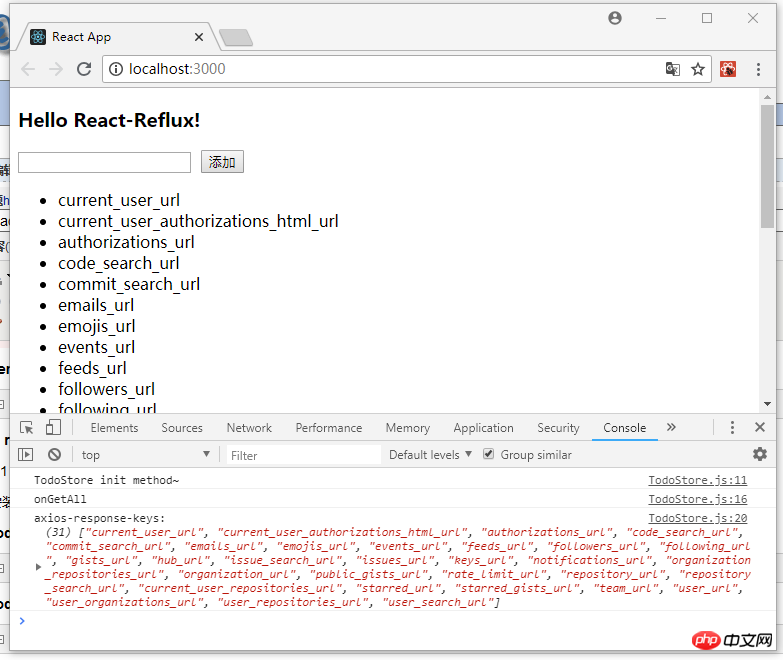
export default TodoList;修改之后 yarn start 启动项目,截图如下:
4. 说在后面的话:本篇文章只是关于 React-Reflux 基础入门的一些知识,没有涉及实战应用,读者自酌。对于 React 我也是初学者,难免有许多不准确的地方,有待提高,欢迎各位道友留言指正。
4.1 好了,简单地分享就到此结束了,谢谢阅读~~~
以上就是本文的全部内容,希望对大家的学习有所帮助,更多相关内容请关注PHP中文网!
相关推荐:




