



javascript如何实现插入节点?本篇文章就给大家总结了几种javascript插入节点的方法。有一定的参考价值,有需要的朋友可以参考一下,希望对你们有所帮助。
JS原生API插入节点的方式大致有innerHTML、outerHTML、appendChild、insertBefore、insertAdjacentHTML、applyElement这6种。
这里总结一下各自的用法,并封装包含before、prepend、append、after、applyElement的一系列函数。
一、六种方式的用法
innerHTML:获取标签内部的HTML内容。
立即学习“Java免费学习笔记(深入)”;
outerHTML:获取包括目标标签在内,以及内部HTML的内容。
appendChild:向目标标签末尾添加子节点,返回参数节点。
insertBefore:向目标节点的第二个参数位置添加第一个参数为子节点,返回第一个参数。
insertAdjacentHTML:向目标节点的指定位置添加节点;第二个参数为要添加的节点,第一个参数指定位置,位置包括beforebegin(添加为previousSibling)、afterbegin(添加为firstChild)、beforeend(添加为lastChild)、afterend(添加为nextSibling)。它还有两个兄弟函数,分别是insertAdjacentElement和insertAdjacentText,前者添加元素并返回该元素,后者添加文本。
applyElement:IE的函数,将参数节点设置成目标节点的外包围或者内包围;第一个为参数节点,第二个参数指定方式,方式包括inside(内包围,即参数节点将目标节点的子节点包起来)、outside(外包围,即参数节点将目标节点包起来)。
上面6种方式除了前两个是属性外,另外4个都是函数。innerHTML与outerHTML没有什么好说的,直接用HTML字符串赋值就能达到插入的目的了;appendChild简单套一层函数外壳就能封装成append函数;insertBefore让节点的插入方式非常灵活;insertAdjacentHTML可以实现字符串的插入方式;applyElement函数兼容一下即可成为JQuery的Wrap系列函数。
二、实现before、prepend、append、after函数
before把参数节点插入到目标节点前面,只需获取目标节点的父节点,然后父节点调用insertBefore即可。
prepend把参数节点插入到目标节点第一个子节点的位置,获取目标节点的第一个子节点,然后调用insertBefore即可。
append的功能和原生API里appendChild的功能一样。
after把参数节点插入到目标节点的后面,只需获取目标节点的nextSibling,然后调用insertBefore即可。

具体实现如下:
var append = function(node, scope) {
     if(node.nodeType === 1 || node.nodeType === 9 || node.nodeType === 11) {
        scope.appendChild(node);
    }
};
var prepend = function(node, scope) {
     if(node.nodeType === 1 || node.nodeType === 9 || node.nodeType === 11) {
        scope.insertBefore(node, scope.firstChild);
    }
};
var before = function(node, scope) {
     if(node.nodeType === 1 || node.nodeType === 9 || node.nodeType === 11) {
        scope.parentNode.insertBefore(node, scope);
    }
};
var after = function(node, scope) {
     if(node.nodeType === 1 || node.nodeType === 9 || node.nodeType === 11) {
        scope.parentNode.insertBefore(node, scope.nextSibling);
    }
};
上面函数只能插入元素节点、文档节点以及文档碎片,都是节点类型。如果我们想要支持字符串形式的插入方式,则需要封装insertAdjacentHTML了。
这里利用策略模式,将我要实现的四个函数做成策略对象,然后动态生成,以达到精简代码的效果:
//E5才有的迭代, 所以迭代要预先兼容
Array.prototype.forEach = [].forEach || function(callback) {
      for(var i = 0, len = this.length; i < len; i++) {
        callback.call(this[i], this[i], i, this);
    }
};
/**插入策略集合**/
var insertStrategies = {
    before : function(node, scope) {
        scope.parentNode.insertBefore(node, scope);
    },
    prepend : function(node, scope) {
        scope.insertBefore(node, scope.firstChild);
    },
    append : function(node, scope) {
        scope.appendChild(node);
    },
    after : function(node, scope) {
        scope.parentNode.insertBefore(node, scope.nextSibling);
    },
    /*支持字符串格式的插入, 注意:要兼容不可直接做p子类的元素*/
    /*insertAdjace还有Element和Text,前者只能插元素,后者只能插文本*/
    beforestr : function(node, scope) {
        scope.insertAdjacentHTML('beforeBegin', node);
    },
    prependstr : function(node, scope) {
        scope.insertAdjacentHTML('afterBegin', node);
    },
    appendstr : function(node, scope) {
        scope.insertAdjacentHTML('beforeEnd', node);
    },
    afterstr : function(node, scope) {
        scope.insertAdjacentHTML('afterEnd', node);
    }
};
//响应函数
var returnMethod = function(method, node, scope) {    //如果是字符串
    if(typeof node === 'string') {
        return insertStrategies[method + 'str'](node, scope);
    }
    //1(元素)、9(文档)、11(文档碎片)
    if(node.nodeType === 1 || node.nodeType === 9 || node.nodeType === 11) {
          return insertStrategies[method](node, scope);
    }
    //此处还可添加节点集合的处理逻辑,用于处理选择其引擎获取的节点集合。
};

['before', 'prepend', 'append', 'after'].forEach(function(method){
    window[method] = function(node, scope) {
        returnMethod(method, node, scope);
    };
});
所有函数都被实现为window的属性,所以直接当全局函数调用即可,这些函数并不属于节点对象,所以scope参数指代的是目标节点。下面兼容applyElement后,我们将所有的函数都扩展到HTMLElement的原型上面去,这样就可以省略scope参数,以达到元素节点直接调用的效果。当然对于框架来说,一般是生成框架对象,然后把这些函数扩展到其原型上去,这样可以避免修改原生对象的原型。
三、兼容applyElement
applyElement函数是IE私有实现,所以想在其他浏览器中使用,我们得类似Array的forEach一样在对象原型上兼容一下。
其实要达到新元素包含目标节点或者包含目标元素的子节点用innerHTML与outerHTML也能做到。但是这必然会存在一个问题:当新元素是dom树的一部分,并且它也有一系列子节点,那么它的子节点应该怎么处理?留在原地还是并入目标元素中?如果并入目标元素中是目标元素的在前还是新元素的在前?
wrap系列函数效果只是挪走新元素标签里的内容,它的子元素呈现的效果就是变成新元素父节点点的子节点。这种方式也可以用Range对象来实现,当然也可以用innerHTML与outerHTML来实现。我这里用Range对象实现一遍。
/*兼容IE的applyElement*/
HTMLElement.prototype.removeNode = HTMLElement.prototype.removeNode || function(deep) {
       if(this.parentNode) {
            var range = this.ownerDocument.createRange();
        range.selectNodeContents(this);
        if(!deep) {
               var fragment = range.extractContents();
            range.setStartBefore(this);
            range.insertNode(fragment);
            range.detach();
        }
        return this.parentNode.removeChild(this);
    }
};

HTMLElement.prototype.applyElement = HTMLElement.prototype.applyElement || function(node, where) {
    node = node.removeNode();
    where = (where || 'outside').toLowerCase();
    var range = this.ownerDocument.createRange();
    if(where === 'inside') {
        range.selectNodeContents(this);
        range.surroundContents(node);
        range.detach();
    }else if(where === 'outside') {
        range.selectNode(this);
        range.surroundContents(node);
        range.detach();
    }
    return node;
};
四、将所有函数扩展到HTMLElement的原型上
思路和修复applyElement一样,我们只需将window[method]替换成HTMLElement.prototype[method],批量生成时传递的scope改成this即可达成。
//E5才有的迭代, 所以迭代要预先兼容
Array.prototype.forEach = [].forEach || function(callback) {
        for(var i = 0, len = this.length; i < len; i++) {
        callback.call(this[i], this[i], i, this);
    }
};

/**插入策略集合**/
var insertStrategies = {
    before : function(node, scope) {
        scope.parentNode.insertBefore(node, scope);
    },
    prepend : function(node, scope) {
        scope.insertBefore(node, scope.firstChild);
    },
    append : function(node, scope) {
        scope.appendChild(node);
    },
    after : function(node, scope) {
        scope.parentNode.insertBefore(node, scope.nextSibling);
    },
    /*支持字符串格式的插入, 注意:要兼容不可直接做p子类的元素*/
    /*insertAdjace还有Element和Text,前者只能插元素,后者只能插文本*/
    /**/
    beforestr : function(node, scope) {
        scope.insertAdjacentHTML('beforeBegin', node);
    },
    prependstr : function(node, scope) {
        scope.insertAdjacentHTML('afterBegin', node);
    },
    appendstr : function(node, scope) {
        scope.insertAdjacentHTML('beforeEnd', node);
    },
    afterstr : function(node, scope) {
        scope.insertAdjacentHTML('afterEnd', node);
    }
};
//响应函数
var returnMethod = function(method, node, scope) {    //如果是字符串
    if(typeof node === 'string') {   //低版本浏览器使用机会毕竟少数,每次都要判断很划不来。这段代码舍弃
        /*if(!scope.insertAdjacentHTML){
            throw new Error('(Firefox8-、IE4-、Opera7-、Safari4-)浏览器不能插入字符串!');
        }*/
        return insertStrategies[method + 'str'](node, scope);
    }    //1(元素)、2(属性)、3(文本)、9(文档)、11(文档碎片)
    if(node.nodeType === 1 || node.nodeType === 9 || node.nodeType === 11) {
            return insertStrategies[method](node, scope);
    }
    //此处还可添加节点集合的处理逻辑(用文档碎片)
};

['before', 'prepend', 'append', 'after'].forEach(function(method){
    HTMLElement.prototype[method] = function(node) {
        returnMethod(method, node, this);
    };
});/*兼容IE的applyElement*/
HTMLElement.prototype.removeNode = HTMLElement.prototype.removeNode || function(deep) {
        if(this.parentNode) {
                var range = this.ownerDocument.createRange();
        range.selectNodeContents(this);
        if(!deep) {
                var fragment = range.extractContents();
            range.setStartBefore(this);
            range.insertNode(fragment);
            range.detach();
        }
        return this.parentNode.removeChild(this);
    }
};

HTMLElement.prototype.applyElement = HTMLElement.prototype.applyElement || function(node, where) {
    node = node.removeNode();
    where = (where || 'outside').toLowerCase();
    var range = this.ownerDocument.createRange();
    if(where === 'inside') {
        range.selectNodeContents(this);
        range.surroundContents(node);
        range.detach();
    }else if(where === 'outside') {
        range.selectNode(this);
        range.surroundContents(node);
        range.detach();
    }    return node;
};
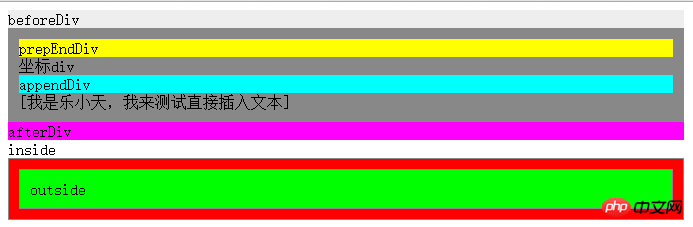
五、测试
测试代码如下:
插入节点.html
坐标p
inside
outside
结果图:
参考书目:《javascript框架设计》、《javascript高级程序设计》、《JavaScript设计模式与开发实践》
总结:以上就是本篇文的全部内容,希望能对大家的学习有所帮助。更多相关教程请访问JavaScript视频教程,jQuery视频教程,bootstrap教程!





