

在制作表单时,不免要做表单验证。同样也需要提供验证状态样式,在bootstrap框架中同样提供这几种效果。

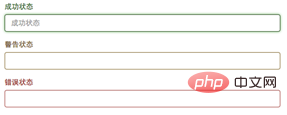
1、.has-warning:警告状态(黄色)(推荐学习:Bootstrap视频教程)
2、.has-error:错误状态(红色)
3、.has-success:成功状态(绿色)
使用的时候只需要在form-group容器上对应添加状态类名。
1.修正会员卡升级会员级别的判定方式2.修正了订单换货状态用户管理中心订单不显示的问题3.完善后台积分设置数据格式验证方式4.优化前台分页程序5.解决综合模板找回密码提示错误问题6.优化商品支付模块程序7.重写优惠卷代码8.优惠卷使用方式改为1卡1号的方式9.优惠卷支持打印功能10.重新支付模块,所有支付方式支持自动对账11.去掉规格库存显示12.修正部分功能商品价格显示4个0的问题13.全新的支
 0
0

<form role="form">
<div class="form-group has-success">
  <label class="control-label" for="inputSuccess1">成功状态</label>
  <input type="text" class="form-control" id="inputSuccess1" placeholder="成功状态" >
</div>
<div class="form-group has-warning">
  <label class="control-label" for="inputWarning1">警告状态</label>
  <input type="text" class="form-control" id="inputWarning1" placeholder="警告状态">
</div>
<div class="form-group has-error">
  <label class="control-label" for="inputError1">错误状态</label>
  <input type="text" class="form-control" id="inputError1" placeholder="错误状态">
</div>
</form>
效果图:
更多Bootstrap相关技术文章,请访问Bootstrap教程栏目进行学习!
以上就是bootstrap中验证提示状态的类有什么的详细内容,更多请关注php中文网其它相关文章!

每个人都需要一台速度更快、更稳定的 PC。随着时间的推移,垃圾文件、旧注册表数据和不必要的后台进程会占用资源并降低性能。幸运的是,许多工具可以让 Windows 保持平稳运行。

 广告
广告
 收藏
收藏
 收藏
收藏
 收藏
收藏
Copyright 2014-2025 https://www.php.cn/ All Rights Reserved | php.cn | 湘ICP备2023035733号


 588
588








 取消收藏
取消收藏







