




<span style="font-size: 15px;"><span style="color: #800000;">div</span>{<span style="color: #ff0000;">
    width</span>:<span style="color: #0000ff;"> 0px</span>;<span style="color: #ff0000;">
    height</span>:<span style="color: #0000ff;"> 0px</span>;<span style="color: #ff0000;">
    border-width</span>:<span style="color: #0000ff;"> 20px</span>;<span style="color: #ff0000;">
    border-style</span>:<span style="color: #0000ff;"> solid</span>;<span style="color: #ff0000;">
    border-color</span>:<span style="color: #0000ff;"> lightgreen pink yellow lightblue</span>;
}</span>
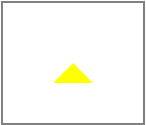
<span style="font-size: 15px;"><span style="color: #800000;">#triangle</span>{<span style="color: #ff0000;">
    width</span>:<span style="color: #0000ff;"> 0px</span>;<span style="color: #ff0000;">
    height</span>:<span style="color: #0000ff;"> 0px</span>;<span style="color: #ff0000;">
    border-width</span>:<span style="color: #0000ff;"> 20px</span>;<span style="color: #ff0000;">
    border-style</span>:<span style="color: #0000ff;"> solid</span>;<span style="color: #ff0000;">
    border-color</span>:<span style="color: #0000ff;"> transparent transparent yellow transparent</span>;
}</span><span style="font-size: 15px;"><span style="color: #008080;"> 1</span> <span style="color: #800000;">#triangle</span>{
<span style="color: #008080;"> 2</span> <span style="color: #ff0000;"> width</span>:<span style="color: #0000ff;"> 0px</span>;
<span style="color: #008080;"> 3</span> <span style="color: #ff0000;"> height</span>:<span style="color: #0000ff;"> 0px</span>;
<strong><span style="color: #008080;"> 4</span> <span style="color: #ff0000;"> *width</span>:<span style="color: #0000ff;"> 40px</span>;
<span style="color: #008080;"> 5</span> <span style="color: #ff0000;"> *height</span>:<span style="color: #0000ff;"> 40px</span>;
<span style="color: #008080;"> 6</span> <span style="color: #ff0000;"> font-size</span>:<span style="color: #0000ff;"> 0</span>;
<span style="color: #008080;"> 7</span> <span style="color: #ff0000;"> line-height</span>:<span style="color: #0000ff;"> 0</span>;
<span style="color: #008080;"> 8</span> <span style="color: #ff0000;"> overflow</span>:<span style="color: #0000ff;"> hidden</span>;</strong>
<span style="color: #008080;"> 9</span> <span style="color: #ff0000;"> border-width</span>:<span style="color: #0000ff;"> 20px</span>;
<strong><span style="color: #008080;">10</span> <span style="color: #ff0000;"> border-style</span>:<span style="color: #0000ff;"> dashed dashed solid dashed</span>;
<span style="color: #008080;">11</span> <span style="color: #ff0000;"> border-color</span>:<span style="color: #0000ff;"> transparent transparent yellow transparent</span>;</strong>
<span style="color: #008080;">12</span> }</span>
t.png) 即在IE下,出现的不是三角形,而是梯形。
即在IE下,出现的不是三角形,而是梯形。

<span style="color: #800000; font-size: 15px;">border-style: solid dashed dashed dashed;
border-color: lightgreen transparent transparent transparent;</span>


<span style="color: #800000; font-size: 15px;">border-style: dashed solid dashed dashed;
border-color: transparent pink transparent transparent;</span>

q.png)
<span style="font-size: 15px;"><span style="color: #008080;"> 1</span> <span style="color: #008000;">/*</span><span style="color: #008000;"> css </span><span style="color: #008000;">*/</span>
<span style="color: #008080;"> 2</span> <span style="color: #800000;">*</span>{
<span style="color: #008080;"> 3</span> <span style="color: #ff0000;">    margin</span>:<span style="color: #0000ff;"> 0px</span>;
<span style="color: #008080;"> 4</span> <span style="color: #ff0000;">    padding</span>:<span style="color: #0000ff;"> 0px</span>;
<span style="color: #008080;"> 5</span> <span style="color: #ff0000;">    text-align</span>:<span style="color: #0000ff;"> center</span>;
<span style="color: #008080;"> 6</span> }
<span style="color: #008080;"> 7</span> <span style="color: #800000;">#container</span>{
<span style="color: #008080;"> 8</span> <span style="color: #ff0000;">    position</span>:<span style="color: #0000ff;"> relative</span>;<span style="color: #ff0000;">  //这句很重要,因为小三角是相对父元素#container来绝对定位的
</span><span style="color: #008080;"> 9</span> <span style="color: #ff0000;">    width</span>:<span style="color: #0000ff;"> 50px</span>;
<span style="color: #008080;">10</span> <span style="color: #ff0000;">    height</span>:<span style="color: #0000ff;"> 40px</span>;
<span style="color: #008080;">11</span> <span style="color: #ff0000;">    border</span>:<span style="color: #0000ff;">1px solid lightblue</span>;
<span style="color: #008080;">12</span> <span style="color: #ff0000;">    margin</span>:<span style="color: #0000ff;"> 200px auto</span>;
<span style="color: #008080;">13</span> <span style="color: #ff0000;">    padding</span>:<span style="color: #0000ff;"> 20px</span>;
<span style="color: #008080;">14</span>
<span style="color: #008080;">15</span> }
<span style="color: #008080;">16</span> <span style="color: #800000;">#chat</span>{
<span style="color: #008080;">17</span> <span style="color: #ff0000;">    width</span>:<span style="color: #0000ff;"> 50px</span>;
<span style="color: #008080;">18</span> <span style="color: #ff0000;">    height</span>:<span style="color: #0000ff;"> 40px</span>;
<span style="color: #008080;">19</span> <span style="color: #ff0000;">    background-color</span>:<span style="color: #0000ff;"> lightblue</span>;
<span style="color: #008080;">20</span> }
<span style="color: #008080;">21</span> <span style="color: #800000;">#triangle</span>{
<span style="color: #008080;">22</span> <span style="color: #ff0000;">    position</span>:<span style="color: #0000ff;"> absolute</span>;<span style="color: #ff0000;">   //设置小三角绝对定位
</span><span style="color: #008080;">23</span> <span style="color: #ff0000;">    width</span>:<span style="color: #0000ff;"> 0px</span>;
<span style="color: #008080;">24</span> <span style="color: #ff0000;">    height</span>:<span style="color: #0000ff;"> 0px</span>;
<span style="color: #008080;">25</span> <span style="color: #ff0000;">    *width</span>:<span style="color: #0000ff;"> 14px</span>;
<span style="color: #008080;">26</span> <span style="color: #ff0000;">    *height</span>:<span style="color: #0000ff;"> 14px</span>;
<span style="color: #008080;">27</span> <span style="color: #ff0000;">    font-size</span>:<span style="color: #0000ff;"> 0</span>;
<span style="color: #008080;">28</span> <span style="color: #ff0000;">    line-height</span>:<span style="color: #0000ff;"> 0</span>;
<span style="color: #008080;">29</span> <span style="color: #ff0000;">    overflow</span>:<span style="color: #0000ff;"> hidden</span>;
<span style="color: #008080;">30</span> <span style="color: #ff0000;">    border-width</span>:<span style="color: #0000ff;"> 7px</span>;
<span style="color: #008080;">31</span> <span style="color: #ff0000;">    border-style</span>:<span style="color: #0000ff;"> dashed dashed dashed solid</span>;
<span style="color: #008080;">32</span> <span style="color: #ff0000;">    border-color</span>:<span style="color: #0000ff;"> transparent transparent transparent lightblue</span>;
<span style="color: #008080;">33</span> <span style="color: #ff0000;">    top</span>:<span style="color: #0000ff;"> 33px</span>;<span style="color: #ff0000;">   //33px:父元素#container的内边距20px + #chat宽度的一半20px - 自身元素#triangle的边宽7px =33px
</span><span style="color: #008080;">34</span> <span style="color: #ff0000;">    left</span>:<span style="color: #0000ff;"> 70px</span>;<span style="color: #ff0000;">  //70px</span>:<span style="color: #0000ff;">  #chat的宽度50px + 父元素#container的内边距20px =70px
</span><span style="color: #008080;">35</span> }</span><span style="font-size: 15px;"><span style="color: #008000;">/*</span><span style="color: #008000;"> html代码 </span><span style="color: #008000;">*/</span><span style="color: #800000;">
<div id="container">
<div id="chat"></div>
<div id="triangle"></div>
</div></span></span>

每个人都需要一台速度更快、更稳定的 PC。随着时间的推移,垃圾文件、旧注册表数据和不必要的后台进程会占用资源并降低性能。幸运的是,许多工具可以让 Windows 保持平稳运行。

Copyright 2014-2025 https://www.php.cn/ All Rights Reserved | php.cn | 湘ICP备2023035733号


 587
587




 收藏
收藏




 取消收藏
取消收藏







