

步骤:
首先打开百度ai 开发平台 注册一个账号:

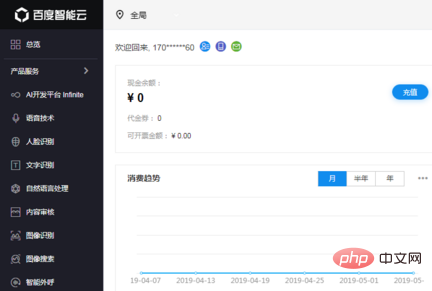
注册账号,进入控制台
立即学习“PHP免费学习笔记(深入)”;
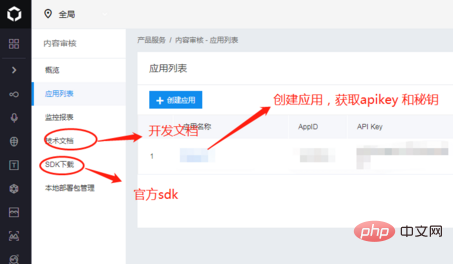
创建自己的应用,获取apikey 和秘钥

Easily find JSON paths within JSON objects using our intuitive Json Path Finder
 193
193

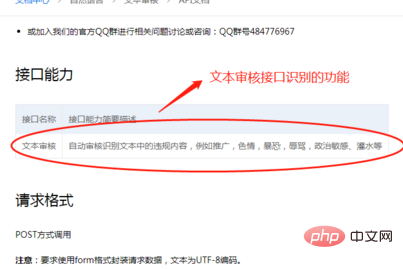
进入文档页 文本审核:
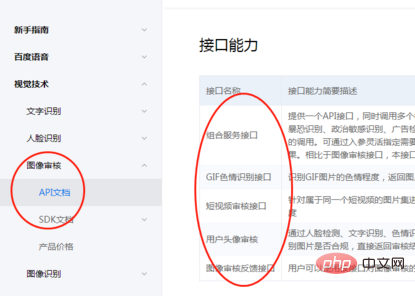
图像审核:
代码实例:
class Sentive
{
  protected $accessTokenUrl = 'https://aip.baidubce.com/oauth/2.0/token';//获取token url
  protected $textUrl = 'https://aip.baidubce.com/rest/2.0/antispam/v2/spam';//文本审核url
  protected $imgUrl = 'https://aip.baidubce.com/api/v1/solution/direct/img_censor';//图片审核url
  protected $avatarUrl = 'https://aip.baidubce.com/rest/2.0/solution/v1/face_audit';//头像审核url
  protected $grant_type;
  protected $client_id;
  protected $client_secret;
  function __construct()
  {
    $this->grant_type = 'client_credentials';
    $this->client_id = 'xxx';//API Key
    $this->client_secret = 'xxx';//Secret Key
  }
  static function request($url = '', $param = '')
  {
    if (empty($url) || empty($param)) {
      return false;
    }
    $postUrl = $url;
    $curlPost = $param;
    $curl = curl_init();//初始化curl
    curl_setopt($curl, CURLOPT_URL, $postUrl);//抓取指定网页
    curl_setopt($curl, CURLOPT_HEADER, 0);//设置header
    curl_setopt($curl, CURLOPT_RETURNTRANSFER, 1);//要求结果为字符串且输出到屏幕上
    curl_setopt($curl, CURLOPT_POST, 1);//post提交方式
    curl_setopt($curl, CURLOPT_POSTFIELDS, $curlPost);
    $data = curl_exec($curl);//运行curl
    curl_close($curl);
    return $data;
  }
  static function request_post($url = '', $param = array(), $type)
  {
    if (empty($url) || empty($param)) {
      return false;
    }
    $postUrl = $url;
    $curlPost = $param;
    $curl = curl_init();
    curl_setopt($curl, CURLOPT_URL, $postUrl);
    curl_setopt($curl, CURLOPT_HEADER, 0);
    // 要求结果为字符串
    curl_setopt($curl, CURLOPT_RETURNTRANSFER, 1);
    // post方式
    curl_setopt($curl, CURLOPT_POST, 1);
    curl_setopt($curl, CURLOPT_SSL_VERIFYPEER, false);
    curl_setopt($curl, CURLOPT_POSTFIELDS, $curlPost);
    if ($type == "text") {
      curl_setopt($curl, CURLOPT_HTTPHEADER, array('Content-Type: application/x-www-form-urlencoded'));
    } else {
      curl_setopt($curl, CURLOPT_HTTPHEADER, array('Content-Type: application/json;charset=utf-8'));
    }
    curl_setopt($curl, CURLINFO_HEADER_OUT, true);
    $data = curl_exec($curl);
    $code = curl_getinfo($curl, CURLINFO_HTTP_CODE);
    if ($code === 0) {
      throw new \Exception(curl_error($curl));
    }
    curl_close($curl);
    return $data;
  }
  //获取token
  public function getToken()
  {
    new Redis();
    $post_data['grant_type'] = $this->grant_type;
    $post_data['client_id'] = $this->client_id;
    $post_data['client_secret'] = $this->client_secret;
    $o = "";
    foreach ($post_data as $k => $v) {
      $o .= "$k=" . urlencode($v) . "&";
    }
    $post_data = substr($o, 0, -1);
    $res = self::request($this->accessTokenUrl, $post_data);
    $redis->setkey("filterToken", json_decode($res, true)['access_token']);
    return json_decode($res, true)['access_token'];
  }
  //文本审核
  public function textVerify($data)
  {
    new Redis();
    $token = $redis->get("filterToken");
    if (empty($token)) {
      $token = $this->getToken();
    }
    $curl = $this->textUrl . "?access_token=" . $token;
    $result = self::request_post($curl, $data, "text");
    return json_decode($result, true);
  }
  //图片审核
  public function imgVerify($img)
  {
    $redis = new Redis();
    $token = $redis->get("filterToken");
    if (empty($token)) {
      $token = $this->getToken();
    }
    $curl = $this->imgUrl . "?access_token=" . $token;
    $bodys = array(
      'image' => $img,
      'scenes' => array("ocr",
        "face", "public", "politician", "antiporn", "terror", "webimage", "disgust",
        'watermark')
    );
    $bodys = json_encode($bodys);
    $result = self::request_post($curl, $bodys, "img");
    return json_decode($result, true);
  }
  //头像审核
  public function avatarVerify($img)
  {
    $redis = new Redis();
    $token = $redis->get("filterToken");
    if (empty($token)) {
      $token = $this->getToken();
    }
    $curl = $this->avatarUrl . "?access_token=" . $token;
    $bodys = array(
      "configId" => "1",
      "images" => $img
    );
    $result = self::request_post($curl, $bodys, "text");
    return json_decode($result, true);
  }
}推荐教程:PHP教程

每个人都需要一台速度更快、更稳定的 PC。随着时间的推移,垃圾文件、旧注册表数据和不必要的后台进程会占用资源并降低性能。幸运的是,许多工具可以让 Windows 保持平稳运行。

Copyright 2014-2025 https://www.php.cn/ All Rights Reserved | php.cn | 湘ICP备2023035733号


 225
225









 收藏
收藏






 取消收藏
取消收藏






