

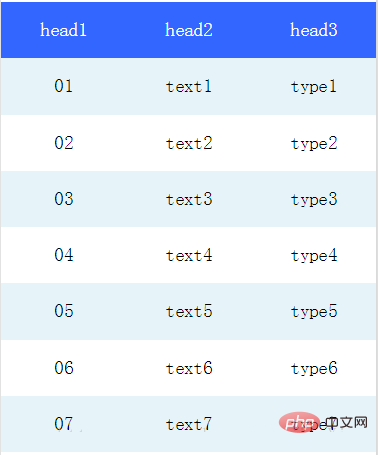
我们可以在微信小程序视图容器view中通过flex布局实现表格样式。
Flex是Flexible Box的缩写,顾名思义为“弹性布局”,用来为盒装模型提供最大的灵活性。
任何一个容器都可以指定为Flex 布局。
table.wxml
<view class="table">
  <view class="tr bg-w">
    <view class="th">head1</view>
    <view class="th">head2</view>
    <view class="th ">head3</view>
  </view>
  <block wx:for="{{listData}}" wx:key="{{code}}">
    <view class="tr bg-g" wx:if="{{index % 2 == 0}}">
      <view class="td">{{item.code}}</view>
      <view class="td">{{item.text}}</view>
      <view class="td">{{item.type}}</view>
    </view>
    <view class="tr" wx:else>
      <view class="td">{{item.code}}</view>
      <view class="td">{{item.text}}</view>
      <view class="td">{{item.type}}</view>
    </view>
  </block>
</view>table.wxss

适合品牌专卖店专用,从前台的美工设计就开始强调视觉形象,有助于提升商品的档次,打造网店品牌!后台及程序核心比较简洁,着重在线购物,去掉了繁琐的代码及垃圾程式,在结构上更适合一些中高档的时尚品牌商品展示. 率先引入语言包机制,可在1小时内制作出任何语言版本,程序所有应用文字皆引自LANG目录下的语言包文件,独特的套图更换功能,三级物品分类,购物车帖心设计,在国内率先将购物车与商品显示页面完美结合,完
 0
0

.table {
  border: 0px solid darkgray;
}
.tr {
  display: flex;
  width: 100%;
  justify-content: center;
  height: 3rem;
  align-items: center;
}
.td {
    width:40%;
    justify-content: center;
    text-align: center;
}
.bg-w{
  background: snow;
}
.bg-g{
  background: #E6F3F9;
}
.th {
  width: 40%;
  justify-content: center;
  background: #3366FF;
  color: #fff;
  display: flex;
  height: 3rem;
  align-items: center;
}table.js
Page({
  data: {
    listData:[
      {"code":"01","text":"text1","type":"type1"},
      {"code":"02","text":"text2","type":"type2"},
      {"code":"03","text":"text3","type":"type3"},
      {"code":"04","text":"text4","type":"type4"},
      {"code":"05","text":"text5","type":"type5"},
      {"code":"06","text":"text6","type":"type6"},
      {"code":"07","text":"text7","type":"type7"}
    ]
  },
  onLoad: function () {
    console.log('onLoad')
  }

})效果图如下
推荐:《小程序开发教程》
以上就是如何在小程序中插入表格的详细内容,更多请关注php中文网其它相关文章!

每个人都需要一台速度更快、更稳定的 PC。随着时间的推移,垃圾文件、旧注册表数据和不必要的后台进程会占用资源并降低性能。幸运的是,许多工具可以让 Windows 保持平稳运行。

 广告
广告Copyright 2014-2025 https://www.php.cn/ All Rights Reserved | php.cn | 湘ICP备2023035733号


 349
349



 收藏
收藏















