




前言:
集群是指通过添加服务器的数量,提供相同的服务,从而让如武器达到一个稳定、高效的状态。为什么要使用redis集群呢?redis集群可以强化的redis的读写能力。
下面我们就来正式学习下redis集群。
准备工作:
需要4个部件:Redis、Ruby语言运行环境、Redis的Ruby驱动redis-xxxx.gem、创建Redis集群的工具redis-trib.rb。使用redis-trib.rb工具来创建Redis集群,由于该文件是用ruby语言写的,所以需要安装Ruby开发环境,以及驱动redis-xxxx.gem。
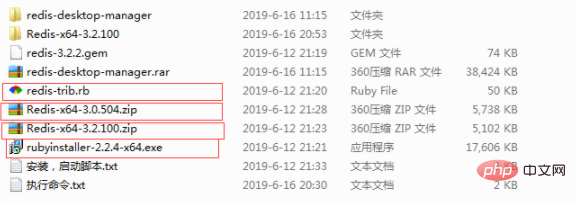
1)下载Redis安装文件:https://github.com/MSOpenTech/redis/releases/,Redis提供msi和zip格式的下载文件,这里下载zip格式Redis-x64-3.2.100版本。
2)下载Ruby安装文件:http://dl.bintray.com/oneclick/rubyinstaller/rubyinstaller-2.2.4-x64.exe
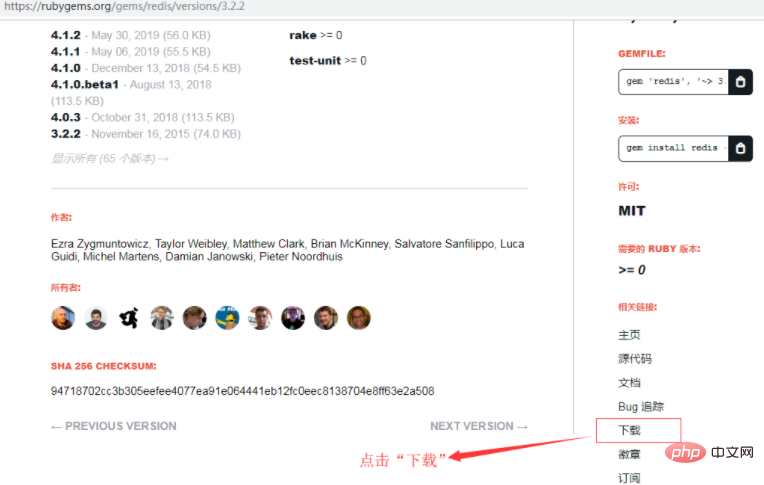
3)下载Ruby环境下Redis的驱动:https://rubygems.org/gems/redis/versions/3.2.2,考虑到兼容性,这里下载的是3.2.2版本
注意:下载在页面右下角相关连接一项中
4)下载Redis官方提供的创建Redis集群的ruby脚本文件redis-trib.rb,路径如下:https://raw.githubusercontent.com/MSOpenTech/redis/3.0/src/redis-trib.rb
安装Redis
将下载到的Redis-x64-3.2.100.zip解压即可,为了方便使用,建议放在盘符根目录下,如:D:\Redis-Cluster\Redis-x64-3.2.100。
安装Redis,并运行3个实例(Redis集群需要至少3个以上节点,低于3个无法创建);
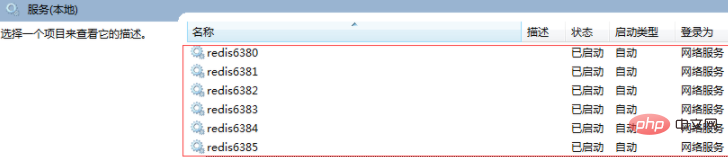
通过配置文件来启动6个不同的Redis实例,由于Redis默认端口为6379,所以这里使用了6380、6381、6382、6383、6384、6385来运行6个Redis实例。
注意:
(1)为了避免不必要的错误,配置文件尽量保存为utf8格式,并且不要包含注释;
(2)配置文件中以下两种保存日志的方式(保存在文件中、保存到System Log中)请根据需求选择其中一种即可:
loglevel notice    #日志的记录级别,notice是适合生产环境的
logfile "D:/Redis-Cluster/Redis-x64-3.2.100/Logs/redis6380_log.txt" #指定log的保持路径,默认是创建在Redis安装目录下,如果有子目录需要手动创建,如此处的Logs目录
syslog-enabled yes    #是否使用系统日志
syslog-ident redis6380    #在系统日志的标识名
这里使用了保存在文件中的方式,所以先在Redis目录D:\Redis-Cluster\Redis-x64-3.2.100下新建Logs文件夹。
在Redis安装根目录下,创建编码格式为utf-8的配置文件:redis.6380.conf、redis.6381.conf、redis.6382.conf、redis.6383.conf、redis.6384.conf、redis.6385.conf。
redis.6380.conf、
port 6380
loglevel notice
logfile "D:/Redis-Cluster/Redis-x64-3.2.100/Logs/redis6380_log.txt"
appendonly yes
appendfilename "appendonly.6380.aof"
cluster-enabled yes
cluster-config-file nodes.6380.conf
cluster-node-timeout 15000
cluster-slave-validity-factor 10
cluster-migration-barrier 1
cluster-require-full-coverage yes
redis.6381.conf、
port 6381
loglevel notice
logfile "D:/Redis-Cluster/Redis-x64-3.2.100/Logs/redis6381_log.txt"
appendonly yes
appendfilename "appendonly.6381.aof"
cluster-enabled yes
cluster-config-file nodes.6381.conf
cluster-node-timeout 15000
cluster-slave-validity-factor 10
cluster-migration-barrier 1
cluster-require-full-coverage yes
redis.6382.conf、
port 6382
loglevel notice
logfile "D:/Redis-Cluster/Redis-x64-3.2.100/Logs/redis6382_log.txt"
appendonly yes
appendfilename "appendonly.6382.aof"
cluster-enabled yes
cluster-config-file nodes.6382.conf
cluster-node-timeout 15000
cluster-slave-validity-factor 10
cluster-migration-barrier 1
cluster-require-full-coverage yes
redis.6383.conf、
port 6383
loglevel notice
logfile "D:/Redis-Cluster/Redis-x64-3.2.100/Logs/redis6383_log.txt"
appendonly yes
appendfilename "appendonly.6383.aof"
cluster-enabled yes
cluster-config-file nodes.6383.conf
cluster-node-timeout 15000
cluster-slave-validity-factor 10
cluster-migration-barrier 1
cluster-require-full-coverage yes
redis.6384.conf、
port 6384
loglevel notice
logfile "D:/Redis-Cluster/Redis-x64-3.2.100/Logs/redis6384_log.txt"
appendonly yes
appendfilename "appendonly.6384.aof"
cluster-enabled yes
cluster-config-file nodes.6384.conf
cluster-node-timeout 15000
cluster-slave-validity-factor 10
cluster-migration-barrier 1
cluster-require-full-coverage yes
redis.6385.conf
port 6385
loglevel notice
logfile "D:/Redis-Cluster/Redis-x64-3.2.100/Logs/redis6385_log.txt"
appendonly yes
appendfilename "appendonly.6385.aof"
cluster-enabled yes
cluster-config-file nodes.6385.conf
cluster-node-timeout 15000
cluster-slave-validity-factor 10
cluster-migration-barrier 1
cluster-require-full-coverage yes
(学习视频分享:redis视频教程)
配置解释如下:
port 6380                                 #端口号
loglevel notice                           #日志的记录级别,notice是适合生产环境的
logfile "Logs/redis6380_log.txt"          #指定log的保持路径,默认是创建在Redis安装目录下,如果有子目录需要手动创建,如此处的Logs目录
syslog-enabled yes                        #是否使用系统日志
syslog-ident redis6380                    #在系统日志的标识名
appendonly yes                            #数据的保存为aof格式
appendfilename "appendonly.6380.aof"      #数据保存文件
cluster-enabled yes                       #是否开启集群
cluster-config-file nodes.6380.conf
cluster-node-timeout 15000
cluster-slave-validity-factor 10
cluster-migration-barrier 1
cluster-require-full-coverage yes
将上述配置文件保存到Redis目录下,并使用这些配置文件安装6个redis服务,命令如下:
D:/Redis-Cluster/Redis-x64-3.2.100/redis-server.exe --service-install D:/Redis-Cluster/Redis-x64-3.2.100/redis.6380.conf --service-name redis6380
D:/Redis-Cluster/Redis-x64-3.2.100/redis-server.exe --service-install D:/Redis-Cluster/Redis-x64-3.2.100/redis.6381.conf --service-name redis6381
D:/Redis-Cluster/Redis-x64-3.2.100/redis-server.exe --service-install D:/Redis-Cluster/Redis-x64-3.2.100/redis.6382.conf --service-name redis6382
D:/Redis-Cluster/Redis-x64-3.2.100/redis-server.exe --service-install D:/Redis-Cluster/Redis-x64-3.2.100/redis.6383.conf --service-name redis6383
D:/Redis-Cluster/Redis-x64-3.2.100/redis-server.exe --service-install D:/Redis-Cluster/Redis-x64-3.2.100/redis.6384.conf --service-name redis6384
D:/Redis-Cluster/Redis-x64-3.2.100/redis-server.exe --service-install D:/Redis-Cluster/Redis-x64-3.2.100/redis.6385.conf --service-name redis6385
注意:
1)redis.6380.conf等配置文件最好使用完整路径,避免重启Redis集群出现问题

2)卸载命令为:
D:/Redis-Cluster/Redis-x64-3.2.100/redis-server.exe --service-uninstall D:/Redis-Cluster/Redis-x64-3.2.100/redis.6380.conf --service-name redis6380
D:/Redis-Cluster/Redis-x64-3.2.100/redis-server.exe --service-uninstall D:/Redis-Cluster/Redis-x64-3.2.100/redis.6381.conf --service-name redis6381
D:/Redis-Cluster/Redis-x64-3.2.100/redis-server.exe --service-uninstall D:/Redis-Cluster/Redis-x64-3.2.100/redis.6382.conf --service-name redis6382
D:/Redis-Cluster/Redis-x64-3.2.100/redis-server.exe --service-uninstall D:/Redis-Cluster/Redis-x64-3.2.100/redis.6383.conf --service-name redis6383
D:/Redis-Cluster/Redis-x64-3.2.100/redis-server.exe --service-uninstall D:/Redis-Cluster/Redis-x64-3.2.100/redis.6384.conf --service-name redis6384
D:/Redis-Cluster/Redis-x64-3.2.100/redis-server.exe --service-uninstall D:/Redis-Cluster/Redis-x64-3.2.100/redis.6385.conf --service-name redis6385
启动这6个服务,命令如下:
D:/Redis-Cluster/Redis-x64-3.2.100/redis-server.exe --service-start --service-name redis6380
D:/Redis-Cluster/Redis-x64-3.2.100/redis-server.exe --service-start --service-name redis6381
D:/Redis-Cluster/Redis-x64-3.2.100/redis-server.exe --service-start --service-name redis6382
D:/Redis-Cluster/Redis-x64-3.2.100/redis-server.exe --service-start --service-name redis6383
D:/Redis-Cluster/Redis-x64-3.2.100/redis-server.exe --service-start --service-name redis6384
D:/Redis-Cluster/Redis-x64-3.2.100/redis-server.exe --service-start --service-name redis6385
执行结果:
安装ruby
(1)Ruby环境安装。
双击下载的“rubyinstaller-2.2.4-x64.exe”安装即可,同样,为了操作方便,也是建议安装在盘符根目录下,如: C:\Ruby22-x64 ,安装时这里选中后两个选项,
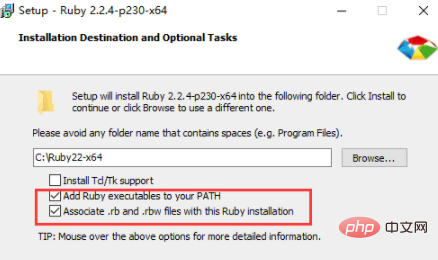
意思是将ruby添加到系统的环境变量中,在cmd命令中能直接使用ruby的命令
(1)安装Ruby环境下Redis的驱动
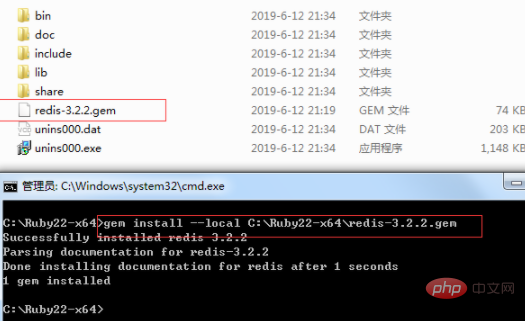
将下载的"Ruby环境下Redis的驱动文件(redis-3.2.2.gem)"拷贝到Ruby安装根目录(C:\Ruby22-x64)下。
然后执行安装命令如下:
gem install --local path_to_gem/filename.gem
创建Redis集群
将下载的“创建Redis集群的ruby脚本文件redis-trib.rb”文件拷贝到Redis安装根目录(D:\Redis-Cluster\Redis-x64-3.2.100)下。
(1)使用redis-trib.rb来创建Redis集群
MD下切换到Redis目录(D:\Redis-Cluster\Redis-x64-3.2.100)
D:/Redis-Cluster/Redis-x64-3.2.100/redis-trib.rb create --replicas 1 127.0.0.1:6380 127.0.0.1:6381 127.0.0.1:6382 127.0.0.1:6383 127.0.0.1:6384 127.0.0.1:6385
D:\Redis-Cluster\Redis-x64-3.2.100>redis-trib.rb create --replicas 1 127.0.0.1:6380 127.0.0.1:6381 127.0.0.1:6382 127.0.0.1:6383 127.0.0.1:6384 127.0.0.1:6385
>>> Creating cluster
Connecting to node 127.0.0.1:6380: OK
Connecting to node 127.0.0.1:6381: OK
Connecting to node 127.0.0.1:6382: OK
Connecting to node 127.0.0.1:6383: OK
Connecting to node 127.0.0.1:6384: OK
Connecting to node 127.0.0.1:6385: OK
>>> Performing hash slots allocation on 6 nodes...
Using 3 masters:
127.0.0.1:6380
127.0.0.1:6381
127.0.0.1:6382
Adding replica 127.0.0.1:6383 to 127.0.0.1:6380
Adding replica 127.0.0.1:6384 to 127.0.0.1:6381
Adding replica 127.0.0.1:6385 to 127.0.0.1:6382
M: bb6ef615bb0ae13275943caec0db9d30b9f35c5e 127.0.0.1:6380   slots:0-5460      (5461 slots) master
M: b4d120f2983ad683f7b68992e1ba414722238db7 127.0.0.1:6381   slots:5461-10922  (5462 slots) master
M: 837779b3965e2c9d4dd4385750aaaaf9a9039fb0 127.0.0.1:6382   slots:10923-16383 (5461 slots) master
S: 5d154137180284d926ef51a91fc75f9438249ef8 127.0.0.1:6383   replicates bb6ef615bb0ae13275943caec0db9d30b9f35c5e
S: ad151680a3e36cf2083ef822be0bdb075a7d36de 127.0.0.1:6384   replicates b4d120f2983ad683f7b68992e1ba414722238db7
S: 9a2260a5a6a2add84b622a453a6a7b86a29d180d 127.0.0.1:6385   replicates 837779b3965e2c9d4dd4385750aaaaf9a9039fb0
Can I set the above configuration? (type 'yes' to accept): yes
>>> Nodes configuration updated
>>> Assign a different config epoch to each node
>>> Sending CLUSTER MEET messages to join the cluster
Waiting for the cluster to join...
>>> Performing Cluster Check (using node 127.0.0.1:6380)M: bb6ef615bb0ae13275943caec0db9d30b9f35c5e 127.0.0.1:6380   slots:0-5460      (5461 slots) master
M: b4d120f2983ad683f7b68992e1ba414722238db7 127.0.0.1:6381   slots:5461-10922  (5462 slots) master
M: 837779b3965e2c9d4dd4385750aaaaf9a9039fb0 127.0.0.1:6382   slots:10923-16383 (5461 slots) master
M: 5d154137180284d926ef51a91fc75f9438249ef8 127.0.0.1:6383   slots:            (0 slots)    master   replicates bb6ef615bb0ae13275943caec0db9d30b9f35c5e
M: ad151680a3e36cf2083ef822be0bdb075a7d36de 127.0.0.1:6384   slots:            (0 slots)    master   replicates b4d120f2983ad683f7b68992e1ba414722238db7
M: 9a2260a5a6a2add84b622a453a6a7b86a29d180d 127.0.0.1:6385   slots:            (0 slots)    master   replicates 837779b3965e2c9d4dd4385750aaaaf9a9039fb0
[OK] All nodes agree about slots configuration.
>>> Check for open slots...
>>> Check slots coverage...
[OK] All 16384 slots covered.
备注:
(1)--replicas #指定集群中每个主节点配备几个从节点,这里设置为1。
(2)redis-trib.rb工具的使用
、create:创建集群
、check:检查集群
、info:查看集群信息
、fix:修复集群
、reshard:在线迁移slot
、rebalance:平衡集群节点slot数量
、add-node:将新节点加入集群
、del-node:从集群中删除节点
、set-timeout:设置集群节点间心跳连接的超时时间
、call:在集群全部节点上执行命令
、import:将外部redis数据导入集群
(2)检验是否真的创建成功
输入以下命令:
redis-trib.rb check 127.0.0.1:6380
如果现实信息如下,则说明创建的Redis集群是没问题。
D:\Redis-Cluster\Redis-x64-3.2.100>redis-trib.rb check 127.0.0.1:6380
Connecting to node 127.0.0.1:6380: OK
Connecting to node 127.0.0.1:6383: OK
Connecting to node 127.0.0.1:6382: OK
Connecting to node 127.0.0.1:6384: OK
Connecting to node 127.0.0.1:6385: OK
Connecting to node 127.0.0.1:6381: OK
>>> Performing Cluster Check (using node 127.0.0.1:6380)
M: bb6ef615bb0ae13275943caec0db9d30b9f35c5e 127.0.0.1:6380   slots:0-5460      (5461 slots) master   1 additional replica(s)
S: 5d154137180284d926ef51a91fc75f9438249ef8 127.0.0.1:6383   slots:            (0 slots)    slave    replicates bb6ef615bb0ae13275943caec0db9d30b9f35c5e
M: 837779b3965e2c9d4dd4385750aaaaf9a9039fb0 127.0.0.1:6382   slots:10923-16383 (5461 slots) master   1 additional replica(s)
S: ad151680a3e36cf2083ef822be0bdb075a7d36de 127.0.0.1:6384   slots:            (0 slots)    slave    replicates b4d120f2983ad683f7b68992e1ba414722238db7
S: 9a2260a5a6a2add84b622a453a6a7b86a29d180d 127.0.0.1:6385   slots:            (0 slots)    slave    replicates 837779b3965e2c9d4dd4385750aaaaf9a9039fb0
M: b4d120f2983ad683f7b68992e1ba414722238db7 127.0.0.1:6381   slots:5461-10922  (5462 slots) master   1 additional replica(s)
[OK] All nodes agree about slots configuration.
>>> Check for open slots...
>>> Check slots coverage...
[OK] All 16384 slots covered.

D:\Redis-Cluster\Redis-x64-3.2.100>
(3)信息查询
使用Redis客户端Redis-cli.exe来查看数据记录数,以及集群相关信息

原文作者:cctext
原文链接:https://www.cnblogs.com/yy3b2007com/p/11033009.html
相关推荐:redis数据库教程




