



在html中,可以使用border-bottom设置文本下面有虚线,只需要给文本元素设置“border-bottom:width dashed color”样式即可。设置元素下边框的样式时,只有当这个值不是none时边框才可能出现。

本教程操作环境:windows7系统、CSS3&&HTML5版、Dell G3电脑。
border-bottom 简写属性把下边框的所有属性设置到一个声明中。
可以按顺序设置如下属性:
-
border-bottom-width
立即学习“前端免费学习笔记(深入)”;
border-bottom-style
border-bottom-color
语法:
border-bottom:width style color;
如果不设置其中的某个值,也不会出问题,比如 border-bottom:solid #ff0000; 也是允许的
设置元素下边框的样式时,只有当这个值不是 none 时边框才可能出现。
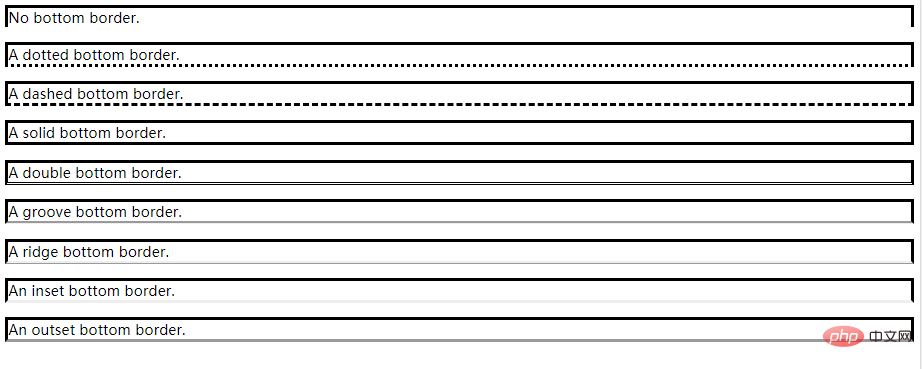
![9S2}HL2[NB@Y_C0]NUCG3O8.png](https://img.php.cn/upload/image/571/510/223/1622787791574564.png "1622787791574564.png")

例子:
No bottom border.
A dotted bottom border.
A dashed bottom border.
A solid bottom border.
A double bottom border.
A groove bottom border.
A ridge bottom border.
An inset bottom border.
An outset bottom border.
效果:
扩展资料:
border-bottom-color 设置元素的下边框的颜色。
只能定义纯色,而且只有当边框的样式是一个非 none 或 hidden 的值时边框才可能出现。
注释:请始终把 border-style 属性声明到 border-color 属性之前。元素必须在您改变其颜色之前获得边框。
属性值:
推荐学习:html视频教程




