
css中可利用font-weight属性来让元素不加粗,写法为“元素{font-weight:normal;}”;font-weight属性用于设置文本的粗细样式,当值设置为“normal”时,元素会被设成标准字符样式,也就是不加粗的样式。
本教程操作环境:windows10系统、CSS3&&HTML5版、Dell G3电脑。
css中不加粗怎么写
在css中可以利用font-weight属性来给元素设置不加粗的样式,font-weight属性用于设置文本的粗细。
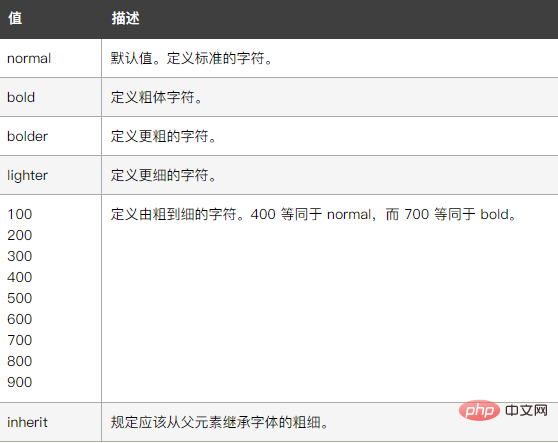
属性值如下图所示:
立即学习“前端免费学习笔记(深入)”;
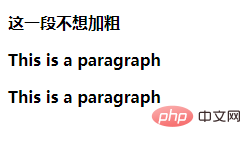
下面我们通过示例来看一下怎样使元素不加粗,示例如下:
<!DOCTYPE html>
<html lang="en">
<head>
    <meta charset="UTF-8">
    <meta name="viewport" content="width=device-width, initial-scale=1.0">
    <meta http-equiv="X-UA-Compatible" content="ie=edge">
    <title>Document</title>
    <style type="text/css">
p {font-weight: bold}
</style>
</head>
<body>
<p class="normal">这一段不想加粗</p>
<p>This is a paragraph</p>
                    <div class="aritcle_card">
                        <a class="aritcle_card_img" href="/xiazai/code/10565">
                            <img src="https://img.php.cn/upload/webcode/000/000/020/176275440895265.jpg" alt="玻璃钢企业网站源码1.5">
                        </a>
                        <div class="aritcle_card_info">
                            <a href="/xiazai/code/10565">玻璃钢企业网站源码1.5</a>
                            <p>本程序源码为asp与acc编写,并没有花哨的界面与繁琐的功能,维护简单方便,只要你有一些点点asp的基础,二次开发易如反掌。  1.功能包括产品,新闻,留言簿,招聘,下载,...是大部分中小型的企业建站的首选。本程序是免费开源,只为大家学习之用。如果用于商业,版权问题概不负责。1.采用asp+access更加适合中小企业的网站模式。 2.网站页面div+css兼容目前所有主流浏览器,ie6+,Ch</p>
                            <div class="">
                                <img src="/static/images/card_xiazai.png" alt="玻璃钢企业网站源码1.5">
                                <span>1</span>
                            </div>
                        </div>
                        <a href="/xiazai/code/10565" class="aritcle_card_btn">
                            <span>查看详情</span>
                            <img src="/static/images/cardxiayige-3.png" alt="玻璃钢企业网站源码1.5">
                        </a>
                    </div>

<p>This is a paragraph</p>
</body>
</html>输出结果:
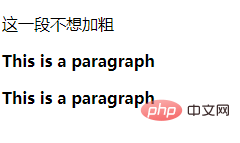
此时并不想让其中一段话加粗,只需要给这段话添加font-weight: normal样式即可:
<!DOCTYPE html>
<html lang="en">
<head>
    <meta charset="UTF-8">
    <meta name="viewport" content="width=device-width, initial-scale=1.0">
    <meta http-equiv="X-UA-Compatible" content="ie=edge">
    <title>Document</title>
    <style type="text/css">
p {font-weight: bold}
p.normal {font-weight: normal}
</style>
</head>
<body>
<p class="normal">这一段不想加粗</p>
<p>This is a paragraph</p>
<p>This is a paragraph</p>
</body>
</html>输出结果:
(学习视频分享:css视频教程)
以上就是css中不加粗怎么写的详细内容,更多请关注php中文网其它相关文章!

每个人都需要一台速度更快、更稳定的 PC。随着时间的推移,垃圾文件、旧注册表数据和不必要的后台进程会占用资源并降低性能。幸运的是,许多工具可以让 Windows 保持平稳运行。

 广告
广告Copyright 2014-2025 https://www.php.cn/ All Rights Reserved | php.cn | 湘ICP备2023035733号


 658
658








 收藏
收藏







 取消收藏
取消收藏







