
消息队列:是在消息传输过程中保存消息的容器。msmq是microsoft的消息处理技术,运行平台为microsoft windows操作系统。它分为用户队列和系统队列。在用户队列中又分为专用队列:不在整个网络中发布,仅在所驻留的本地计算机上可用。专用队列只能由知道队列的完整路径名或标签的用户程序访问。
关于消息队列的安装,可以通过控制面板->添加/删除程序->添加/删除 windows 组件。
选择“消息队列”并单击“详细信息”。
如果运行的是 Windows Server 2003,请选择“应用程序服务器”来访问消息队列。
确保包括“MSMQ HTTP 支持”在内的所有选项在详细信息页上均处于选定状态。
单击“确定”退出详细信息页,然后单击“下一步”。完成安装。
这里我们通过实例来说明如何创建队列、发送消息、接收消息。
创建队列:
创建本机队列:@".\private$\队列名称"
创建远程队列:@"FormatName:DIRECT=TCP:远程机器IP\private$\队列名称"
实例化消息队列
        /// <summary>
        /// </summary>
        /// <param name="isLocalComputer">是否为本机</param>
        public MSMQManager(bool isLocalComputer)
        {
            if (isLocalComputer)
            {
                _path = @".\private$\" + (ConfigurationManager.AppSettings["MSMQName"] ?? "CSMSMQ");
            }
            else
            {
                _path = @"FormatName:DIRECT=TCP:192.168.1.125\private$\" + (ConfigurationManager.AppSettings["MSMQName"] ?? "CSMSMQ");
            }
            _msmq = new MessageQueue(_path);
}创建队列
        /// <summary>
        /// 创建队列
        /// </summary>
        /// <param name="transactional">是否启用事务</param>
        /// <returns></returns>
        public bool Create(bool transactional)
        {
            if (MessageQueue.Exists(@".\private$\" + (ConfigurationManager.AppSettings["MSMQName"] ?? "CSMSMQ")))
            {
                return true;
            }
            else
            {
                if (MessageQueue.Create(@".\private$\" + (ConfigurationManager.AppSettings["MSMQName"] ?? "CSMSMQ"), transactional) != null)
                {
                    return true;
                }
                else
                {
                    return false;
                }
            }
}发送消息队列
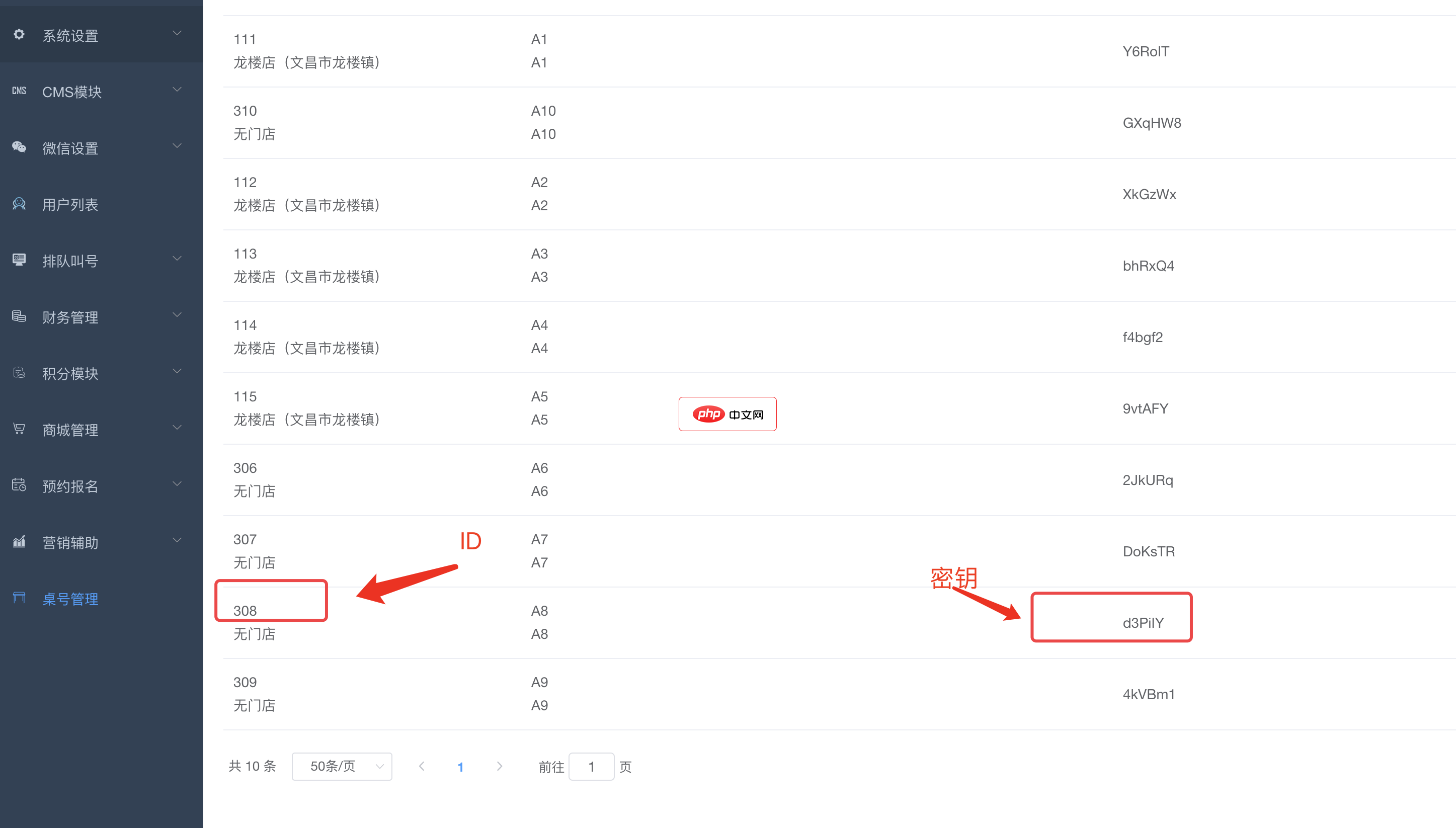
bee餐饮点餐外卖小程序是针对餐饮行业推出的一套完整的餐饮解决方案,实现了用户在线点餐下单、外卖、叫号排队、支付、配送等功能,完美的使餐饮行业更高效便捷!功能演示:1、桌号管理登录后台,左侧菜单 “桌号管理”,添加并管理你的桌号信息,添加以后在列表你将可以看到 ID 和 密钥,这两个数据用来生成桌子的二维码2、生成桌子二维码例如上面的ID为 308,密钥为 d3PiIY,那么现在去左侧菜单微信设置
 3
3

        /// <summary>
        /// 发送消息队列
        /// </summary>
        /// <param name="msmqIndex">消息队列实体</param>
        /// <returns></returns>
        public void Send(MSMQIndex msmqIndex)
        {
            _msmq.Send(new Message(msmqIndex, new BinaryMessageFormatter()));
}接收消息队列,删除队列
        /// <summary>
        /// 接收消息队列,删除队列
        /// </summary>
        /// <returns></returns>
        public MSMQIndex ReceiveAndRemove()
        {
            MSMQIndex msmqIndex = null;
            _msmq.Formatter = new BinaryMessageFormatter();
            Message msg = null;
            try
            {
                msg = _msmq.Receive(new TimeSpan(0, 0, 1));
            }
            catch(Exception ex)
            {
                Console.WriteLine(ex.Message);
            }
            if (msg != null)
            {
                msmqIndex = msg.Body as MSMQIndex;
            }
            return msmqIndex;
}以上代码大致说明了消息队列的创建、发送与接收,下面给出消息队列管理器的全部代码。并在附件中给出DEMO,在您安装完成消息队列后,此DEMO可以正常运行,希望对有这方面需求的人有所帮助。
消息队列管理器
using System;
using System.Collections.Generic;
using System.Text;
using System.Messaging;
using System.Configuration;
namespace MSMQTest.Model
{
    ///
    /// 消息队列管理器
    /// 作者:心海巨澜 xinhaijulan@gmail.com
    ///
    public class MSMQManager : IDisposable
    {
        #region 字段与属性
        private MessageQueue _msmq = null;
        private string _path;

        private static MSMQManager _instanceLocalComputer = new MSMQManager(true);
        ///
        /// 本机消息队列实例
        ///
        public static MSMQManager InstanceLocalComputer
        {
            get { return MSMQManager._instanceLocalComputer; }
        }
        private static MSMQManager _instance = new MSMQManager(false);
        ///
        /// 远程消息队列实例
        ///
        public static MSMQManager Instance
        {
            get { return MSMQManager._instance; }
        }
        #endregion
        /// <summary>
        /// 创建队列
        /// </summary>
        /// <param name="transactional">是否启用事务</param>
        /// <returns></returns>
        public bool Create(bool transactional)
        {
            if (MessageQueue.Exists(@".\private$\" + (ConfigurationManager.AppSettings["MSMQName"] ?? "CSMSMQ")))
            {
                return true;
            }
            else
            {
                if (MessageQueue.Create(@".\private$\" + (ConfigurationManager.AppSettings["MSMQName"] ?? "CSMSMQ"), transactional) != null)
                {
                    return true;
                }
                else
                {
                    return false;
                }
            }
        }
        ///
        /// 实例化消息队列
        ///
        /// 是否为本机
        public MSMQManager(bool isLocalComputer)
        {
            if (isLocalComputer)
            {
                _path = @".\private$\" + (ConfigurationManager.AppSettings["MSMQName"] ?? "CSMSMQ");
            }
            else
            {
                _path = @"FormatName:DIRECT=TCP:192.168.1.125\private$\" + (ConfigurationManager.AppSettings["MSMQName"] ?? "CSMSMQ");
            }
            _msmq = new MessageQueue(_path);
        }
        /// <summary>
        /// 发送消息队列
        /// </summary>
        /// <param name="msmqIndex">消息队列实体</param>
        /// <returns></returns>
        public void Send(MSMQIndex msmqIndex)
        {
            _msmq.Send(new Message(msmqIndex, new BinaryMessageFormatter()));
        }
        /// <summary>
        /// 接收消息队列,删除队列
        /// </summary>
        /// <returns></returns>
        public MSMQIndex ReceiveAndRemove()
        {
            MSMQIndex msmqIndex = null;
            _msmq.Formatter = new BinaryMessageFormatter();
            Message msg = null;
            try
            {
                msg = _msmq.Receive(new TimeSpan(0, 0, 1));
            }
            catch(Exception ex)
            {
                Console.WriteLine(ex.Message);
            }
            if (msg != null)
            {
                msmqIndex = msg.Body as MSMQIndex;
            }
            return msmqIndex;
        }
        #region IDisposable Members
        public void Dispose()
        {
            if (_msmq != null)
            {
                _msmq.Close();
                _msmq.Dispose();
                _msmq = null;
            }
        }
        #endregion
    }
}此DEMO只是消息队列的介绍与使用,还有一些消息队列概念未加说明,比如:
消息队列的创建方式:通过路径、通过格式名、通过标签;
消息队列接收方式:同步与异步;
消息队列序列化:字符、XML、二进制;
以及是否使用事务等。

每个人都需要一台速度更快、更稳定的 PC。随着时间的推移,垃圾文件、旧注册表数据和不必要的后台进程会占用资源并降低性能。幸运的是,许多工具可以让 Windows 保持平稳运行。

Copyright 2014-2025 https://www.php.cn/ All Rights Reserved | php.cn | 湘ICP备2023035733号


 6363
6363




 收藏
收藏













