



jsp是最早的模板技术,用来处理视图层的,用来做数据显示的模板
B S结构:
B:浏览器:用来显示数据,发送请求,没有处理能力
发送一个请求,访问a.jsp,a.jsp在服务器端变成Servlet,在将输出的数据返回给浏览器,浏览器就可以看到结果数据,jsp最终翻译过来也是个html页面
模板技术你就可以把它们当成字符串的替换,比如说:这里{data}这里有一个字符串,你把它换成固定值其他值,但是这个替换有一些附加的功能,通过模板技术处理视图层的内容

第一个例子:
pom.xml:Thymeleaf依赖:
    4.0.0

        org.springframework.boot
        spring-boot-starter-parent
        2.7.1


    com.bjpowernode
    027-thymeleaf-first
    0.0.1-SNAPSHOT

        1.8


            org.springframework.boot
            spring-boot-starter-thymeleaf


            org.springframework.boot
            spring-boot-starter-web


            org.springframework.boot
            spring-boot-starter-test
            test


                org.springframework.boot
                spring-boot-maven-plugin
创建Controller控制器:HelloThymeleafController:
package com.bjpowernode.controller;
import org.springframework.stereotype.Controller;
import org.springframework.web.bind.annotation.RequestMapping;
import javax.servlet.http.HttpServletRequest;
@Controller
public class HelloThymeleafController {
    @RequestMapping("/hello")
    public String helloThymeleaf(HttpServletRequest request){
        //添加数据到request作用域,模板引擎可以从request中获取数据
        request.setAttribute("data","欢迎使用Thymeleaf模板引擎");
        //指定视图 模板引擎使用的页面(html)
        //逻辑名称
        return "hello";
    }
}
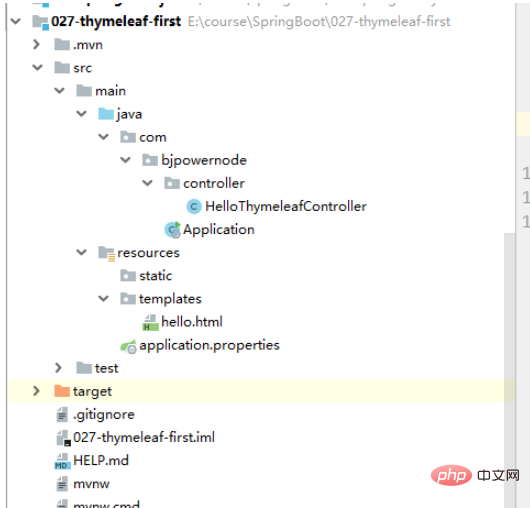
templates:用来放模板用到的视图文件的,模板引擎用到的模板到放在了template目录之下:
本书将PHP开发与MySQL应用相结合,分别对PHP和MySQL做了深入浅出的分析,不仅介绍PHP和MySQL的一般概念,而且对PHP和MySQL的Web应用做了较全面的阐述,并包括几个经典且实用的例子。 本书是第3版,经过了全面的更新、重写以及扩展,包括PHP5的最新特性——新的对象模型、更好的异常处理和SimpleXML;以及MySQL 5的新特性,例如存储过程和存储引擎。 PHP
创建hello.html:
    hello html


   使用Thymeleaf的例子

   想显示数据
运行主启动类Application:
package com.bjpowernode;
import org.springframework.boot.SpringApplication;
import org.springframework.boot.autoconfigure.SpringBootApplication;
@SpringBootApplication
public class Application {
    public static void main(String[] args) {
        SpringApplication.run(Application.class, args);
    }
}
可以在hello.html中加入:未解决在标签中th爆红,和写的时候没有提示信息
xmlns:th="http://www.thymeleaf.org" 在标签中,再次写th的时候就有提示记录了
    hello html


   使用Thymeleaf的例子

   想显示数据
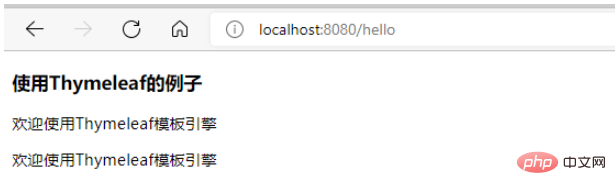
   显示
使用Model:
在Controller:
package com.bjpowernode.controller;
import org.springframework.stereotype.Controller;
import org.springframework.ui.Model;
import org.springframework.web.bind.annotation.RequestMapping;
import javax.servlet.http.HttpServletRequest;
@Controller
public class HelloThymeleafController {
    @RequestMapping("/hello")
    public String helloThymeleaf(Model model, HttpServletRequest request){
        //添加数据到request作用域,模板引擎可以从request中获取数据
        request.setAttribute("data","欢迎使用Thymeleaf模板引擎");
        //使用model和request作用域是一样的 实际上model中的数据就是放到request作用域中的
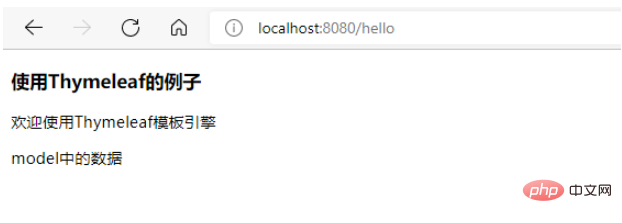
        model.addAttribute("mydata","model中的数据");
        //指定视图 模板引擎使用的页面(html)
        //逻辑名称
        return "hello";
    }
}
hello.html:
    hello html


   使用Thymeleaf的例子

   想显示数据
   显示
speingboot配置文件application.properties:模板引擎的常用相关设置,基本不用设置都是默认的:
#在开发阶段,关闭模板发缓存,让修改立即生效 设置为true时,就是使用模板缓存,当第二次访问的时候,使用内存中的数据,就不在解析模板了spring.thymeleaf.cache=false#编码格式spring.thymeleaf.encoding=UTF-8#模板的类型(默认是 html,模板是html文件 它不仅支持网页做模板还支持其他类别的)spring.thymeleaf.model=HTML#模板的前缀:默认是类路径的classpath:/templates目录下spring.thymeleaf.prefix=classpath:/templates/#后缀spring.thymeleaf.suffix=.html




