



前言
我们要注意区分 axios 和 ajax :
Ajax 是一种技术统称,技术内容包括:HTML 或 XHTML, CSS, JavaScript, DOM, XML, XSLT, 以及最重要的XMLHttpRequest,用于浏览器与服务器之间使用异步数据传输(HTTP 请求),做到局部请求以实现局部刷新,使用是基于 XMLHttpRequest 进行使用;
Axios 是 一个基于 promise 的 HTTP 库,是一个是第三方库
主要技术栈:vue3,ts,axios,mock.js,elementPlus
一、axios 的依赖安装与处理
1. 依赖安装
使用异步网络请求肯定离不开loading、message 等提示,今天我们配合 elementPlus 一起使用;
立即学习“前端免费学习笔记(深入)”;
// 安装axios
npm install axios --save

// 安装 elementPlus
npm install element-plus --save
2. 全局 axios 封装
src 目录下 utils 目录下,新建 request.ts,因为使用的是TS,需要提前定义数据格式:定义请求数据返回的格式,需要提前确认好定义 axios 基础配置信息请求拦截器:所有请求最先到达的地方,我们可以在此自定义请求头信息(比如:token、多语言等等)响应拦截器:返回数据最先到达的地方,我们可以在此处理异常信息(比如:code为401重定向至登录、code为500提示错误信息)
import axios, { AxiosInstance, AxiosError, AxiosRequestConfig, AxiosResponse } from "axios";
import { ElMessage, ElLoading, ElMessageBox } from "element-plus";

// response interface { code, msg, success }
// 不含 data
interface Result {
    code: number,
    success: boolean,
    msg: string
}

// request interface,包含 data
interface ResultData extends Result {
    data?: T
}

enum RequestEnums {
    TIMEOUT = 10000, // 请求超时 request timeout
    FAIL = 500, // 服务器异常 server error
    LOGINTIMEOUT = 401, // 登录超时 login timeout
    SUCCESS = 200, // 请求成功 request successfully
}

// axios 基础配置
const config = {
    // 默认地址,可以使用 process Node内置的,项目根目录下新建 .env.development
    baseURL: process.env.VUE_APP_BASE_API as string,
    timeout: RequestEnums.TIMEOUT as number, // 请求超时时间
    withCredentials: true, // 跨越的时候允许携带凭证
}

class Request {
    service: AxiosInstance;

    constructor(config: AxiosRequestConfig) {
        // 实例化 serice
        this.service = axios.create(config);

        /**
         * 请求拦截器
         * request -> { 请求拦截器 } -> server
         */
        this.service.interceptors.request.use(
            (config: AxiosRequestConfig) => {
                const token = localStorage.getItem('token') ?? '';
                return {
                    ...config,
                    headers: {
                        'customToken': "customBearer " + token
                    }
                }
            },
            (error: AxiosError) => {
                // 请求报错
                Promise.reject(error)
            }
        );

        /**
         * 响应拦截器
         * response -> { 响应拦截器 } -> client
         */
        this.service.interceptors.response.use(
            (response: AxiosResponse) => {
                const { data, config } = response;
                if (data.code === RequestEnums.LOGINTIMEOUT) {
                    // 表示登录过期,需要重定向至登录页面
                    ElMessageBox.alert("Session expired", "System info", {
                        confirmButtonText: 'Relogin',
                        type: 'warning'
                    }).then(() => {
                        // 或者调用 logout 方法去处理
                        localStorage.setItem('token', '');
                        location.href = '/'
                    })
                }
                if (data.code && data.code !== RequestEnums.SUCCESS) {
                    ElMessage.error(data);
                    return Promise.reject(data);
                }
                return data
            },
            (error: AxiosError) => {
                const { response } = error;
                if (response) {
                    this.handleCode(response.status);
                }
                if (!window.navigator.onLine) {
                    ElMessage.error("网络连接失败,请检查网络");
                    // 可以重定向至404页面
                }
            }

        )
    }

    public handleCode = (code: number): void => {
        switch (code) {
            case 401:
                ElMessage.error("登陆失败,请重新登录");
                break;
            case 500:
                ElMessage.error("请求异常,请联系管理员");
                break;
            default:
                ElMessage.error('请求失败');
                break;
        }
    }

    // 通用方法封装
    get(url: string, params?: object): Promise> {
        return this.service.get(url, { params });
    }

    post(url: string, params?: object): Promise> {
        return this.service.post(url, params);
    }
    put(url: string, params?: object): Promise> {
        return this.service.put(url, params);
    }
    delete(url: string, params?: object): Promise> {
        return this.service.delete(url, { params });
    }
}

export default new Request(config)
3. 实际使用
src 目录下新增 api/index.ts
定义请求的参数类型
定义响应想具体参数类型
这里我们使用到ts 中的 namespace ,实际开发中我们很多 api 可能会出现相同名字不同含义,所以我们使用 namespace 进行定义
import request from "@/utils/request";

namespace User {
    // login
    export interface LoginForm {
        userName: string,
        password: string
    }
}


export namespace System {


    export interface Info {
        path: string,
        routeName: string
    }


    export interface ResponseItem {
        code: number,
        items: Array,
        success: boolean
    }

    export interface Sidebar {
        id: number,
        hashId: string | number,
        title: string,
        routeName: string,
        children: Array,
    }

    export interface SidebarItem {
        id: number,
        parentId: number,
        hashId: string | number,
        title: string,
    }
}

export const info = (params: System.Info) => {
    // response
    if (!params || !params.path) throw new Error('Params and params in path can not empty!')
    // 这里因为是全局的一个info,根据路由地址去请求侧边栏,所需不用把地址写死
    return request.post(params.path, { routeName: params.routeName })
}
Vue 文件中调用

二、 mock.js 的依赖安装与处理
1. 安装依赖
# 安装
npm install mockjs --save
在 ts 中使用时,我们需要现在 shims-vue.d.ts 文件中去抛出模块,不然会出现引入报错的问题
/* eslint-disable */
declare module '*.vue' {
  import type { DefineComponent } from 'vue'
  const component: DefineComponent<{}, {}, any>
  export default component
}

declare module 'mockjs';
2. 新建 mock 所需的文件
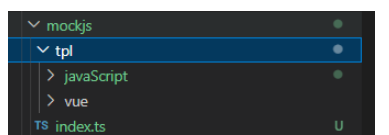
index.ts(属于mockjs全局配置文件),mockjs/javaScript/index.ts(具体的数据文件),这两个需要关注,别的不用关注
1. 新建 mockjs/javaScript/index.ts(具体的数据文件)
因为我这里的数据主要是 侧边栏的数据,都是固定好的,所以并没有用到 mockjs 的规则生成数据
import { GlobalSidebar, Sidebar } from "../../sidebar";

namespace InfoSidebar {
    export type InfoSidebarParams = {
        body: string,
        type: string,
        url: string
    }
}

const dataSource: Array = [
    {
        mainTitle: 'JavaScript基础问题梳理',
        mainSidebar: [
            {
                id: 0,
                hashId: 'This',
                title: 'this指向',
                routeName: 'JsBasic',
                children: [
                    {
                        id: 1,
                        parentId: 0,
                        hashId: 'GlobalFunction',
                        title: '全局函数'
                    },
                    {
                        id: 2,
                        parentId: 0,
                        hashId: 'ObjectMethod',
                        title: '对象方法'
                    },
                    {
                        id: 3,
                        parentId: 0,
                        hashId: 'Constructor',
                        title: '构造函数'
                    },
                    {
                        id: 4,
                        parentId: 0,
                        hashId: 'SetTimeout',
                        title: '定时器、回调函数'
                    },
                    {
                        id: 5,
                        parentId: 0,
                        hashId: 'EventFunction',
                        title: '事件函数'
                    },
                    {
                        id: 6,
                        parentId: 0,
                        hashId: 'ArrowFunction',
                        title: '箭头函数'
                    },
                    {
                        id: 7,
                        parentId: 0,
                        hashId: 'CallApplyBind',
                        title: 'call、apply、bind'
                    },
                ]
            },
            {
                id: 2,
                hashId: 'DeepClone',
                title: '深拷贝和浅拷贝',
                routeName: 'JsBasic',
                children: []
            }
        ]
    },
];

export default {
    name: 'jsBasicInfo',
    jsBasicInfo(params: InfoSidebar.InfoSidebarParams) {
        const param = JSON.parse(params.body)
        if (!param) throw new Error("Params can not empty!");
        const data = dataSource.find((t: GlobalSidebar) => {
            return t.mainSidebar.filter((x: Sidebar) => {
                return x.routeName === param.routeName
            })
        })
        return {
            data,
            success: true,
            code: 200
        }
    }
}
Sidebar.ts
/**
 * @param { number } id Unique value
 * @param { string } hashId href Unique value
 * @param { string } title show current title
 * @param { string } routeName page find data
 */

interface GlobalSidebar {
    mainTitle: string,
    mainSidebar: Array
}

interface Sidebar {
    id: number,
    hashId: string | number,
    title: string,
    routeName: string,
    children: Array,
}

interface SidebarItem {
    id: number,
    parentId: number,
    hashId: string | number,
    title: string,
}

export {
    GlobalSidebar,
    Sidebar,
    SidebarItem
}
2. 新建 mockjs/index.ts
import Mock from "mockjs";
import jsBasicInfo from "./tpl/javaScript/index";
const requestMethod = 'post';
const BASE_URL = process.env.VUE_APP_BASE_API;
const mocks = [jsBasicInfo];

for (let i of mocks) {
    Mock.mock(BASE_URL + '/' + i.name, requestMethod, i.jsBasicInfo);
}

export default Mock
3. main.ts 引入
import { createApp } from 'vue'
import App from './App.vue'

if(process.env.NODE_ENV == 'development'){
    require('./mockjs/index')
}

const app = createApp(App);
app.mount('#app');
三、结合使用
实际上就是刚刚调用axios 的那一段代码




