



一、Java链接MongoDB
1. 导入mongo驱动包
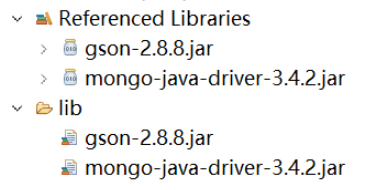
2. 获取Mongo链接对象
MongoClient mc = new MongoClient("localhost",27017);3. 关闭链接
mc.close();
二、查看库,查看集合
1. 获取库对象
立即学习“Java免费学习笔记(深入)”;
MongoDatabase db = mc.getDatabase("myschool");2. 获取库中表的集合
MongoIterablelistCollectionNames = db.listCollectionNames(); MongoCursor iterator = listCollectionNames.iterator(); while (iterator.hasNext()) { System.out.println(iterator.next()); }
三、Java对MongoDB增删改查
1. 添加数据
a. 添加一条数据
//创建对象
Student s = new Student();
s.setSid(1);
s.setSname("王俊凯");
s.setBirthday(new Date());
s.setSsex("男");
s.setClassid(2);

//将数据转换为json格式
Gson gson = new GsonBuilder().setDateFormat("yyyy-MM-dd").create();
String json = gson.toJson(s);

//获取集合对象
MongoCollection collection = db.getCollection("student");

//添加一条数据,将json格式转换为document对象
collection.insertOne(Document.parse(json));
b. 添加多条数据
//存入数据 Listdlist=new ArrayList (); for(int i=0; i<3; i++){ Student s = new Student(); s.setSid(Integer.toString(i+1)); s.setSname("王源"); s.setBirthday(new Date()); s.setSsex("男"); s.setClassid(1); //将数据转换为json格式 Gson gson = new GsonBuilder().setDateFormat("yyyy-MM-dd").create(); String json = gson.toJson(s); dlist.add(Document.parse(json)); } //获取集合对象 MongoCollection collection = db.getCollection("student"); //添加多条数据 collection.insertMany(dlist);
2. 删除数据
a. 删除一条数据

//获取集合对象 MongoCollectioncollection = db.getCollection("student"); Student s = new Student(); s.setSid(1); Gson gson = new GsonBuilder().setDateFormat("yyyy-MM-dd").create(); Bson bson = Document.parse(gson.toJson(s)); DeleteResult deleteOne = collection.deleteOne(bson);
b. 删除多条数据
//获取集合对象 MongoCollectioncollection = db.getCollection("student"); Student s = new Student(); s.setSname("王源"); Gson gson = new GsonBuilder().setDateFormat("yyyy-MM-dd").create(); Bson bson = Document.parse(gson.toJson(s)); DeleteResult deleteMany = collection.deleteMany(bson);
3. 修改数据
a. 修改一条数据
MongoCollectioncollection = db.getCollection("student"); //一个条件对象 Bson eq = Filters.eq("sname","易烊千玺"); //要修改的数据 Document doc = new Document(); doc.put("$set", new Document("age",22)); UpdateResult updateone = collection.updateOne(eq, doc); System.out.println(updateone);
b. 修改多条数据
MongoCollectioncollection = db.getCollection("student"); //多条件 Bson bson = Filters.and(Filters.gte("age", 20),Filters.lte("age", 40)); //要修改的数据 Document doc = new Document(); doc.put("$set", new Document("sex","男")); UpdateResult updateMany = collection.updateMany(bson, doc); System.out.println(updateMany);
4. 查询数据
a. 全查
MongoCollectioncollection = db.getCollection("student"); FindIterable findAll = collection.find(); MongoCursor iterator = findAll.iterator(); while(iterator.hasNext()){ System.out.println(iterator.next()); }
b. 带条件查询
MongoCollectioncollection = db.getCollection("student"); //一个条件对象 Bson eq = Filters.eq("sname","易烊千玺"); FindIterable findOne = collection.find(eq); MongoCursor iterator = findOne.iterator(); while(iterator.hasNext()){ System.out.println(iterator.next()); }
c. 模糊查询
MongoCollectioncollection = db.getCollection("student"); //使用正则表达式进行模糊查找 Bson eq = Filters.regex("sname","易"); FindIterable find = collection.find(eq); MongoCursor iterator = find.iterator(); while(iterator.hasNext()){ System.out.println(iterator.next()); }
d. 分页查询
MongoCollectioncollection = db.getCollection("student"); //分页查询 FindIterable find = collection.find().skip(2).limit(3); MongoCursor iterator = find.iterator(); while(iterator.hasNext()){ System.out.println(iterator.next()); }
e. 排序查询
MongoCollectioncollection = db.getCollection("student"); //排序查询 1升序 -1降序 Bson bson = new Document("sid",1); FindIterable find = collection.find().sort(bson); MongoCursor iterator = find.iterator(); while(iterator.hasNext()){ System.out.println(iterator.next()); }





