



操作
首先nginx不是自己部署,要先启动一下
docker start nginx

发现打印出了nginx 但是 docker ps 发现 nginx还是启动失败
于是准备查看日志
docker logs -f nginx
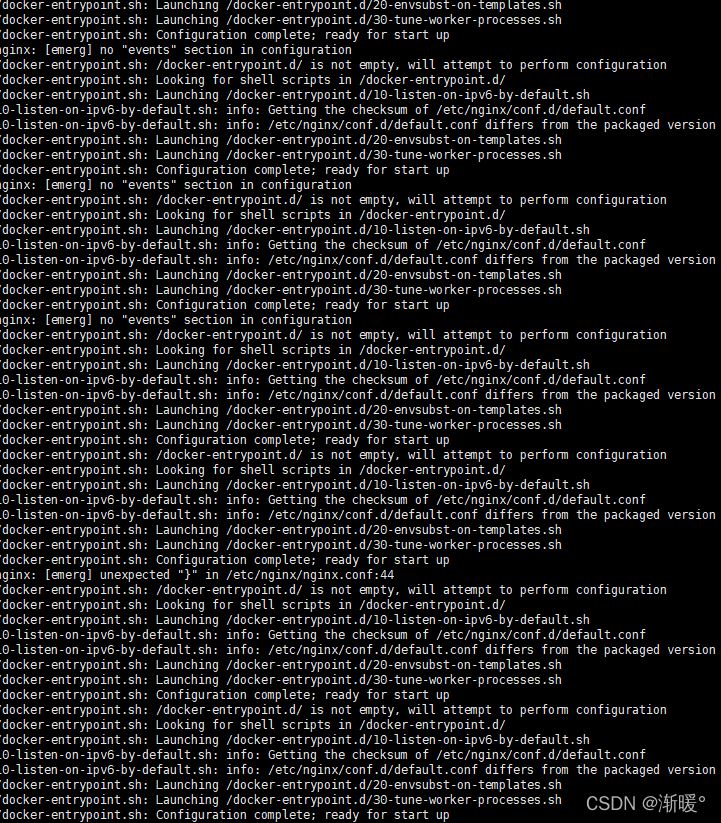
报了一堆错误,也不知道是什么时候打的日志,后来解决之后猜测是因为配置文件为空的原因,因为没有找到event模块
所以首先看一下nginx的容器信息
docker inspect nginx

找到挂载信息了,可以看看配置文件,发现 /usr/nginx/conf 里面没有配置文件,这个时候就应该找到了问题;可是运维同学在查询问题的时候创建了一个空的nginx.conf,我没有打开配置文件
后来在老大的提醒下打开了配置文件发现是空的,然后就对配置文件进行了修改

先找了一个默认的nginx.conf的配置
#user  nobody;
worker_processes  1;

#error_log  logs/error.log;
#error_log  logs/error.log  notice;
#error_log  logs/error.log  info;
#pid        logs/nginx.pid;
events {
    worker_connections  1024;
}
http {
    include       mime.types;
    default_type  application/octet-stream;
    #log_format  main  '$remote_addr - $remote_user [$time_local] "$request" '
    #                  '$status $body_bytes_sent "$http_referer" '
    #                  '"$http_user_agent" "$http_x_forwarded_for"';
    #access_log  logs/access.log  main;
    sendfile        on;
    #tcp_nopush     on;
    #keepalive_timeout  0;
    keepalive_timeout  65;
    #gzip  on;
    server {
        listen       80;
        server_name  localhost;
        #charset koi8-r;
        #access_log  logs/host.access.log  main;
        location / {
            root   html;
            index  index.html index.htm;
        }
        #error_page  404              /404.html;
        # redirect server error pages to the static page /50x.html
        #
        error_page   500 502 503 504  /50x.html;
        location = /50x.html {
        # proxy the PHP scripts to Apache listening on 127.0.0.1:80
        #location ~ \.php$ {
        #    proxy_pass   http://127.0.0.1;
        #}
        # pass the PHP scripts to FastCGI server listening on 127.0.0.1:9000
        #    root           html;
        #    fastcgi_pass   127.0.0.1:9000;
        #    fastcgi_index  index.php;
        #    fastcgi_param  SCRIPT_FILENAME  /scripts$fastcgi_script_name;
        #    include        fastcgi_params;
        # deny access to .htaccess files, if Apache's document root
        # concurs with nginx's one
        #location ~ /\.ht {
        #    deny  all;
    }
    # another virtual host using mix of IP-, name-, and port-based configuration
    #
    #server {
    #    listen       8000;
    #    listen       somename:8080;
    #    server_name  somename  alias  another.alias;
    #    location / {
    #        root   html;
    #        index  index.html index.htm;
    #    }
    #}
    # HTTPS server
    #    listen       443 ssl;
    #    server_name  localhost;
    #    ssl_certificate      cert.pem;
    #    ssl_certificate_key  cert.key;
    #    ssl_session_cache    shared:SSL:1m;
    #    ssl_session_timeout  5m;
    #    ssl_ciphers  HIGH:!aNULL:!MD5;
    #    ssl_prefer_server_ciphers  on;
然后docker start nginx 发现可以启动了
接下来增加正确的jira配置
 location / {
	proxy_pass http://192.168.1.111:8080;
	 proxy_redirect          off;
                proxy_set_header        Host $host:$server_port;   ##重点在$server_port
                proxy_set_header        X-Real-IP $remote_addr;
                proxy_set_header        X-Forwarded-For $proxy_add_x_forwarded_for;
                proxy_max_temp_file_size 0;
                proxy_connect_timeout 90;
                proxy_send_timeout 90;
                proxy_read_timeout 90;
                proxy_buffer_size 4k;
                proxy_buffers 4 32k;
                proxy_busy_buffers_size 64k;
                proxy_hide_header Vary;
                proxy_set_header Accept-Encoding '';
                proxy_set_header Referer $http_referer;
                proxy_set_header Cookie $http_cookie;
        }
进入容器检测一下配置文件是否有问题
docker exec -it 容器id /bin/bash
nginx路径寻找 find / -name nginx
./nginx/sbin/nginx -t
检测发现少了一个}
:set nu
找到具体行,然后修复
ctrl +D // 退出容器
启动nginx
docker restart nginx




