



在 ruby 和 rails 中生成 pdf 的方法有很多种。您可能已经熟悉 html 和 css,因此我们将使用 pdfkit 通过标准 rails 视图和样式代码中的 html 生成 pdf 文件。
PDFKit 简介
在内部,PDFKit 使用 wkhtmltopdf(WebKit HTML 到 PDF),这是一个引擎,它将采用 HTML 和 CSS,使用 WebKit 渲染它,并将其输出为高质量的 PDF。
首先,请在您的计算机上安装 wkhtmltopdf。您可以下载二进制文件或从 Mac 上的 Brew 或您首选的 Linux 存储库进行安装。
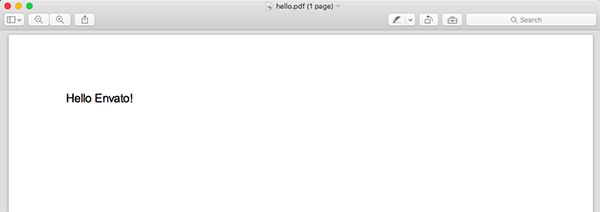
您还需要安装 pdfkit gem,然后运行以下 Ruby 代码来生成包含文本“Hello Envato!”的 PDF
require "pdfkit" kit = PDFKit.new(<<-HTML)Hello Envato!
立即学习“前端免费学习笔记(深入)”;
HTML kit.to_file("hello.pdf")
您应该有一个名为 hello.pdf 的新文件,其文本位于顶部。
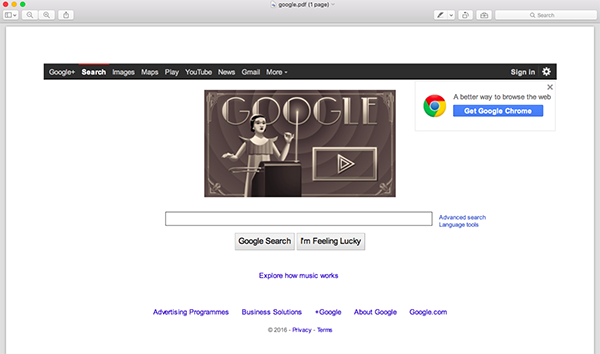
PDFKit 还允许您从 URL 生成 PDF。如果您想从 Google 主页生成 PDF,您可以运行:
require "pdfkit"

PDFKit.new('https://www.google.com', :page_size => 'A3').to_file('google.pdf')
如您所见,我指定了 page_size — 默认情况下使用 A4。您可以在此处查看完整的选项列表。
使用 CSS 设置 PDF 样式
之前我提到过我们将使用 HTML 和 CSS 生成 PDF 文件。在此示例中,我添加了一些 CSS 来设置示例发票的 HTML 样式,如您所见:
require "pdfkit" kit = PDFKit.new(<<-HTML)Envato Invoice
| Description | Price |
|---|---|
| Monthly Subscription to Tuts+ | $15 |
Notes: This invoice was paid on the 23rd of March 2016 using your credit card ending on 1234.
如果运行此脚本,将生成文件envato_invoice.pdf。这张照片显示了样本发票的结果:
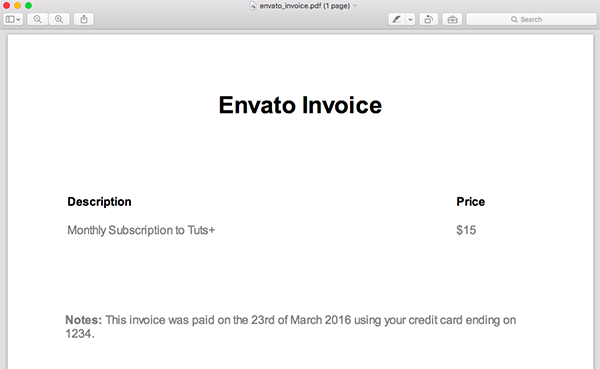
如您所见,如果您已经熟悉 HTML 和 CSS,则 PDFKit 非常易于使用。您可以根据需要继续自定义此文档或设计其样式。
在 Rails 应用程序中使用 PDFKit
现在让我们看看如何在 Rails 应用程序上下文中使用 PDFKit,以便我们可以使用模型中的数据动态生成 PDF 文件。在本节中,我们将构建一个简单的 Rails 应用程序来动态生成之前的“Envato Invoice”。首先创建一个新的 Rails 应用程序并添加三个模型:
$ rails new envato_invoices
$ cd envato_invoices

$ rails generate model invoice date:date client notes
$ rails generate model line_item description price:float invoice:references

$ rake db:migrate
现在,我们必须向数据库添加一些示例数据。将此代码片段添加到 db/seeds.rb。
line_items = LineItem.create([
    { description: 'Tuts+ Subscription April 2016', price: 15.0 },
    { description: 'Ruby eBook', price: 9.90} ])
Invoice.create(
    client: 'Pedro Alonso',
    total: 24.90,
    line_items: line_items,
    date: Date.new(2016, 4, 1))
在终端中运行 rake db:seed 将示例发票添加到数据库中。
我们还对在应用程序中生成发票列表和一张发票的详细信息感兴趣,因此使用 Rails 生成器,运行 railsgeneratecontrollerInvoicesindexshow 来创建控制器和视图。
app/controllers/invoices_controller.rb
class InvoicesController < ApplicationController
  def index
    @invoices = Invoice.all
  end

  def show
    @invoice = Invoice.find(params[:id])
  end
end
app/views/invoices/index.html.erb
Invoices
-
<% @invoices.each do |invoice| %>
- <%= link_to "#{invoice.id} - #{invoice.client} - #{invoice.date.strftime("%B %d, %Y")} ", invoice_path(invoice) %> <% end %>
我们需要修改rails路由以默认重定向到InvoicesController,因此编辑config/routes.rb:
Rails.application.routes.draw do
  root to: 'invoices#index'

  resources :invoices, only: [:index, :show]
end
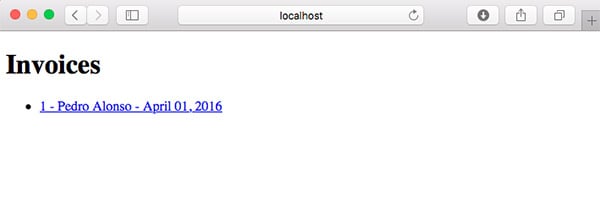
启动 rails server 并导航到 localhost:3000 以查看发票列表:
app/views/invoices/show.html.erb
SV-Cart是开源的电子商务平台。多语言,国际化SV-CART网店系统是一套可以支持各个国家的语言显示的国际电子商务系统,现已支持中文简体、英文、日文、德文和法文,土耳其文,可实现这五种语言在同一平台上的相互转换。免费、开源SV-CART网店系统是一项新的专业开放源代码的WEB2.0网上商城系统,是一套集网上购物和网站内容管理于一体的电子商务解决方案。易操作、多功能SV-CART系统注重操作上的
Envato Invoice
To: <%= @invoice.client %>
Date: <%= @invoice.date.strftime("%B %d, %Y") %>
<% if @invoice.notes %>
<% @invoice.line_items.each do |line_item| %> Description Price <% end %> <%= line_item.description %> <%= number_to_currency(line_item.price) %> Total: <%= number_to_currency(@invoice.total) %> <% end %>Notes: <%= @invoice.notes %>
此发票详细信息页面的 CSS 已移至 app/assets/stylesheets/application.scss
.invoice {
  width: 700px;
  max-width: 700px;
  border: 1px solid grey;
  margin: 50px;
  padding: 50px;

  h1 {
    text-align: center;
    margin-bottom: 100px;
  }
  .notes {
    margin-top: 100px;
  }

  table {
    width: 90%;
    text-align: left;
  }
  th {
    padding-bottom: 15px;
  }

  .total td {
    font-size: 20px;
    font-weight: bold;
    padding-top: 25px;
  }
}
然后,当您点击主列表页面中的发票时,您将看到详细信息:
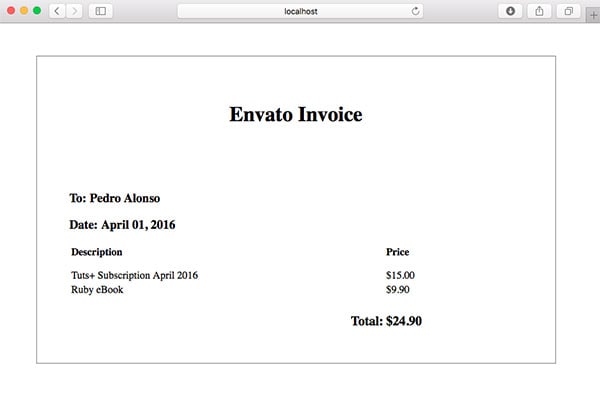
此时,我们已准备好向 Rails 应用程序添加查看或下载 PDF 格式的发票的功能。
处理 PDF 渲染的 InvoicePdf 类
为了将 Rails 应用中的发票呈现为 PDF,我们需要将三个 gem 添加到 Gemfile 中:PDFKit、render_anywhere 和 wkhtmltopdf-binary。默认情况下,rails 只允许您从控制器渲染模板,但通过使用 render_anywhere,我们可以从模型或后台作业渲染模板。
gem 'pdfkit'
gem 'render_anywhere'
gem 'wkhtmltopdf-binary'
为了不让太多逻辑污染我们的控制器,我将在 app/models 文件夹中创建一个新的 InvoicePdf 类,以将逻辑包装到生成 PDF。
require "render_anywhere"

class InvoicePdf
  include RenderAnywhere

  def initialize(invoice)
    @invoice = invoice
  end

  def to_pdf
    kit = PDFKit.new(as_html, page_size: 'A4')
    kit.to_file("#{Rails.root}/public/invoice.pdf")
  end

  def filename
    "Invoice #{invoice.id}.pdf"
  end

  private

    attr_reader :invoice

    def as_html
      render template: "invoices/pdf", layout: "invoice_pdf", locals: { invoice: invoice }
    end
end
此类只是将发票作为类构造函数的参数进行渲染。私有方法 as_html 是 读取视图模板 invoices/pdf 和 layout_pdf 我们用来生成需要渲染为 PDF 的 HTML。最后,方法 to_pdf 使用 PDFKit 将 PDF 文件保存在 Rails 公共文件夹中。
您可能希望在实际应用程序中生成动态名称,以便 PDF 文件不会被意外覆盖。您可能也希望将文件存储在 AWS S3 或私有文件夹上,但这超出了本教程的范围。
/app/views/invoices/pdf.html.erb
Envato Invoice
To: <%= invoice.client %>
Date: <%= invoice.date.strftime("%B %d, %Y") %>
<% if invoice.notes %>
<% invoice.line_items.each do |line_item| %> Description Price <% end %> <%= line_item.description %> <%= number_to_currency(line_item.price) %> Total: <%= number_to_currency(invoice.total) %> <% end %>Notes: <%= invoice.notes %>
/app/views/layouts/invoice_pdf.erb
Envato Invoices <%= yield %>
在此布局文件中需要注意的一件事是我们正在布局中渲染样式。如果我们以这种方式呈现样式,WkHtmlToPdf 确实会工作得更好。
用于呈现 PDF 发票的 DownloadsController
此时我们需要一个调用类 InvoicePdf 的路由和控制器来将 PDF 文件发送到浏览器,因此编辑 config/routes.rb 添加嵌套资源:
Rails.application.routes.draw do
  root to: "invoices#index"

  resources :invoices, only: [:index, :show] do
    resource :download, only: [:show]
  end
end
如果我们运行 rake paths,我们会看到应用程序中可用的路由列表:
          Prefix Verb URI Pattern                              Controller#Action
            root GET  /                                        invoices#index
invoice_download GET  /invoices/:invoice_id/download(.:format) downloads#show
        invoices GET  /invoices(.:format)                      invoices#index
         invoice GET  /invoices/:id(.:format)                  invoices#show
添加 app/controllers/downloads_controller.rb:
class DownloadsController < ApplicationController

  def show
    respond_to do |format|
      format.pdf { send_invoice_pdf }
    end
  end

  private

  def invoice_pdf
    invoice = Invoice.find(params[:invoice_id])
    InvoicePdf.new(invoice)
  end

  def send_invoice_pdf
    send_file invoice_pdf.to_pdf,
      filename: invoice_pdf.filename,
      type: "application/pdf",
      disposition: "inline"
  end
end
如您所见,当请求请求 PDF 文件时,方法 send_invoice_pdf 正在处理该请求。方法 invoice_pdf 只是通过 id 从数据库中查找发票,并创建 InvoicePdf 的实例。那么 send_invoice_pdf 只是调用方法 to_pdf ,将生成的 PDF 文件发送到浏览器。
需要注意的一点是,我们将参数 disposition: "inline" 传递给 send_file。该参数是将文件发送到浏览器,并显示出来。如果您想强制下载文件,则需要传递 disposition: "attachment" 。
向发票显示模板 app/views/invoices/show.html.erb 添加下载按钮:
  <%= link_to "Download PDF",
    invoice_download_path(@invoice, format: "pdf"),
    target: "_blank",
    class: "download" %>
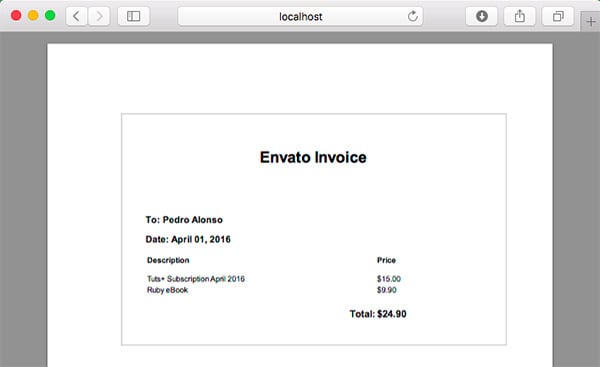
运行应用程序,导航到发票详细信息,单击下载,然后将打开一个新选项卡,显示 PDF 发票。
在开发中将 PDF 渲染为 HTML
当您处理 PDF 标记时,每次想要测试更改时都必须生成 PDF,有时可能会很慢。因此,能够以纯 HTML 形式查看将转换为 PDF 的 HTML 非常有用。我们只需要编辑/app/controllers/downloads_controller.rb即可。
class DownloadsController < ApplicationController

  def show
    respond_to do |format|
      format.pdf { send_invoice_pdf }

      if Rails.env.development?
        format.html { render_sample_html }
      end
    end
  end

  private

  def invoice
    Invoice.find(params[:invoice_id])
  end

  def invoice_pdf
    InvoicePdf.new(invoice)
  end

  def send_invoice_pdf
    send_file invoice_pdf.to_pdf,
      filename: invoice_pdf.filename,
      type: "application/pdf",
      disposition: "inline"
  end

  def render_sample_html
    render template: "invoices/pdf", layout: "invoice_pdf", locals: { invoice: invoice }
  end
end
现在 show 方法也在开发模式下响应 HTML 请求。 PDF 发票的路径类似于 http://localhost:3000/invoices/1/download.pdf。如果您将其更改为 http://localhost:3000/invoices/1/download.html,您将看到 HTML 格式的发票,其中使用了用于生成 PDF 的标记。
根据上面的代码,假设您熟悉 Ruby 语言和 Rails 框架,使用 Ruby on Rails 生成 PDF 文件非常简单。也许整个过程最好的一点是您不必学习任何新的标记语言或有关 PDF 生成的细节。
我希望本教程是有用的。请在评论中留下任何问题、评论和反馈,我很乐意跟进。




