
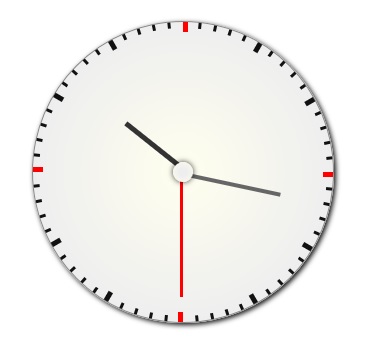
自己封装的一个用html5+jquery写的时钟表
代码:
<!DOCTYPE html PUBLIC "-//W3C//h2D XHTML 1.0 Transitional//EN" "http://www.w3.org/TR/xhtml1/h2D/xhtml1-transitional.h2d">
<html xmlns="http://www.w3.org/1999/xhtml">
<head>
<title>超酷数码钟表</title>
<script type="text/javascript" src="http://ajax.googleapis.com/ajax/libs
/jquery/1.10.2/jquery.min.js"></script>
<script type="text/javascript">
//引用的是在线jquery地址,如果不行请自行下载切换
(function($){
  $.fn.drawClock = function(options){
    var mainId = $(this);

    //设置默认参数
    var defaultOptions = {
      'width': '300px',
      'height': '300px',
      'margin': '200px auto',
      'border': '1px solid #888',
      'border-radius': '50%',
      'box-shadow': '2px 2px 4px #111'
    };
    var options = $.extend(defaultOptions, options);

    mainId.css({
      'width': options.width,
      'height': options.height,
      'margin': options.margin,
      'border': options.border,
      'border-radius': options['border-radius'],
      'box-shadow': options['box-shadow'],
      'position': 'relative'
    }).css({
      'background': '-webkit-gradient(radial, ' + mainId.width()/2 + ' ' + mainId.height()/2 + ', 0, ' + mainId.width()/2 + ' ' + mainId.height()/2 + ', ' + mainId.width()/2 + ', from(#ffe), to(#eee))',
      'background': '-moz-radial-gradient(circle closest-side, #ffe 0%, #eee 100%)'
    });

    //钟表盘中心圆
    $("<div id='circle'></div>").appendTo(mainId).css({
      'width': '20px',
      'height': '20px',
      'border-radius': '50%',
      'box-shadow': '0 0 5px rgba(0,0,0,0.8)',
      'position': 'absolute',
      'z-index': 999,
      'background': '-webkit-gradient(radial, ' + mainId.width()/2 + ' ' + mainId.height()/2 + ', 0, ' + mainId.width()/2 + ' ' + mainId.height()/2 + ', ' + mainId.width()/2 + ', from(#ffe), to(#eee))',
      'background': '-moz-radial-gradient(circle, #eee 30%, #ffe 100%)'
    }).css({
      'left': mainId.width()/2 - $('#circle').width()/2,
      'top': mainId.height()/2 - $('#circle').height()/2
    });

    var dateTime = new Date();
    var oHours = dateTime.getHours();
    var oMinutes = dateTime.getMinutes();
    var oSeconds = dateTime.getSeconds();

    //初始化时分秒
    var hPointer = drawPointer(mainId.width()/2, mainId.height()/2, mainId.width()/2*(3/6), 5, "#333", -90+oHours*30+oMinutes*6/12);
    var mPointer = drawPointer(mainId.width()/2, mainId.height()/2, mainId.width()/2*(4/6), 4, "#666", -90+oMinutes*6);
    var sPointer = drawPointer(mainId.width()/2, mainId.height()/2, mainId.width()/2*(5/6), 3, "#f00", -90+oSeconds*6);

    //运动时分秒
    var timer = setInterval(function(){
      dateTime = new Date();
      oHours = dateTime.getHours();
      oMinutes = dateTime.getMinutes();
      oSeconds = dateTime.getSeconds();
      hPointer.css({'transform': 'rotate(' + (-90+oHours*30+oMinutes*6/12) + 'deg)'});
      mPointer.css({'transform': 'rotate(' + (-90+oMinutes*6) + 'deg)'});
      sPointer.css({'transform': 'rotate(' + (-90+oSeconds*6) + 'deg)'});
    }, 1000);


    //绘制钟表刻度
    for(var i=0; i<60; i++){
      var width = 3, height = 6, oBcolor = '#111';
      if(i%5 == 0){
        width = 5;
        height = 10;
      }
      if(i%15 == 0){
        oBcolor = 'red';
      }
      $("<div class='clockMark'></div>").appendTo(mainId).css({
        'width': width,
        'height': height,
        'position': 'absolute',
        'top': 0,
        'left': mainId.width()/2,
        'background': oBcolor,
        'transform': 'rotate(' + i*6 + 'deg)',
        "transform-origin": "0 " + mainId.width()/2+'px'
      });
    }

    //绘制钟表指针
    function drawPointer (startx, starty, width, height, bcolor, angle) {
      var oPointer = $("<div></div>");
      oPointer.appendTo(mainId).css({
        'width': width,
        'height': height,
        'position': 'absolute',
        'top': starty,
        'left': startx,
        'background': bcolor,
        'transform': 'rotate(' + angle + 'deg)',
        'transform-origin': '0 0'
      });
      return oPointer;
    }

    return this;
  }
})(jQuery);
</script>
<script type="text/javascript">
$(function(){
  $('#clock').drawClock();
});
</script>
</head>

<body>
  <div id="clock"></div>
</body>
</html>演示图:
以上所述就是本文的全部内容了,希望大家能够喜欢。
立即学习“前端免费学习笔记(深入)”;

HTML怎么学习?HTML怎么入门?HTML在哪学?HTML怎么学才快?不用担心,这里为大家提供了HTML速学教程(入门课程),有需要的小伙伴保存下载就能学习啦!

 C++高性能并发应用_C++如何开发性能关键应用
 Java AI集成Deep Java Library_Java怎么集成AI模型部署
 Golang后端API开发_Golang如何高效开发后端和API
 Python异步并发改进_Python异步编程有哪些新改进
 C++系统编程内存管理_C++系统编程怎么与Rust竞争内存安全
 Java GraalVM原生镜像构建_Java怎么用GraalVM构建高效原生镜像
 Python FastAPI异步API开发_Python怎么用FastAPI构建异步API
 C++现代C++20/23/26特性_现代C++有哪些新标准特性如modules和coroutines
Copyright 2014-2025 https://www.php.cn/ All Rights Reserved | php.cn | 湘ICP备2023035733号


 856
856

 收藏
收藏















