摘要:HTML代码:<!DOCTYPE html><html><head lang="en"> <meta charset="UTF-8"> <title></title> <link rel="sh
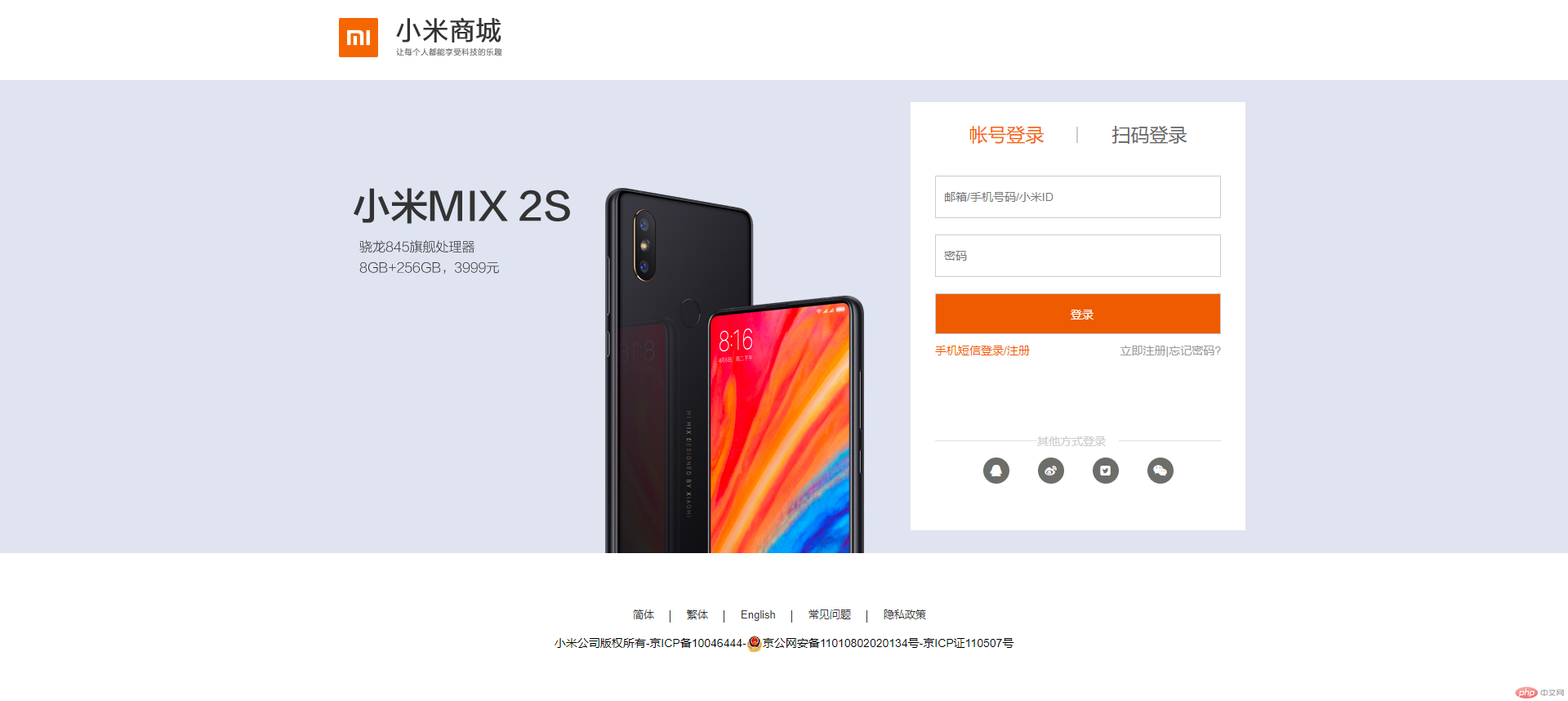
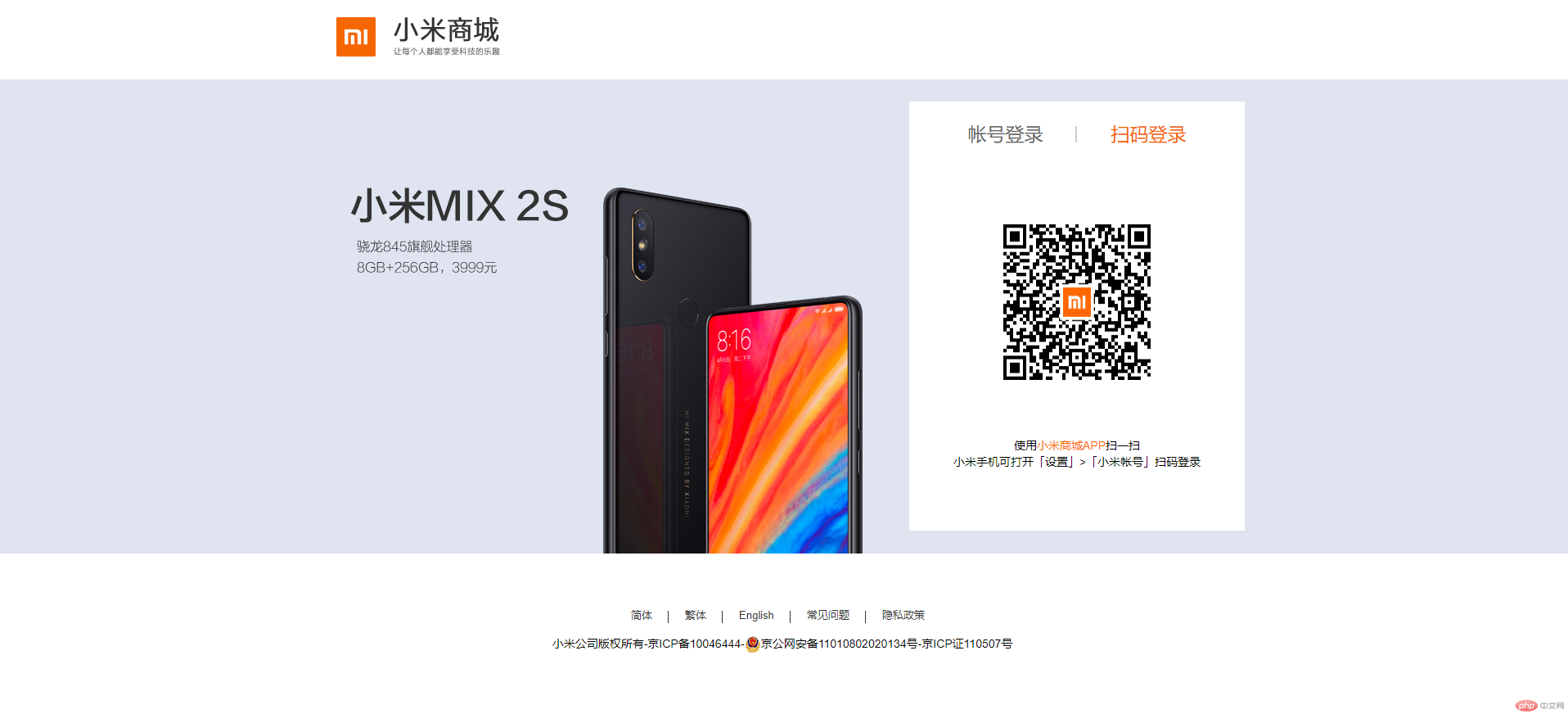
HTML代码:
<!DOCTYPE html>
<html>
<head>
<meta charset="UTF-8">
<title></title>
<link rel="shortcut icon" type="image/x-icon" href="static/images/footlogo.png" />
<link rel="stylesheet" type="text/css" href="static/layui/css/layui.css">
<link rel="stylesheet" type="text/css" href="static/font-awesome/css/font-awesome.min.css">
<link rel="stylesheet" href="static/css/login.css"/>
<script type="text/javascript" src="static/layui/layui.js"></script>
</head>
<body>
<!--头部-->
<div>
<div>
<div><img src="static/images/mistore_logo.png" alt=""/></div>
</div>
</div>
<!--内容部分-->
<div>
<div>
<div>
<div>
<ul>
<li><a href="javascript:;">帐号登录</a><span></span></li>
<li><a href="javascript:;">扫码登录</a></li>
</ul>
</div>
<div>
<div>
<form action="#">
<input type="text" name="username" placeholder="邮箱/手机号码/小米ID"/>
<input type="password" name="password" placeholder="密码"/>
<input type="button" value="登录"/>
</form>
<div>
<a href="#">手机短信登录/注册</a>
<a href="#">忘记密码?</a><a href="#">立即注册|</a>
</div>
<div>
<p>其他方式登录</p>
<ul>
<li style="margin-right: 35px;"><i class="fa fa-qq"></i></li>
<li style="margin-right: 35px;"><i class="fa fa-weibo"></i></li>
<li style="margin-right: 35px;"><i class="fa fa-twitter-square"></i></li>
<li><i class="fa fa-weixin"></i></li>
</ul>
</div>
</div>
<div style="text-align: center">
<img src="static/images/下载.png">
<p>使用<span style="color: #ff6700;">小米商城APP</span>扫一扫</p>
<p>小米手机可打开「设置」>「小米帐号」扫码登录</p>
</div>
</div>
</div>
</div>
</div>
<!--底部-->
<div>
<ul>
<li><a href="#">简体</a> <span></span></li>
<li><a href="#">繁体</a> <span></span></li>
<li><a href="#">English</a> <span></span></li>
<li><a href="#">常见问题</a> <span></span></li>
<li><a href="#">隐私政策</a></li>
</ul>
<div></div>
<p>小米公司版权所有-京ICP备10046444-<span><img src="https://account.xiaomi.com/static/res/9204d06/account-static/respassport/acc-2014/img/ghs.png"></span>京公网安备11010802020134号-京ICP证110507号</p>
</div>
<script type="text/javascript" src="static/js/jq_3.3.1_mi.js"></script>
<script type="text/javascript">
$(function(){
$('.tab>ul>li').click(function(){
$('.tab>ul>li').removeClass('active')
$(this).addClass('active')
$('.login_content>div').removeClass('show')
num=$(this).index()+1
$('.login_content>div:nth-child('+num+')').addClass('show')
})
})
</script>
</body>
</html>
CSS代码:
*,ul {
margin: 0px;
padding: 0px;
}
li {
list-style: none;
}
a {
text-decoration: none;
color: #ccc;
cursor: pointer;
}
.clear {
clear: both;
}
.header {
width: 1130px;
height: 100px;
margin: 0px auto;
line-height: 90px;
padding-left: 40px;
}
.content {
width: 100%;
height: 580px;
background: url(../images/login.png);
}
.content_top {
width: 1130px;
margin: 0 auto;
height: 580px;
position: relative
}
.login {
width: 410px;
height: 524px;
position: absolute;
z-index: 999;
background-color: white;
margin: auto;
right: 0px;
top: 0;
bottom: 0;
}
.tab {
width: 350px;
height: 50px;
margin: 15px auto;
}
.tab li {
height: 50px;
width: 50%;
line-height: 50px;
text-align: center;
float: left;
font-size: 23px;
position: relative
}
.tab li a {
color: #666;
}
.active a {
color: #f56600!important;
}
.show {
display: block!important;
}
.login_content {
width: 350px;
margin: 0 auto
}
.login_content input {
width: 348px;
height: 50px;
text-indent: 10px;
margin: 10px 0;
outline: none;
border: 1px solid #ccc
}
.login_content>div {
width: 350px;
height: 226px;
margin: 10px auto;
display: none
}
.login_content>div:nth-child(2) {
dbackground-color: blue
}
.tab li span {
width: 2px;
height: 20px;
display: block;
position: absolute;
top: 15px;
right: 0;
background-color: #ccc
}
.other {
height: 20px;
width: 350px;
}
.other a {
font-size: 14px;
color: #999;
}
.btn {
background-color: #ef5b00;
width: 350px!important;
height: 50px;
line-height: 50px;
display: block;
margin-bottom: 14px;
text-align: center;
font-size: 14px;
color: #fff;
cursor: pointer;
}
.dibu {
position: absolute;
bottom: 10px;
width: 350px;
margin: auto;
left: 0;
right: 0
}
.oth_type_tit {
border: none;
border-top: 1px solid #e0e0e0;
padding-top: 10px;
padding-bottom: 10px\9;
}
.oth_type_txt {
font-size: 14px;
color: #b0b0b0;
margin: 0 auto;
text-align: center;
width: 100% \9;
}
.login_form_pic {
width: 350px;
margin: 100px auto 0px;
border-top: 1px solid #e0e0e0;
position: relative;
}
.login_form_pic p {
width: 100px;
height: 30px;
line-height: 30px;
color: #ccc;
background: #fff;
position: absolute;
top: -15px;
left: 125px;
}
.login_form_pic ul {
width: 233px;
margin: 20px auto 0px;
}
.login_form_pic ul li {
float: left;
height: 32px;
width: 32px;
line-height: 32px;
color: #fff;
text-align: center;
border-radius: 16px;
background: #6D6E6A;
}
.login_form_content0 img {
height: 190px;
width: 180px;
margin: 70px auto;
}
.login_form_content0 p {
width: 350px;
margin: 0px auto;
line-height: 20px;
height: 20px;
}
.login_form_content0 p {
width: 350px;
margin: 0px auto;
line-height: 20px;
height: 20px;
}
.win_banner_stylepc .oth_type_txt {
color: #bbb;
}
.oth_type_links {
padding-top: 10px;
text-align: center;
}
.win_banner_stylepc .oth_type_links {
padding-top: 3px;
}
.other a:nth-child(1) {
float: left;
color: #ef5b00;
}
.other a:nth-child(2),.other a:nth-child(3) {
float: right
}
.footer {
width: 1226px;
margin: 60px auto;
height: 60px;
}
.footer ul {
width: 410px;
margin: 0 auto;
height: 30px;
}
.footer li {
float: left;
position: relative;
padding: 0 20px;
line-height: 30px;
height: 30px;
}
.footer li span {
width: 1px;
height: 15px;
position: absolute;
top: 10px;
right: 0;
background-color: #333
}
.footer li a {
font-size: 13px;
color: #333333
}
.footer p {
width: 700px;
margin: 10px auto;
text-align: center;
font-size: 14px;
}
批改老师:查无此人批改时间:2019-01-11 17:19:19
老师总结:完成的不错,css代码记得也要缩进,看着会整齐些。下次写作业可以加点自己的思路,这样老师可以给与你建议。加油