摘要:<!DOCTYPE html> <html lang="en"> <head> <meta charset="UTF-8"> <title>$.post()</titl
<!DOCTYPE html>
<html lang="en">
<head>
    <meta charset="UTF-8">
    <title>$.post()</title>
</head>
<body>
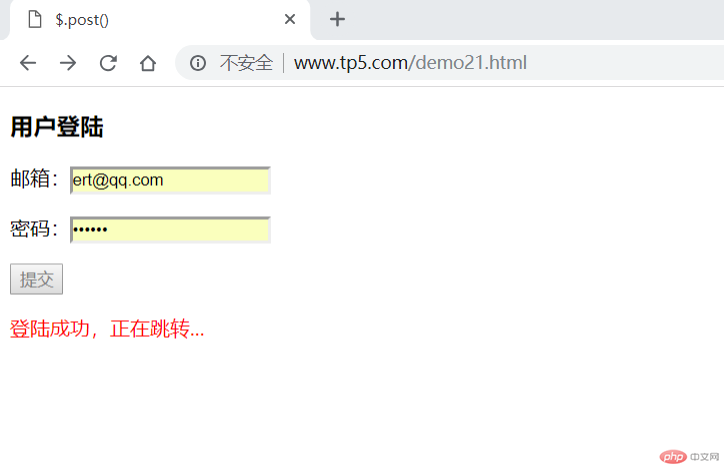
<h3>用户登陆</h3>
<form>
   <p><label for="email">邮箱:</label><input type="email" id="email" name="email"></p>
   <p><label for="password">密码:</label><input type="password" id="password" name="password"></p>
   <p><button type="button">提交</button></p>
</form>
<script src="lib/jquery-3.3.1.min.js"></script>
<script>
        let btn=document.getElementsByTagName('button')[0];
        btn.onclick = function () {
            //1.创建xhr对象
 let xhr = new XMLHttpRequest();
            //2.监听响应状态
 xhr.onreadystatechange = function () {
                //判断是否获取到响应的数据
 if(xhr.readyState ===4){
                    if(xhr.status ===200){
                        //在页面创建一个新元素用来显示响应的数据
 let p = document.createElement('p');
                        p.style.color='red';
                        let json = JSON.parse(xhr.responseText);
                        //如果json.status==1,表示查询成功
 if(json.status ===1){
                            p.innerHTML= json.msg;
                        }else if(json.status ===0){
                            p.innerHTML= json.msg;
                        }


                        document.forms[0].appendChild(p);
                        btn.disabled=true;
                        setTimeout(function(){
                            document.forms[0].removeChild(p);
                            btn.disabled = false;
                            if (json.status == 1) {
                                location.href = 'inc/admin.php';
                            }
                        },2000)
                    }else {
                        alert('响应失败'.xhr.status);
                }
                }else {
                    //http请求正在继续,这里可以放一个gif动图提示用户
 }
            };
            //3.设置请求参数
 xhr.open('post','inc/check4.php',true);

            //4.设置头信息,将内容类型设置为表单提交方式
 xhr.setRequestHeader('Content-Type','application/x-www-form-urlencoded');
            //5.发送请求
 let data = {
               email:document.getElementsByName('email')[0].value,
               password:document.getElementsByName('password')[0].value
 };
            let data_json = JSON.stringify(data);

            xhr.send('data='+data_json);


        }
</script>
</body>
</html>
<?php
header("Content-type: text/html; charset=utf-8");
//echo json_encode('测试数据');
//连接数据库并验证用户
//print_r($_POST);
$email = htmlspecialchars(trim($_POST['email']));
$password = sha1(htmlspecialchars(trim($_POST['password'])));
//print_r($password);
//到数据库中去验证用户提交的数据
$pdo = new PDO('mysql:host=localhost;dbname=laoshi','root','root');
$sql = "SELECT COUNT(*) FROM `user` WHERE `email`= :email AND `password`= :password";
$stmt = $pdo->prepare($sql);
$stmt->execute(['email'=>$email,'password'=>$password]);
if($stmt->fetchColumn(0) == 1){
$status = 1;
$message='验证通过';
}else{
$status = 0;
$message='邮箱或密码错误';
}
echo json_encode(['status'=>$status,'message'=>$message]);花了2周才成功实现,主要是后端没学习,一开始数据库里的password字符的位数设置成30,所以一直都不对,后来设置成50就实现了,password使用sha1()加密后是40位的
批改老师:韦小宝批改时间:2019-01-14 09:50:04
老师总结:恩 写的没毛病 代码的注释也很清晰 可以考虑使用jQuery和ajax来进行改写哦 jQuery和ajax来进行异步无刷新提交就方便的多咯