摘要:模板继承主要使用: 1.@extends('模板路径') 继承模板,将模板内容加载到文件中 2.@section('区块名') @show显示区块 在模板中可重写 可扩展内容 3.@
模板继承主要使用:
1.@extends('模板路径') 继承模板,将模板内容加载到文件中
2.@section('区块名') @show显示区块 在模板中可重写 可扩展内容
3.@yield('区块名','默认值') 只能重写 不可以扩展
4.@parent 将section中的内容继承下来然后可以扩展(@yield不可用)
5.@stop 结束区块
下面为小案例
* base.blade.php
@include('home.public.header')
<div class="content">
    <div class="left">
    @section('left')
        <h3>网站丑陋的左边</h3>
        <h3>网站丑陋的左边</h3>
        <h3>网站丑陋的左边</h3>
        <h3>网站丑陋的左边</h3>
        <h3>网站丑陋的左边</h3>
        <h3>网站丑陋的左边</h3>
        <h3>网站丑陋的左边</h3>
        @show
    </div>
    <div class="right">
        @section('right')
        <h4>网站丑陋的右边</h4>
        <h4>网站丑陋的右边</h4>
        <h4>网站丑陋的右边</h4>
        <h4>网站丑陋的右边</h4>
        <h4>网站丑陋的右边</h4>
        <h4>网站丑陋的右边</h4>
        <h4>网站丑陋的右边</h4>
            @show
        @yield('low','很low的不能扩展,只能重写')
    </div>
    <div class="clear"></div>
</div>

<div class="news">
    @section('news')
    <h5>网站丑陋的新闻</h5>
    <h5>网站丑陋的新闻</h5>
    <h5>网站丑陋的新闻</h5>
    <h5>网站丑陋的新闻</h5>
    <h5>网站丑陋的新闻</h5>
        @show
</div>

@include('home.public.footer')
* header.blade.php
<!doctype html>
<html lang="en">
<head>
    <meta charset="UTF-8">
    <meta name="viewport"
 content="width=device-width, user-scalable=no, initial-scale=1.0, maximum-scale=1.0, minimum-scale=1.0">
    <meta http-equiv="X-UA-Compatible" content="ie=edge">
    <title>Document</title>
    <style>
 .header{
            width:1000px;
 margin: 0 auto;
 text-align: center;
 /*border-bottom: 1px solid rgba(17, 16, 16, 0.54);*/
 }
        .header span{
            text-align: center;
 }
        .header ul li{
            list-style: none;
 float: left;
 padding: 0 20px;
 cursor: pointer;
 }
        .header ul{
            text-align: center;
 display: inline-block;
 margin: 0 auto;
 padding: 0;
 }
        .clear{clear:both}
        .content{width:1200px;margin: 20px auto;margin-bottom: 0;margin-top: 9px}
        .content .left{
            width: 360px;
 float: left;
 background: #1d68a7;
 color:#fff;
 padding: 20px;
 height:500px;
 }
        .content .right{
            width: 759px;
 float: left;
 background: #1a760d;
 color:#fff;
 padding: 20px;
 height:500px;
 margin-left: 1px;
 }
        .news{
            width:1160px;
 margin: 0 auto;
 margin-top: 1px;
 padding: 20px;
 background: #4dc0b5;
 }
        .footer{
            width:1160px;
 margin: 0 auto;
 margin-top: 1px;
 padding: 20px;
 background: #6574cd;
 }
        .news span{
            color:#fff;
 padding: 0 10px;
 }
    </style>
</head>
<body>


<div class="header">
    <span>
    <ul>
 @section('header')
 <li>首页</li>
        <li>关于我们</li>
        <li>产品展示</li>
        <li>新闻中心</li>
        <li>案例展示</li>
        <li>联系我们</li>
 @show
 <div class="clear"></div>
    </ul>
    </span>
</div>
* footer.blade.php
<div class="footer">
    @section('footer')
    <span>网站丑陋的脚部</span>
        @show
</div>
</body>
</html>
* index.blade.php 主要首页
@extends('home/base')
@section('header')
    @parent
    <li>新增项目</li>
    @stop
@section('left')
    @parent
    <h4>新增漂亮的左边</h4>
    <h4>新增漂亮的左边</h4>
    <h4>新增漂亮的左边</h4>
@stop
@section('right')
    @parent
    <h4>新增漂亮的左边</h4>
    <h4>新增漂亮的左边</h4>
    <h4>新增漂亮的左边</h4>
@stop
@section('low')
    <h4>恭喜</h4>
@stop
@section('news')
    @parent
    <span>新增好奇怪的新闻</span>
    <span>新增好奇怪的新闻</span>
    <span>新增好奇怪的新闻</span>
    <span>新增好奇怪的新闻</span>
    <span>新增好奇怪的新闻</span>
@stop

@section('footer')
    @parent
    <span style="margin-left:50px">新增网站备案号:辽ABCDEFGHIJKLMNOPQRSTUVWXYZ</span>
@stop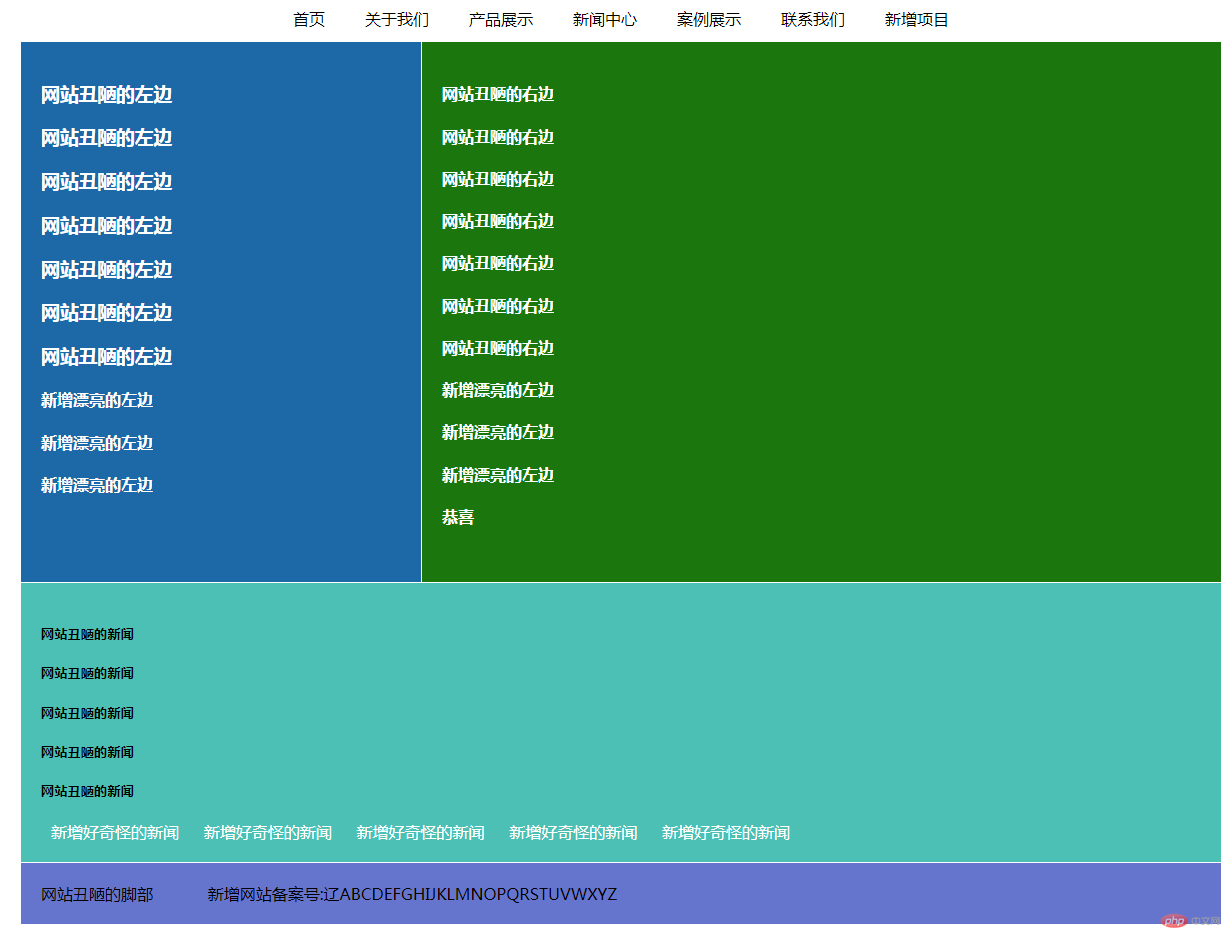
批改老师:天蓬老师批改时间:2019-01-24 11:18:39
老师总结:都已经学到了Laravel , 看来进度很快, laravel是一个在全世界非常流行的php框架,得到了所有IDE的强有力的支持,
另外, Blade是Laravel默认的模板引擎,但不是唯一的,
还有, 其实,php除了是世界上最好的语言之外, 还是一个最优秀的模板语言, 其实, php从诞生之日 起, 就是用来写模板的, 就是用来生成HTML代码的, 所有PHP的中文翻译是: 超文本预