摘要:HTML<!DOCTYPE html> <html> <head> <meta charset="utf-8"> <title>小米商城-登录</title> <link rel="shortcut icon" type=&q
HTML
<!DOCTYPE html>
<html>
<head>
<meta charset="utf-8">
<title>小米商城-登录</title>
<link rel="shortcut icon" type="image/x-icon" href="static/images/footlogo.png">
<link rel="stylesheet" type="text/css" href="static/css/login.css">
<link rel="stylesheet" type="text/css" href="static/layui/css/layui.css">
<link rel="stylesheet" type="text/css" href="static/font-awesome/css/font-awesome.min.css">
<script src="static/layui/layui.js"></script>
<script src="http://code.jquery.com/jquery-3.1.1.min.js"></script>
</head>
<body>
<div class="header">
<a href="./index.html"><img src="static/images/5.png"></a>
</div>
<div class="content">
<div class="login-content">
<div class="login-form">
<div class="login-form-main">
<p style="color: #ff6700;" id="tab_0" onclick="change(0,'tag_',1)">账号登录</p><span>|</span><P id="tab_1" onclick="change(1,'tag_',1)">扫码登录</P>
</div>
<div class="clear"></div>
<!-- 账号密码登录或注册 -->
<div class="login-form-content" id="tag_0">
<form>
<input type="text" name="username" placeholder="邮箱/ 手机号码/ 小米ID/" autocomplete="off">
<input type="password" name="password" placeholder="密码">
<button>登录</button>
</form>
<h6>
<a href="" style="color: #ff6700;">手机短信登录/注册</a>
<span><a href="">立即注册</a> | <a href="">忘记密码</a></span>
</h6>
<div class="login-form-pic">
<p>其他方式登录</p>
<ul>
<li class="pic1" style="margin-right: 35px;"><i class="fa fa-qq"></i></li>
<li class="pic2" style="margin-right: 35px;"><i class="fa fa-weibo"></i></li>
<li class="pic3" style="margin-right: 35px;"><i class="fa fa-twitter-square"></i></li>
<li class="pic4"><i class="fa fa-weixin"></i></li>
</ul>
</div>
</div>
<!-- 使用扫码登录 -->
<div class="login-form-content0" style="display: none;" id="tag_1">
<img src="static/images/download.png">
<p>使用<span style="color: #ff6700;">小米商城APP</span>扫一扫</p>
<p>小米手机可打开[设置] > [小米账号] 扫码登录</p>
</div>
</div>
</div>
</div>
<p style="margin-top: 60px;">简体<span>|</span>繁体<span>|</span>English<span>|</span> 常见问题<span>|</span> 私隐政策</p>
<p>小米公司版权所有-京ICP备10046111-<img src="static/images/ghs.png"> 京公网安备21012142124号-京ICP证121212号</p>
</body>
</html>
<script type="text/javascript">
// 账号登录或扫码登录之间切换 js写法
function change(num1,tag,num2){
for(var i=0;i<=num2;i++){
document.getElementById(tag+i).style.display = 'none';
}
document.getElementById(tag+num1).style.display = 'block';
if(num1==0){
document.getElementById('tab_0').style.color = '#ff6700';
document.getElementById('tab_1').style.color = '#757575';
}
if(num1==1){
document.getElementById('tab_1').style.color = '#ff6700';
document.getElementById('tab_0').style.color = '#757575';
}
}
// 账号登录或扫码登录之间切换 jQ写法
// $('#tab_1').click(function(){
// $('#tag_0').hide();
// $('#tag_1').show();
// $('#tab_1').css('color','#ff6700');
// $('#tab_0').css('color','#757575');
// });
// $('#tab_0').click(function(){
// $('#tag_1').hide();
// $('#tag_0').show();
// $('#tab_0').css('color','#ff6700');
// $('#tab_1').css('color','#757575');
// });
</script>CSS
*{margin: 0; padding: 0;}
li{list-style: none;}
a{text-decoration: none;color: #ccc;cursor: pointer;}
.clear{clear: both;}

.header{width: 1226px;height: 100px;margin: 0px auto;line-height: 90px;}
.content{width: 100%;height: 580px;background: url(../images/login.png) no-repeat center;}
.login-content{width: 1226px;height: 560px;margin: 0 auto;}
.login-form{width: 410px;height: 520px;background: #fff;float: right;margin: 30px 50px;}
.login-form-main{width: 330px;margin: 25px auto;}
.login-form-main p{font-size: 23px;text-align: center;float: left;color: #757575;width: 150px;
	height: 50px;line-height: 50px;font-weight: bold;}
.login-form-main span{font-size: 30px;float: left;height: 50px;line-height: 50px;color: #e0e0e0;}
.login-form-content{margin-top: 25px;/*display: none;*/}
.login-form-content input{border: 0;width: 328px;height: 28px;padding: 11px;margin: 15px auto;
	border: 1px solid #e0e0e0;display: block;}
.login-form-content button{border: none;width: 300px;height: 50px;margin: 25px auto;
	display: block;background: #ff6700;color: #fff;}
.login-form-content h6{font-weight: 300;width: 350px;margin: 0px auto;height: 40px;line-height: 40px;}
.login-form-content span{float: right;color: #ccc;}

.login-form-pic{width: 350px;margin: 100px auto 0px;border-top: 1px solid #e0e0e0;
	position: relative;}
.login-form-pic p{width: 100px;height: 30px;line-height: 30px;color: #ccc;background: #fff;
	position: absolute;top: -14px;left: 125px;}
.login-form-pic ul{width: 233px;margin: 20px auto 0px;}
.login-form-pic ul li{float: left;height: 32px;width: 32px;line-height: 34px;color: #fff;
	text-align: center;border-radius: 16px;background: #6d6e6a;}
.login-form-pic ul li i{font-size: 17px;}
.login-form-pic .pic1:hover{background: #000;cursor: pointer;}
.login-form-pic .pic2:hover{background: #ff6700;cursor: pointer;}
.login-form-pic .pic3:hover{background:	skyblue;cursor: pointer;}
.login-form-pic .pic4:hover{background: lightgreen;cursor: pointer;}
.login-form-content0{width: 350px;margin: 0px auto;text-align: center;}
.login-form-content0 img{height: 190px;width: 180px;margin: 70px auto 15px;}
.login-form-content0 p{width: 350px;margin: 0px auto;height: 20px;line-height: 20px;}

p{width: 1226px;height: 38px;line-height: 38px;text-align: center;color: #757575;}
span{font-size: 13px;margin: 0px 10px;}
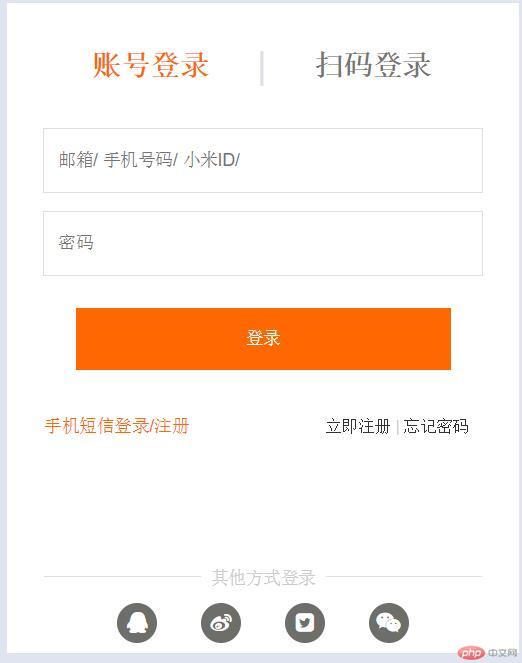
效果图

批改老师:韦小宝批改时间:2019-02-25 11:56:02
老师总结:不错不错 以假乱真 写的很棒 这种登录切换的功能在实际的网站中是很常见的