
比如: a 留言了, b 用 @ 回复了 a, 所以 b 的回复可能是这样的:
@A
How much money do you have?
就是说, 当鼠标悬停在 @A 上面的时候, 就会将 A 的评论内容显示在一个悬浮区域中.
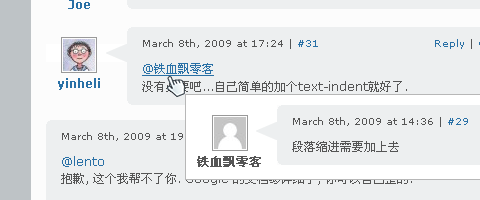
实现步骤
在这里我们将以iNove主题为例进行讲解。
1. 将以下代码保存为commenttips.js:
jQuery(document).ready(
 function(){
 var id=/^#comment-/;
 var at=/^@/;
 jQuery('#thecomments li p a').each(
  function() {
  if(jQuery(this).attr('href').match(id)&& jQuery(this).text().match(at)) {
   jQuery(this).addClass('atreply');
  }
  }
 );
 jQuery('.atreply').hover(
  function() {
  jQuery(jQuery(this).attr('href')).clone().hide().insertAfter(jQuery(this).parents('li')).attr('id','').addClass('tip').fadeIn(200);
  },
  function() {
  jQuery('.tip').fadeOut(400, function(){jQuery(this).remove();});
  }
 );
 jQuery('.atreply').mousemove(
  function(e) {
  jQuery('.tip').css({left:(e.clientX+18),top:(e.pageY+18)})
  }
 );
 }
)
2. 将 commenttips.js 文件放置到 inove/js 目录.
3. style.css 中追加样式代码如下:
#thecomments .tip {
 background:#FFF;
 border:1px solid #CCC;
 width:605px;
 padding:10px !important;
 padding:10px 10px 0;
 margin-top:0;
 position:absolute;
 z-index:3;
}
#thecomments .tip .act {
 display:none;
}
*+html #thecomments .tip {
 padding:10px 10px 0 !important;
}
4. 在主题中添加代码调用 JavaScript. 打开 templates/end.php, 在

全网最新最细最实用WPS零基础入门到精通全套教程!带你真正掌握WPS办公! 内含Excel基础操作、函数设计、数据透视表等

Copyright 2014-2025 https://www.php.cn/ All Rights Reserved | php.cn | 湘ICP备2023035733号


 663
663




 收藏
收藏







 取消收藏
取消收藏







