
这次给大家带来怎样用vue自动化表单,用vue自动化表单的注意事项有哪些,下面就是实战案例,一起来看一下。
背景
B端系统表单较多,且表单可能含有较多字段
字段较多的表单带来了大片HTML代码
在大片HTML中,混杂着参数绑定、事件处理等逻辑,不利于维护
技术栈 Vue,Element(默认表单布局)适合中后台项目快速开发
目标
通过json配置快速生成表单的vue plugin。
设计目标
减少html 重复片段
表单字段组件可扩展
事件、联动通过eventbus 解耦
校验可扩展
表单布局可自定义
可视化配置
大概方案设计
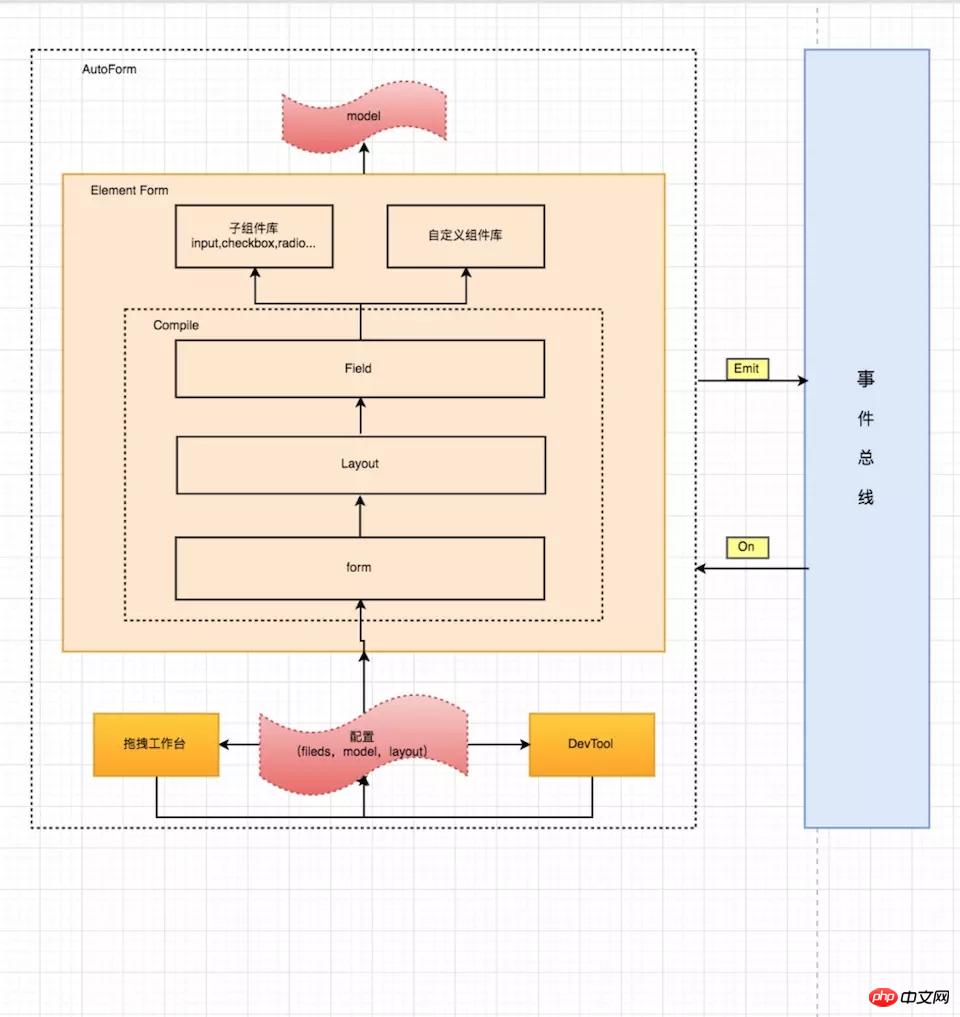
使用
安装
npm install charlie-autoform charlie-autoform_component_lib
源码:https://charlielau.github.io/autoform/#/component/autoform
引入插件
import AutoForm from 'charlie-autoform';
import AutoForm_component_lib from 'charlie-autoform_component_lib';
Vue.use(AutoForm);
Vue.use(AutoForm_component_lib);
demo.vue
<template>
 <p>
  <auto-form ref="tagForm1" :model="model1" :fields="fields1" :layout="layout">
   <el-form-item class="clearfix">
   <el-button type="primary">立即创建</el-button>
   <el-button>取消</el-button>
   </el-form-item>
  </auto-form>
 </p>
</template>
<script>
 export default {
 data() {
  return {
  model2: {
   name: '',
   type: []
  },
  layout2: {
   align: 'left',
   labelWidth: '100px',
   custom: false, //是否自定义布局
   inline: true //是否内联
  },
  fields2: [
   {
   key: 'name',
   type: 'input',
   templateOptions: {
    label: '审批人'
   }
   },
   {
   key: 'region',
   type: 'select',
   templateOptions: {
    label: '活动区域',
    placeholder: '请选择活动区域',
    options: [
    {
     label: '区域一',
     value: 'shanghai'
    },
    {
     label: '区域二',
     value: 'beijing'
    }
    ],
    validators:[ //校验
    // {required:true,message:'必填'}
    // ""
    ]
   }
   }
  ]
  };
 }
 };
</script>最终效果

添加自定义组件或者组件目录
Vue.$autoform.RegisterDir(()=>require.context('./components/autoform', 'c'));//目录
Vue.$autoform.Register(Vue,[Components...],{prefix: "c"}) //组件对象cHello.vue
// PATH:/components/autoform/cHello.vue
<template>
 <p>
  <p>
   <p>基本的变量可以通过"mixins"获取,这里有开发组件需要的一些变量</p>
   <p>自定义子组件:Hello</p>
   <p>当前field: {{field}}</p>
   <p>整个model: {{model}}</p>
   <p>当前model: {{model[field.name]}}</p><p><span>立即学习</span>“<a href="https://pan.quark.cn/s/cb6835dc7db1" style="text-decoration: underline !important; color: blue; font-weight: bolder;" rel="nofollow" target="_blank">前端免费学习笔记(深入)</a>”;</p>
                    <div class="aritcle_card">
                        <a class="aritcle_card_img" href="/xiazai/code/11113">
                            <img src="https://img.php.cn/upload/webcode/000/000/001/176500620968446.jpg" alt="云网OA">
                        </a>
                        <div class="aritcle_card_info">
                            <a href="/xiazai/code/11113">云网OA</a>
                            <p>采用JSP开发的办公自动化产品、基于B/S结构,运行环境:JDK v1.5、Tomcat v5.5、MySQL v4.1,三者均为以上版本其他相关内容:可视化流程设计: 流程支持串签、会签和分支流程,可以设置流程节点的修改、删除权限,并可指定流程中各个用户在表单中可以填写的域。智能表单所见即所得设计: 智能设计,自动在数据库中生成表格,方便优化程序 公共交流: 集论坛、博客、聊天室于一体文件柜:C</p>
                            <div class="">
                                <img src="/static/images/card_xiazai.png" alt="云网OA">
                                <span>0</span>
                            </div>
                        </div>
                        <a href="/xiazai/code/11113" class="aritcle_card_btn">
                            <span>查看详情</span>
                            <img src="/static/images/cardxiayige-3.png" alt="云网OA">
                        </a>
                    </div>

   <p>layout: {{layout}}</p>
   <p>字段相关配置to: {{to}}</p>
  </p>
 </p>
</template>
<script>
 import {baseField} from "charlie-autoform";
 export default {
  mixins: [baseField],
  name: 'cHello',
  data () {
   return {};
  },
  methods: {},
  mounted(){
   //this.eventBus 事件总线
  }
 };
</script>成果
目前应用再多个系统
定性: 维护成本降低、关注点分离
定量:表单开发效率提升50%
相信看了本文案例你已经掌握了方法,更多精彩请关注php中文网其它相关文章!
推荐阅读:
以上就是怎样用vue自动化表单的详细内容,更多请关注php中文网其它相关文章!

每个人都需要一台速度更快、更稳定的 PC。随着时间的推移,垃圾文件、旧注册表数据和不必要的后台进程会占用资源并降低性能。幸运的是,许多工具可以让 Windows 保持平稳运行。

Copyright 2014-2025 https://www.php.cn/ All Rights Reserved | php.cn | 湘ICP备2023035733号


 122
122




 收藏
收藏







 取消收藏
取消收藏





