
本篇文章将和大家分享的代码是关于python的用户登录接口编制,以及其实现流程图,感兴趣的朋友可以了解一下,希望能对你有所帮助。
实现代码如下:
# Author: Steven Zeng
'''
作业:编写登录接口
输入用户名密码
认证成功后显示欢迎信息
输错3次后锁定
'''
print("welcome to here")
f1=open('username.txt')
f2=open('password.txt')
f3=open('error.txt')#建立一个Demo记录输错3次密码的用户,并对其锁定
username_true=f1.readlines()#readlines读取方式返回的是逐行一个元素的列表
password_true=f2.readlines()
un_error=f3.readlines()
f1.close()
f2.close()
f3.close()
UK={}
#建立一个字典形式为用户名对密码
for i in range(len(username_true)):
    UK[str(username_true[i])]=str(password_true[i])#注:字典的键必须是不可变更型数据(常用整数和字符串)
# 而键值可以是数字也可以是字符串
#print(un_error)
#print(un_error.count(777+'\n')
#print(UK)
count=0
while count<3:
    username = input("Please, input your username:")
    password = input("Please, input your keywords")
    if un_error.count(str(username+'\n'))>=3:
        print("Out of trying, You are Locking!")
        break
    elif str(username+'\n') in UK and str(password+'\n')==UK.get(str(username+'\n')):
        print("welcome to you, honorable customer!")
        break
    else:
        print('''Invalid customer, please try again!
        And you have {count_left1} times left!'''.format(count_left1=2-count))
        f3=open('error.txt','a')#建立一个Demo记录输错3次密码的用户,并对其锁定
        f3.write(username+'\n')
        f3.close()
count += 1流程图: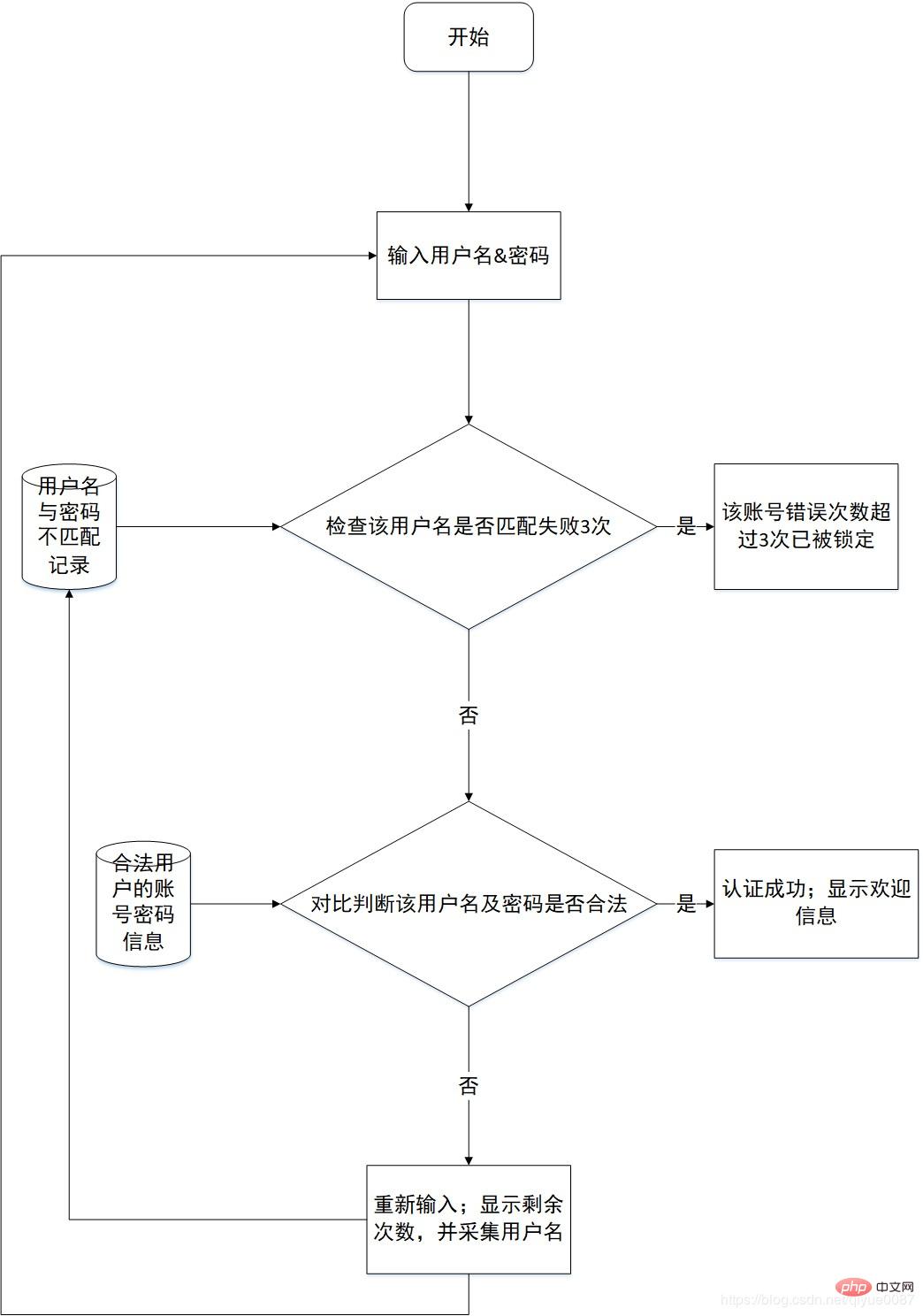

抖猫高清去水印微信小程序,源码为短视频去水印微信小程序全套源码,包含微信小程序端源码,服务端后台源码,支持某音、某手、某书、某站短视频平台去水印,提供全套的源码,实现功能包括:1、小程序登录授权、获取微信头像、获取微信用户2、首页包括:流量主已经对接、去水印连接解析、去水印操作指导、常见问题指引3、常用工具箱:包括视频镜头分割(可自定义时长分割)、智能分割(根据镜头自动分割)、视频混剪、模糊图片高
 0
0

相关教程:Python视频教程
以上就是Python的用户登录接口编制以及实现流程图的详细内容,更多请关注php中文网其它相关文章!

python怎么学习?python怎么入门?python在哪学?python怎么学才快?不用担心,这里为大家提供了python速学教程(入门到精通),有需要的小伙伴保存下载就能学习啦!

 广告
广告Copyright 2014-2025 https://www.php.cn/ All Rights Reserved | php.cn | 湘ICP备2023035733号


 823
823








 收藏
收藏














