



在php中,redis全称Remote Dictionary Server(远程数据服务),是一款内存高速缓存数据库,其数据模型为“key-value”,并支持丰富的数据结构,如string、list、hash等;可持久化,保证数据安全。

本教程操作环境:windows7系统、PHP7.1版,DELL G3电脑
Redis是Remote Dictionary Server(远程数据服务)的缩写,由意大利人Antirez(Salvatore Sanfilippo)开发的一款内存高速缓存数据库,它使用C语言编写,其数据模型为key-value,并支持丰富的数据结构(类型),如string、list、hash、set、sorted sort。可持久化,保证数据安全。
Redis是一个开源的使用ANSI C语言编写、支持网络、可基于内存亦可持久化的日志型、Key-Value数据库,并提供多种语言的API。
Redis和其他键值数据库之间的主要区别之一是Redis存储和操作高级数据类型的能力。这些数据类型是大多数开发人员熟悉的基本数据结构(列表,映射,集合和排序集)。Redis的卓越性能,简单性和数据结构的原子操作有助于解决使用传统关系数据库实现时难以实现或执行不佳的问题。
立即学习“PHP免费学习笔记(深入)”;
PHP 使用 Redis
安装
开始在 PHP 中使用 Redis 前, 我们需要确保已经安装了 redis 服务及 PHP redis 驱动,且你的机器上能正常使用 PHP。 接下来让我们安装 PHP redis 驱动:下载地址为:https://github.com/phpredis/phpredis/releases。
PHP安装redis扩展
以下操作需要在下载的 phpredis 目录中完成:
$ wget https://github.com/phpredis/phpredis/archive/2.2.4.tar.gz
$ cd phpredis-2.2.7                      # 进入 phpredis 目录
$ /usr/local/php/bin/phpize              # php安装后的路径
$ ./configure --with-php-config=/usr/local/php/bin/php-config
$ make && make install
如果你是 PHP7 版本,则需要下载指定分支:
git clone -b php7 https://github.com/phpredis/phpredis.git
修改php.ini文件
vi /usr/local/php/lib/php.ini
增加如下内容:

思乐微信商城微分销系统是以.net+access/mssql进行开发的微信分销系统。基于微信朋友圈的传播,是打造以分销商为中心的全新微信分销体验。让粉丝实时有效的获取朋友圈流量并快速分享购买分佣。因为是基于微信,所以要在微信上体验才更好。关注我们的微信核心功能:1、自动提示用户关注微信,解决一般程序无关注微信公众号的过程2、只要通过链接进一次,不过好久注册,什么方面注册,只要是用微信注册的,都会算
extension_dir = "/usr/local/php/lib/php/extensions/no-debug-zts-20090626"extension=redis.so
安装完成后重启php-fpm 或 apache。查看phpinfo信息,就能看到redis扩展。
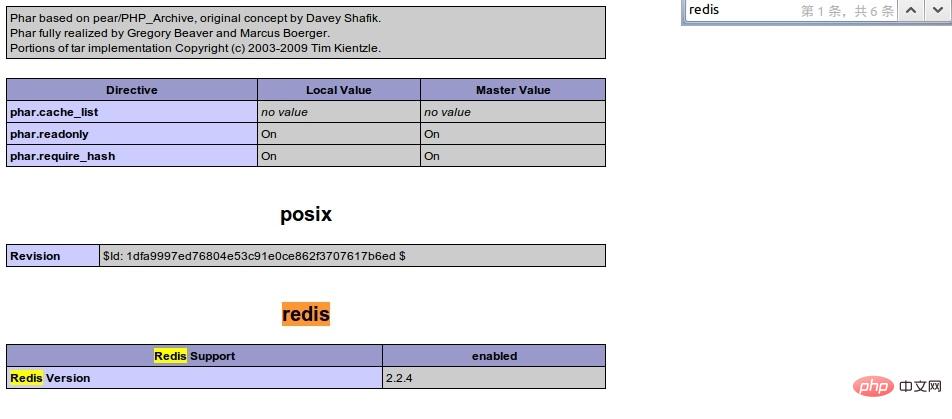
连接到 redis 服务
connect('127.0.0.1', 6379);
   echo "Connection to server sucessfully";
         //查看服务是否运行
   echo "Server is running: " . $redis->ping();
?>
执行脚本,输出结果为:
Connection to server sucessfully
Server is running: PONG
Redis PHP String(字符串) 实例
connect('127.0.0.1', 6379);
   echo "Connection to server sucessfully";
   //设置 redis 字符串数据
   $redis->set("tutorial-name", "Redis tutorial");
   // 获取存储的数据并输出
   echo "Stored string in redis:: " . $redis->get("tutorial-name");
?>
执行脚本,输出结果为:
Connection to server sucessfully
Stored string in redis:: Redis tutorial
Redis PHP List(列表) 实例
connect('127.0.0.1', 6379);
   echo "Connection to server sucessfully";
   //存储数据到列表中
   $redis->lpush("tutorial-list", "Redis");
   $redis->lpush("tutorial-list", "Mongodb");
   $redis->lpush("tutorial-list", "Mysql");
   // 获取存储的数据并输出
   $arList = $redis->lrange("tutorial-list", 0 ,5);
   echo "Stored string in redis";
   print_r($arList);
?>
执行脚本,输出结果为:
Connection to server sucessfully
Stored string in redis
Redis
Mongodb
Mysql
Redis PHP Keys 实例
connect('127.0.0.1', 6379);
   echo "Connection to server sucessfully";
   // 获取数据并输出
   $arList = $redis->keys("*");
   echo "Stored keys in redis:: ";
   print_r($arList);
?>
执行脚本,输出结果为:
Connection to server sucessfully
Stored string in redis::
tutorial-name
tutorial-list
推荐学习:《PHP视频教程》




