

更多>
最新下载


jQuery图像缩放工具插件Zoomer
jQuery图像缩放工具插件Zoomer是一款简单的方法来添加丰富的交互式图像。实现类似地图放大、缩小、平移等功能;可以实现多图片切换缩放。本作品由【站长素材】收集整理,转载请注明出处!
0
2026-01-12


24小时阅读排行榜
- 1 如何为c++项目配置compile_commands.json以获得更好的工具支持? (Clangd/Clang-Tidy)
- 2 mysql中查询数据时使用LIMIT和OFFSET的组合
- 3 如何搭建mysql沙箱环境_mysql测试隔离方案
- 4 如何优化大事务处理_mysql并发事务拆分
- 5 css 网格容器高度塌陷怎么办_显式设置容器高度或最小高度
- 6 css 想让网格元素之间间距固定怎么办_grid-gap px 设置
- 7 c++的“Pimpl Idiom”对编译防火墙之外有什么性能影响? (指针间接性)
- 8 怎么用mysql实现用户权限控制_mysql项目安全设计
- 9 mysql用户密码修改后权限会变吗_mysql认证机制解析
- 10 如何在云环境迁移mysql_mysql云迁移思路
- 11 如何为c++类重载操作符? (operator+实例)
- 12 如何在 .NET 应用中调用 Go 编写的图像处理库
- 13 C++中的std::error_code有什么优势?(高性能的错误处理机制)
- 14 MAUI怎么实现瀑布流布局 CollectionView瀑布流
- 15 XML中的处理指令是什么 Processing Instruction用法
更多>
最新教程

-
- Node.js 教程
- 15440 2025-08-28
-
- CSS3 教程
- 1544428 2025-08-27
-
- Rust 教程
- 22740 2025-08-27
-
- Vue 教程
- 25211 2025-08-22
-
- PostgreSQL 教程
- 21805 2025-08-21
-
- Git 教程
- 8820 2025-08-21
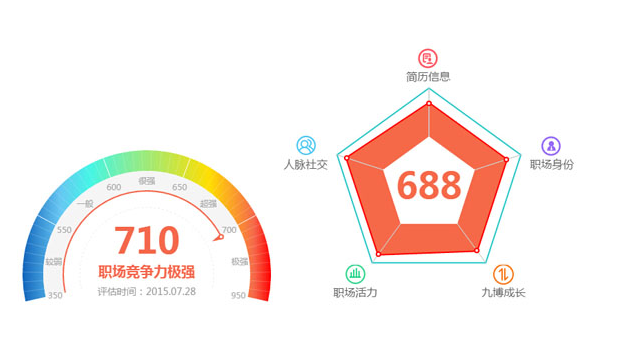
html5+Canvas仿支付宝芝麻信用仪表盘图表和雷达图表代码


这是一款基于Canvas实现漂亮的仿支付宝芝麻信用信用评估仪表盘图表和雷达图表特效,Canvas图表代码。
js代码
<script src="chart.meter.js"></script>
<script src="chart.radar.js"></script>
<script>
window.onload = function(){
Meter.setOptions({
element: 'meter',
centerPoint: {
x: 180,
y: 180
},
radius: 180,
data: {
value: 710,
title: '职场竞争力{t}',
subTitle: '评估时间:2015.07.28',
area: [{
min: 350, max: 550, text: '较弱'
},{
min: 550, max: 600, text: '一般'
},{
min: 600, max: 650, text: '很强'
},{
min: 650, max: 700, text: '超强'
},{
min: 700, max: 950, text: '极强'
}]
}
}).init();
Radar.setOptions({
element: 'radar',
radius: 140,
polar: [
{ text: '简历信息', max: 190, icon: { sx: 0, sy: 0, w: 32, h: 33, l: -17, t: -60 } },
{ text: '职场身份', max: 190, icon: { sx: 32, sy: 0, w: 30, h: 33, l: 30, t: -30 } },
{ text: '九博成长', max: 190, icon: { sx: 61, sy: 0, w: 32, h: 33, l: 10, t: 0 } },
{ text: '职场活力', max: 190, icon: { sx: 93, sy: 0, w: 31, h: 33, l: -40, t: 0 } },
{ text: '人脉社交', max: 190, icon: { sx: 124, sy: 0, w: 29, h: 33, l: -60, t: -30 } }
],
title: '{v}',
data: [130, 130, 130, 148, 150],
styles: {
label: {
image: 'icon.png'
}
}
}).init();
}
</script>
js代码
<script src="chart.meter.js"></script>
<script src="chart.radar.js"></script>
<script>
window.onload = function(){
Meter.setOptions({
element: 'meter',
centerPoint: {
x: 180,
y: 180
},
radius: 180,
data: {
value: 710,
title: '职场竞争力{t}',
subTitle: '评估时间:2015.07.28',
area: [{
min: 350, max: 550, text: '较弱'
},{
min: 550, max: 600, text: '一般'
},{
min: 600, max: 650, text: '很强'
},{
min: 650, max: 700, text: '超强'
},{
min: 700, max: 950, text: '极强'
}]
}
}).init();
Radar.setOptions({
element: 'radar',
radius: 140,
polar: [
{ text: '简历信息', max: 190, icon: { sx: 0, sy: 0, w: 32, h: 33, l: -17, t: -60 } },
{ text: '职场身份', max: 190, icon: { sx: 32, sy: 0, w: 30, h: 33, l: 30, t: -30 } },
{ text: '九博成长', max: 190, icon: { sx: 61, sy: 0, w: 32, h: 33, l: 10, t: 0 } },
{ text: '职场活力', max: 190, icon: { sx: 93, sy: 0, w: 31, h: 33, l: -40, t: 0 } },
{ text: '人脉社交', max: 190, icon: { sx: 124, sy: 0, w: 29, h: 33, l: -60, t: -30 } }
],
title: '{v}',
data: [130, 130, 130, 148, 150],
styles: {
label: {
image: 'icon.png'
}
}
}).init();
}
</script>
本站所有资源都是由网友投搞发布,或转载各大下载站,请自行检测软件的完整性!本站所有资源仅供学习与参考,请勿用于商业用途,否则产生的一切后果将由您自己承担!如有侵权请联系我们删除下架,联系方式:admin@php.cn
相关推荐
热门下载




canvas音谱可视化mp3音乐播放器代码
html5 canvas通过AudioContext对获取audio标签播放的音域和音高,调用js绘制相应高度的矩形或线条。
播放器特效
2021-03-10








